EasyManua.ls Logo

EARLDOM OD-KFX001 - User Manual

EARLDOM OD-KFX001
4 pages
Print Icon
To Next Page IconTo Next Page
Loading...
SHENZHEN KAFULLE ELECTRONICS CO.,LTD
Shenzhen Caffle Electronics Co., Ltd.
Instruction manual
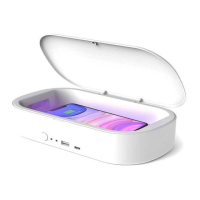
Product Name: Ultraviolet rays disinfection box Product Type: OD-KFX001
Date :2020-4-10 Version: A0 Document No. OD-KFX001:
Directions
Please read all these instructions carefully before using this product and save them for future needs.
1. please strictly follow the rules described in this manual to ensure your safety.
2. put this equipment in a place that children can not contact. Children are prohibited from operating
this equipment.
3. do not modify, repair or disassemble the appliance. doing so may lead to fire, electric shock,
electrical safety failure, etc.
4. do not use any diluent or volatile liquid to clean the equipment. Remember, only wipe the surface of
the equipment with a clean dry cloth.
5. do not use this equipment in places of high temperature and humidity.
6. do not insert pins and other foreign objects into this equipment.
7. can also be used using the backup USB2.0 interface if a wireless charging device is used.
8. do not drop the device or collide with other objects.
9. any abnormal situation or problem when using this machine, it should be stopped immediately.
Question and Answer IconNeed help?

Do you have a question about the EARLDOM OD-KFX001 and is the answer not in the manual?

Overview

This document provides the instruction manual for the KAFULLE Ultraviolet Rays Disinfection Box, model OD-KFX001, manufactured by Shenzhen Caffle Electronics Co., Ltd. The manual details the device's functions, technical specifications, usage instructions, and safety guidelines.

Function Description

The KAFULLE Ultraviolet Rays Disinfection Box is a multi-functional device designed for sterilizing small items and mobile phones using ultraviolet (UV) light, while also offering wireless charging capabilities for compatible digital products.

Key Functions:

  • Ultraviolet (UV) Disinfection: The primary function is to kill bacteria on mobile phones and small items such as Escherichia coli, Streptococcus pneumoniae, Aspergillus Niger, and Candida albicans. The disinfection process lasts for 180 seconds.
  • Wireless Charging: The device supports wireless charging for digital products that are compatible with wireless charging technology. This includes models like Apple iPhone X, iPhone 11, iPhone 8, iPhone 8 Plus, Nuts R1, Millet, Samsung S9/S9+, and Huawei P30, among others.
  • Wired Charging (USB Output): The device is equipped with USB2.0 and Type-C output interfaces, allowing for wired charging of various digital products such as Apple, Android, tablets, watches, and headphones.

Important Technical Specifications

Input Voltage:

  • PD18W adapter or 5 V/3.5A adapter

Output Specifications:

  • USB Output: 9 V/3A Max
  • Type-C Output: 9 V/3A Max

Disinfection Time:

  • 180 seconds

LED Indication Functions:

  • Panel LED (Wireless Charging Standby): Red light
  • Panel LED (Wireless Charging Work): Blue light
  • Panel LED (Kill Status): Blue light

Panel Key Function:

  • Turn on/off kill function

Usage Features

General Operation:

  1. Safety First: Users must strictly follow the rules described in the manual to ensure safety. The device should be kept out of reach of children, who are prohibited from operating it.
  2. Disinfection Process:
    • Place the object to be disinfected inside the product.
    • Close the top cover.
    • Touch the panel key switch to start the disinfection function.
    • The panel blue indicator light will turn on, indicating the killing function is active.
    • After 180 seconds, the disinfection will automatically stop.
    • During disinfection, the UV light is harmful to human eyes, so the cover must not be opened. If observation is necessary, wear goggles or glass for isolation.
  3. Wireless Charging Process:
    • The device supports wireless charging for compatible digital products.
    • For optimal charging, ensure the mobile phone's center position aligns with the central wireless charging identification coil position.
    • The panel light will show red during normal standby and blue during normal charging.
    • Wireless charging can operate properly even during disinfection.
  4. Wired Charging:
    • Connect a charging line or data line to the USB2.0 or Type-C output interface to charge compatible Apple, Android, tablets, watches, headphones, and other digital products.

Important Usage Notes:

  • High Voltage Warning: The product contains a high voltage circuit. Disassembly is forbidden. The UV ray is harmful to human body, so the upper cover must not be opened during normal use.
  • Adapter Compatibility: If repeated charge/pause phenomena occur during wireless charging, or if the panel red indicator flickers, check if the external adapter power is too small or if the charging equipment current is too large. A higher power adapter should be used for normal operation.
  • Heat During Charging: It is normal for the bottom of the product to heat up during charging. It is recommended to unplug the equipment once fully charged to prevent continuous heating and potential battery life loss.
  • Interference: The elimination function and wireless charging function do not interfere with each other during normal use.
  • USB Extension Line: If the provided USB extension line is damaged, it should be replaced. Consult dealers or technical personnel for assistance.

Maintenance Features

Cleaning:

  • Do not use any diluent or volatile liquid to clean the equipment.
  • Only wipe the surface of the equipment with a clean dry cloth.

Environmental Considerations:

  • Do not use this equipment in places of high temperature and humidity.

Handling and Storage:

  • Do not insert pins or other foreign objects into the equipment.
  • Do not drop the device or collide with other objects.

Troubleshooting and Safety:

  • Abnormal Situations: If any abnormal situation or problem occurs while using the machine, stop use immediately.
  • FCC Compliance: This device complies with Part 15 of the FCC Rules.
    • It must not cause harmful interference.
    • It must accept any interference received, including interference that may cause undesired operation.
    • Any changes or modifications not expressly approved by the party responsible for compliance could void the user's authority to operate the equipment.
  • FCC Radiation Exposure Statement: This equipment complies with FCC radiation exposure limits for an uncontrolled environment. It should be installed and operated with a minimum distance of 20 cm between the radiator and your body.
  • Interference Correction (if applicable): If the equipment causes harmful interference to radio or television reception, users are encouraged to try the following measures:
    • Reorient or relocate the receiving antenna.
    • Increase the separation between the equipment and receiver.
    • Connect the equipment into an outlet on a circuit different from that to which the receiver is connected.
    • Consult the dealer or an experienced radio/TV technician for help.

EARLDOM OD-KFX001 Specifications

General IconGeneral
BrandEARLDOM
ModelOD-KFX001
CategoryAccessories
LanguageEnglish