6
Display Instructions
Display InstructionsDisplay Instructions
Display Instructions
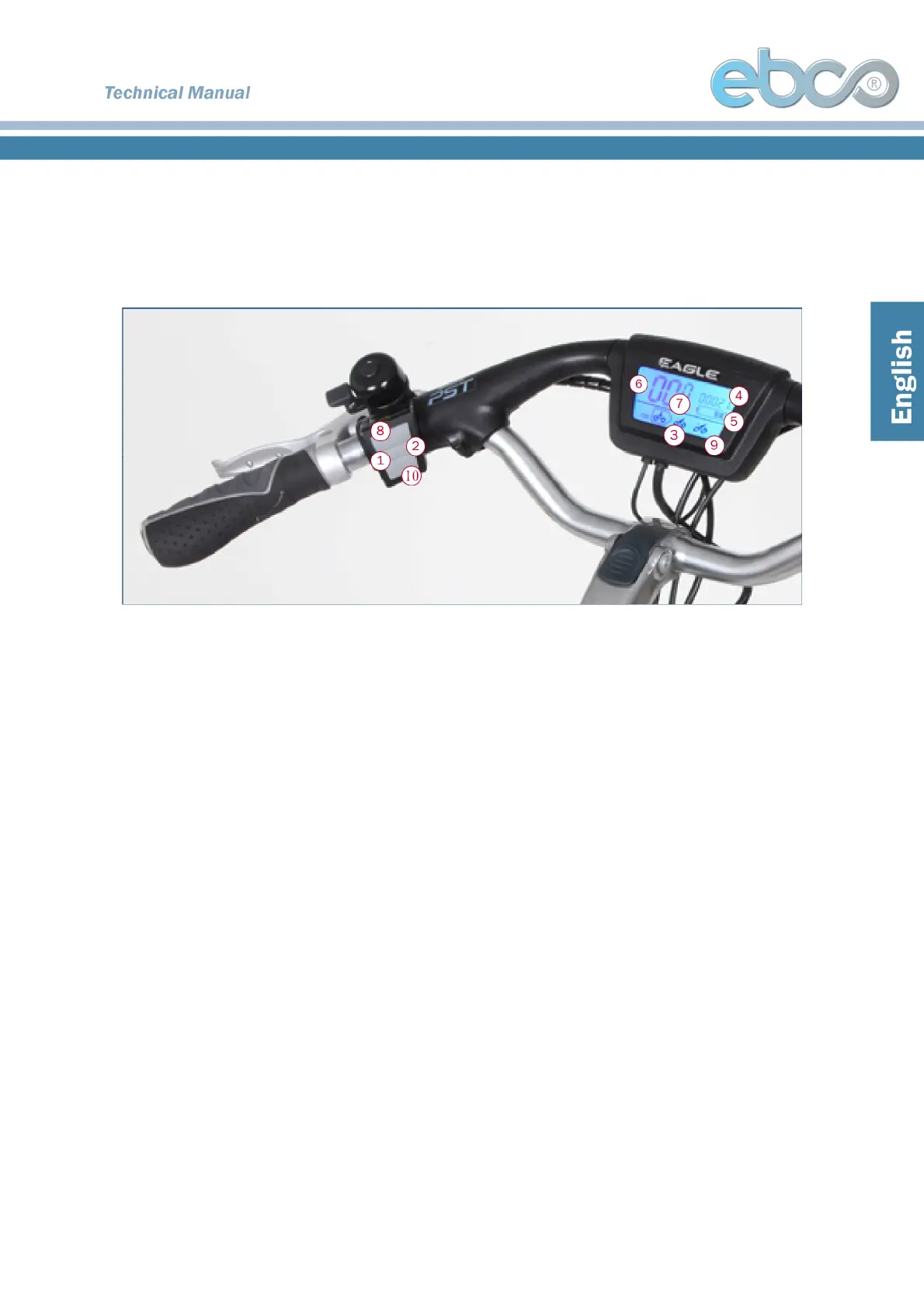
1. Light button
1. Light button1. Light button
1. Light button
2. On/Off button
2. On/Off button 2. On/Off button
2. On/Off button –
––
– Turns power on and off
Turns power on and off Turns power on and off
Turns power on and off
3. Mode icon
3. Mode icon3. Mode icon
3. Mode icon
• Mode 1: Economy
• Mode 2: Normal
• Mode 3: Climbing
• Mode 4: Turbo
4.
4.4.
4. T
T T
Total distance / Trip distance
otal distance / Trip distanceotal distance / Trip distance
otal distance / Trip distance
• Total distance will be displayed during stoppage.
• Trip distance will be displayed while cycling.
• When the bicycle is connected to an external charger the trip distance will be reset to 0.
5.
5.5.
5. Battery icon
Battery icon Battery icon
Battery icon
• Each grid shows the battery capacity. Five grids indicate the battery is fully charged.
• The last grid will start flashing when the charge is less than 10%. This symbol shows
that the battery has no remaining power. The display will work for an additional 3 minutes
before it turns off automatically.
6.
6.6.
6. Background light
Background light Background light
Background light–
––
– The display will be lit when lighting system is switched on
The display will be lit when lighting system is switched on The display will be lit when lighting system is switched on
The display will be lit when lighting system is switched on
7.
7.7.
7. Current speed
Current speed Current speed
Current speed –
––
– Displays current speed (in KPH)
Displays current speed (in KPH) Displays current speed (in KPH)
Displays current speed (in KPH)
8.
8.8.
8. Mode button for changing the mode
Mode button for changing the mode Mode button for changing the mode
Mode button for changing the mode
9.
9.9.
9. Turbo icon (flashes when activated))
Turbo icon (flashes when activated)) Turbo icon (flashes when activated))
Turbo icon (flashes when activated))
10. Turbo butto
10. Turbo butto10. Turbo butto
10. Turbo button
nn
n
Sleeping mode
Sleeping modeSleeping mode
Sleeping mode
The display shuts off, while in the economy, normal and climbing mode after 3 minutes of standing still.
Service symbol
Service symbolService symbol
Service symbol


 To Next Page
 Loading...