The device now automatically stores in
memory the radio stations with sufficient
transmission strength. The storage places
0...9 in the selected blocks are occupied.
The AMS function ends when all storage
places in the block are occupied.
c) Calling-up the stored radio stations
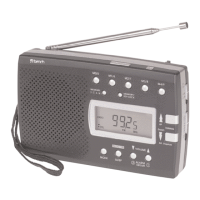
If you would like to call-up a saved station:
First of all select the reception range
(Band), e. g. FM.
Press the button PAGE repeatedly until
you see, in the small window PAGE, the
number for the block 0...5 from which
you want to call-up the radio station.
Then press on one of the buttons
M0/5 M1/6 M2/7 M3/8 M4/9 ,
until, in the small second window of
MEM the number of the storage space
appears.
Note: These buttons each have two
assignments. Each press on them switches
between the two assignments
(e.g. between 0 and 5).
When you have selected the desired
memory position,
Press the button Memory Set again.
The station is now saved.
b) AMS function
The device has an automatic transmission
storage.
Press the button Memory Set.
Press and hold the button Memory
Preview for two seconds, to activate
the AMS function.
KH 2027 KH 2028
- 13 -



 To Next Page