EasyManua.ls Logo

Eberline ESP-1 - Page 61

Default Icon
96 pages
Print Icon
To Next Page IconTo Next Page
To Previous Page IconTo Previous Page
Loading...
5-12
A
nonfunctioning
counter
can
be
recognized
by:
М '
B
Rate
meter
readout
too
low.
B
Rate
meter
readout
too
high.
Ш
Readout
not
statistical
(erratic).
The
first
step
in
determining
any
problem
should
be
the
condition
of
the
batteries.
If
battery
life
is
shorter
than
specified,
tum
the
ESP-1
OFF
and
check
the
drain
on
the
batteries
by
inserting
an
ammeter
in
series
with
the
"+"
lead
from
the
battery.
The
current
should
be
less
than
50
pA.
With
the
ESP-1
turned
ON,
this
drain
should
be
less
than
25
mA
(with
no
alarm).
If
the
drain
is
too
high
in
either
condition,
isolate
the
faulty
component
and
replace
it.
Remember
to
look
for
leaky
capacitors,
but
only
as
a
last
resort.
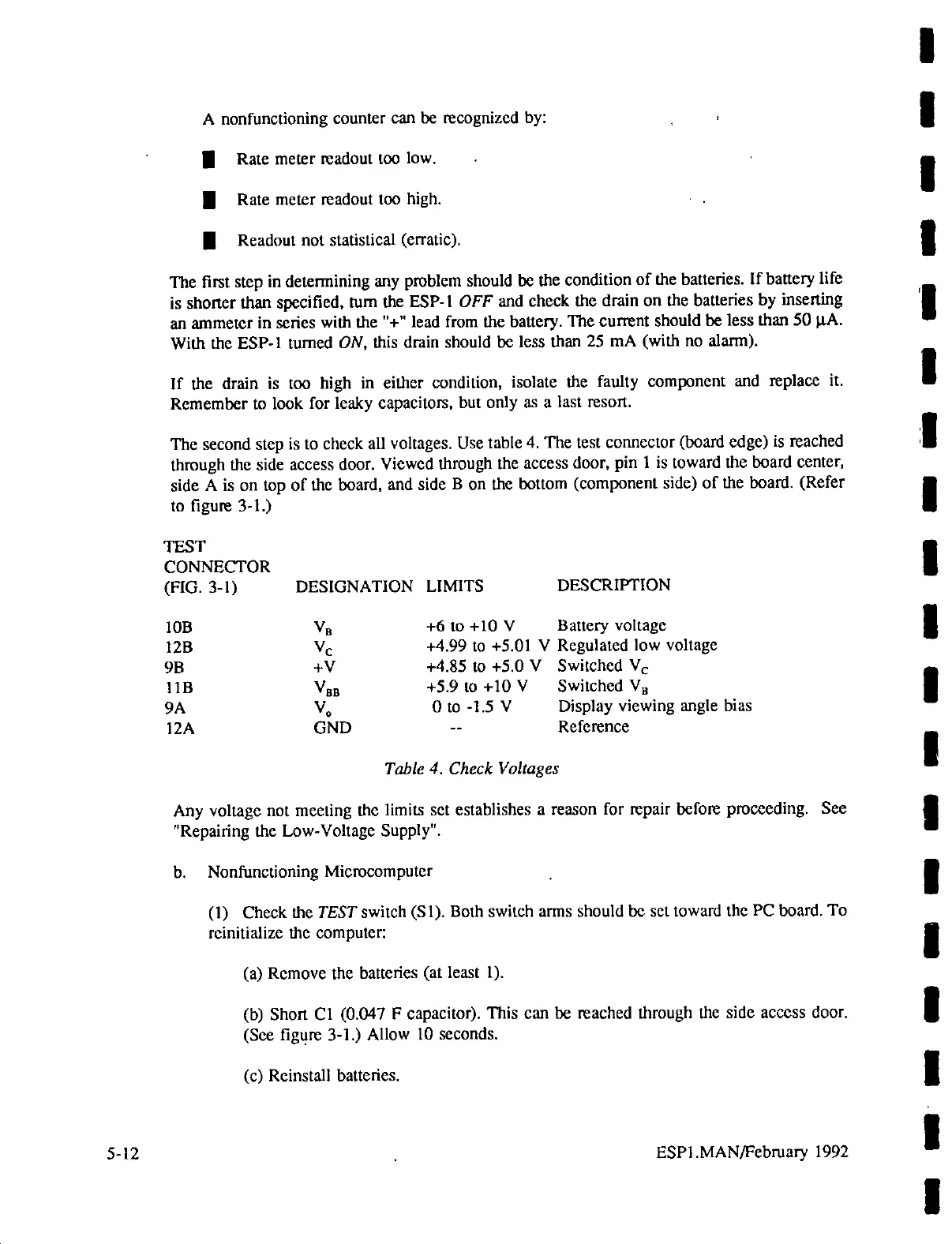
The
second
step
is to
check
all
voltages.
Use
table
4.
The
test
connector
(board
edge)
is
reached
through
the
side
access
door.
Viewed
through
the
access
door,
pin
1
is
toward
the
board
center,
side
A
is
on
top
of
the
board,
and
side
B
on
the
bottom
(component
side)
of
the
board.
(Refer
to
figure
3-1.)
TEST
CONNECTOR
(FIG.
3-1)
DESIGNATION
LIMITS
DESCRIPTION
10B
Va
+6
to
+10
V
Battery
voltage
12B
Ve
+4.99
to
+5.01
Y
Regulated
low
voltage
9B
+V
+4.85
to
45.0
V
Switched
Ve
11B
Van
45910
+10
У
Switched
Vg
9A
V,
Ою
-1.5
V
Display
viewing
angle
bias
12A
GND
--
Reference
Table
4.
Check
Voltages
Any
voltage
not
meeting
the
limits
set
establishes
a
reason
for
repair
before
proceeding.
See
"Repairing
the
Low-Voltage
Supply".
b.
Nonfunctioning
Microcomputer
(1)
Check
the
TEST
switch
(S1).
Both
switch
arms
should
be
set
toward
the
PC
board.
To
reinitialize
the
computer:
(a)
Remove
the
batteries
(at
least
1).
(b)
Short
C1
(0.047
F
capacitor).
This
can
be
reached
through
the
side
access
door.
(Sce
figure
3-1.)
Allow
10
seconds.
(c)
Reinstall
batteries.
ESP1.MAN/February
1992

Related product manuals