September 2012 IPV6860
1) Cannot connect to the server.
2) Network Error. Please try later.
3) Server Error.
4) Incorrect user or password.
5) The sender is denied by the server. Maybe the server needs to authenticate the user, please check and
try again.
6) The receiver is denied by the server. Maybe because of the anti-spam privacy of the server.
7) The message is denied by the server. Maybe because of the anti-spam privacy of the server.
8) The server does not support the authentication mode used by the device.
Report Internet IP by Mail: If selected, you will receive e-mails that contain the camera’s internet IP. When
camera is powered on or Internet IP changed, it will send the internet IP by e-mail. (For example: IPCAM's URL
is http://121.213.109.69:1008
).
3.17 FTP Service Settings
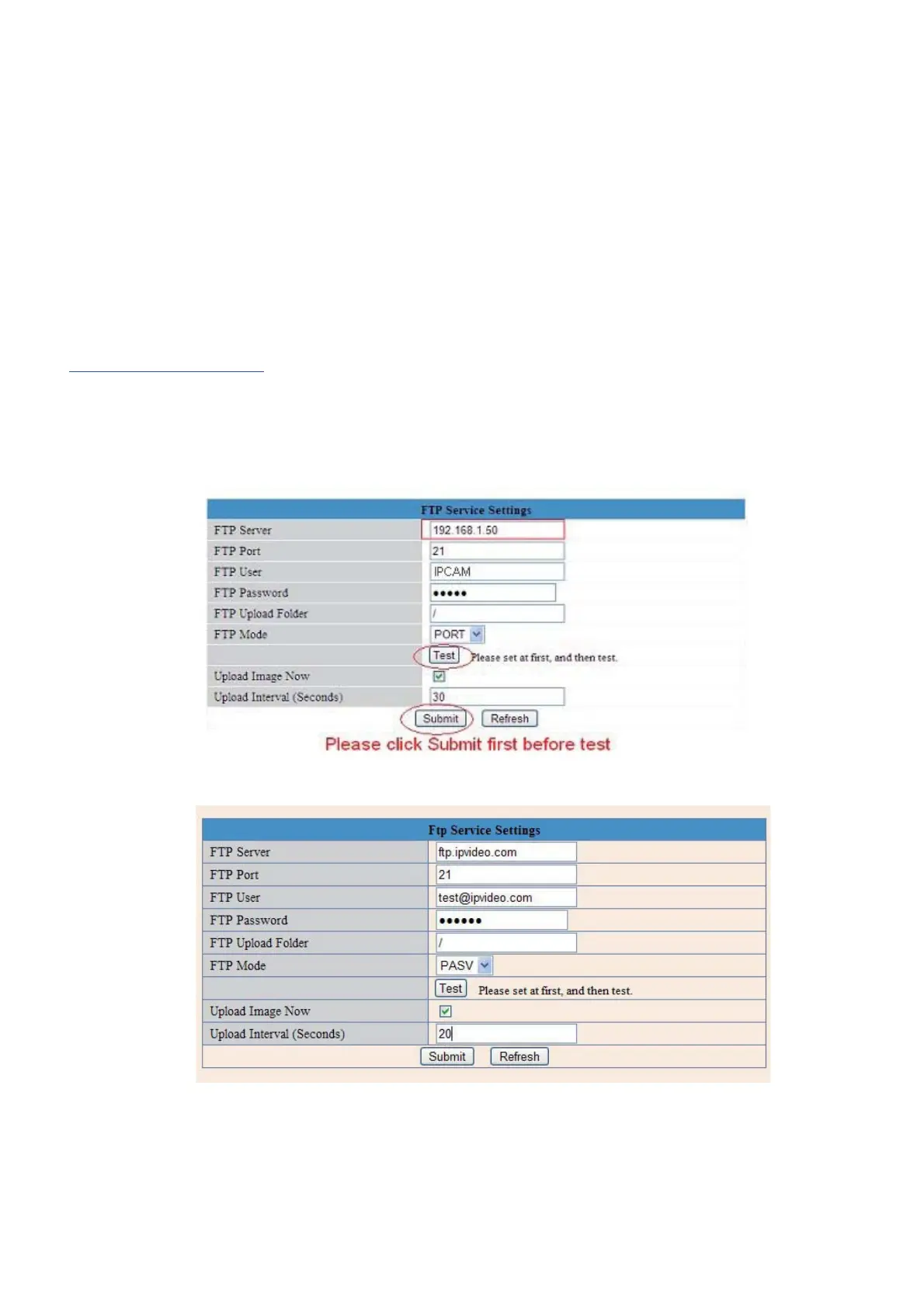
Set the FTP Service, you can upload images to your FTP server when motion is detected.
Figure 9.3
Figure 9.4
FTP Server: If your FTP server is set up in LAN. You can set as Figure 9.3.
If you have an FTP server that can be accessed from the Internet, you can set as Figure 9.4.
FTP Port: Usually the port is 21.


 To Next Page
 Loading...