Removing the Battery 3 - 25
Removing the Battery
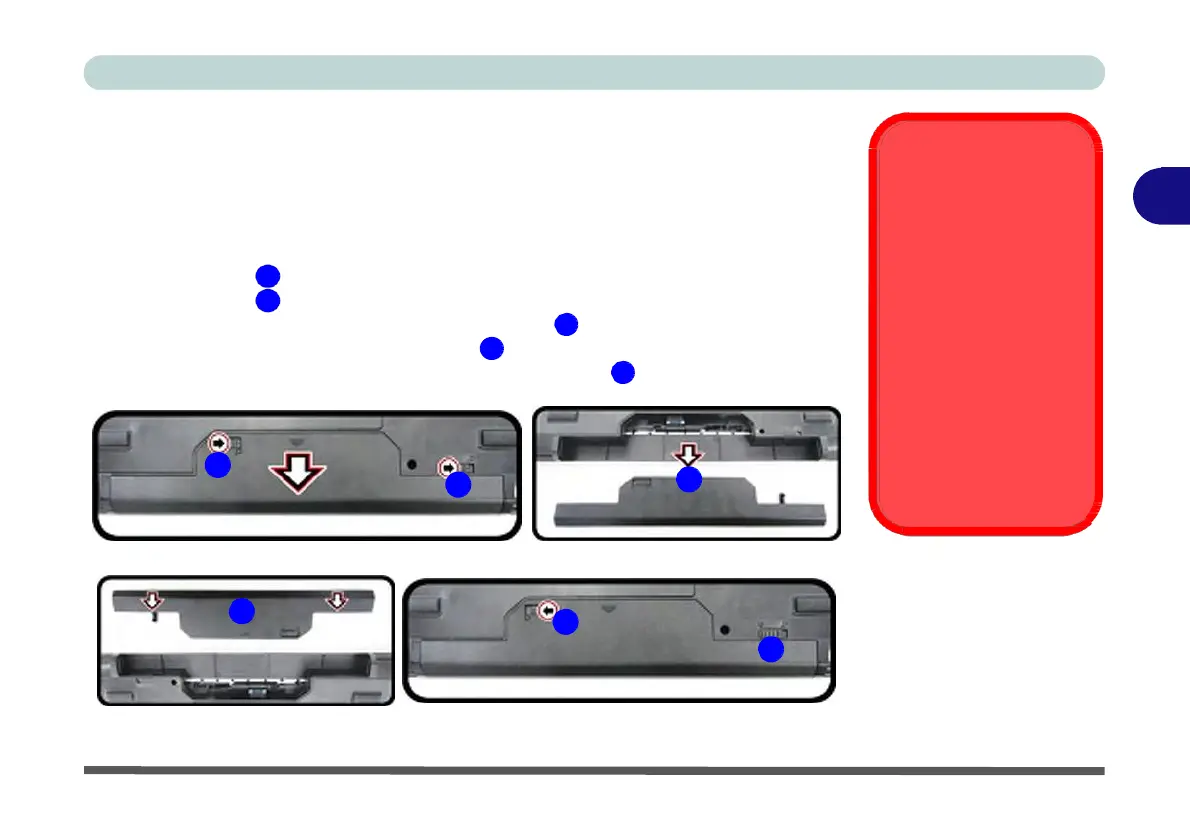
It is possible to remove the battery from the computer, however we recommend that
you do not remove the battery yourself. If you do need to remove the battery for any
reason (e.g. long term storage) see below.
1.
Turn the computer off, and turn it over.
Bottom Cover
Removal Warning
3
Do not remove any cov-
er(s) and /or screw(s) for
2.
Slide the latch
3.
Slide the latch
1 in the direction of the arrow.
2 in the direction of the arrow, and hold it in place.
the purposes of device
upgrade as this may vio-
4.
Slide the battery out in the direction of the arrow 3 .
5.
Reinsert the battery as illustrated below 4 .
6.
Make sure the latches are returned to the lock position 5 .
1
2
3
late the terms of your
warranty.
If you need to replace/
remove the hard disk/
RAM/optical device etc.,
for any reason, please
contact your distributor/
supplier for further infor-
mation.
Figure 3 - 17
Battery
Removal
4
5 and
Insertion
5


 To Next Page
 Loading...