EasyManua.ls Logo

EccoPC 15 - Page 44

Default Icon
222 pages
Print Icon
To Next Page IconTo Next Page
To Previous Page IconTo Previous Page
Loading...
Quick Start Guide
1
1 - 12 Control Center
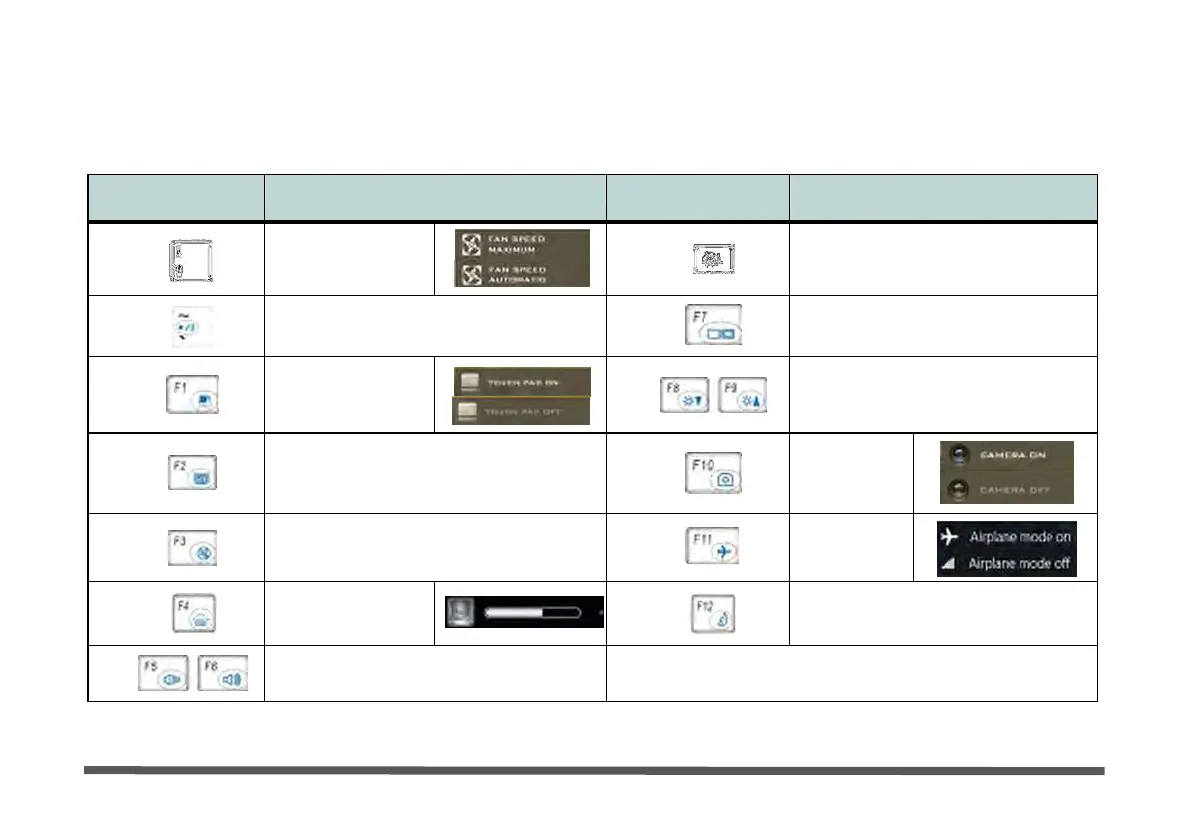
Function Keys & Visual Indicators
The function keys (F1 - F12 etc.) will act as hot keys when pressed while the Fn key is held down.
Keys
Function/Visual Indicators
Keys
Function/Visual Indicators
Fn
+
Fan
Control Toggle
Automatic
/
Full
Power
Fn
+
Control Center Toggle
Fn
+
Play/Pause (in Audio/Video Programs)
Fn
+
Display Toggle
Fn
+
Touchpad Toggle
Fn
+
Brightness Decrease/Increase
Fn
+
Turn LCD Backlight
Off
(Press a key to or use Touchpad to turn
on)
Fn
+
PC Camera
Power
Toggle
Fn
+
Mute
Toggle
Fn
+
Airplane
Mode Toggle
Fn
+
For
Backlight
Keyboards
Only
Toggle
Off/High/Low
Fn
+
Sleep
Toggle
Fn
+
Volume Decrease/Increase
Table 1 - 3 - Function Keys & Visual Indicators