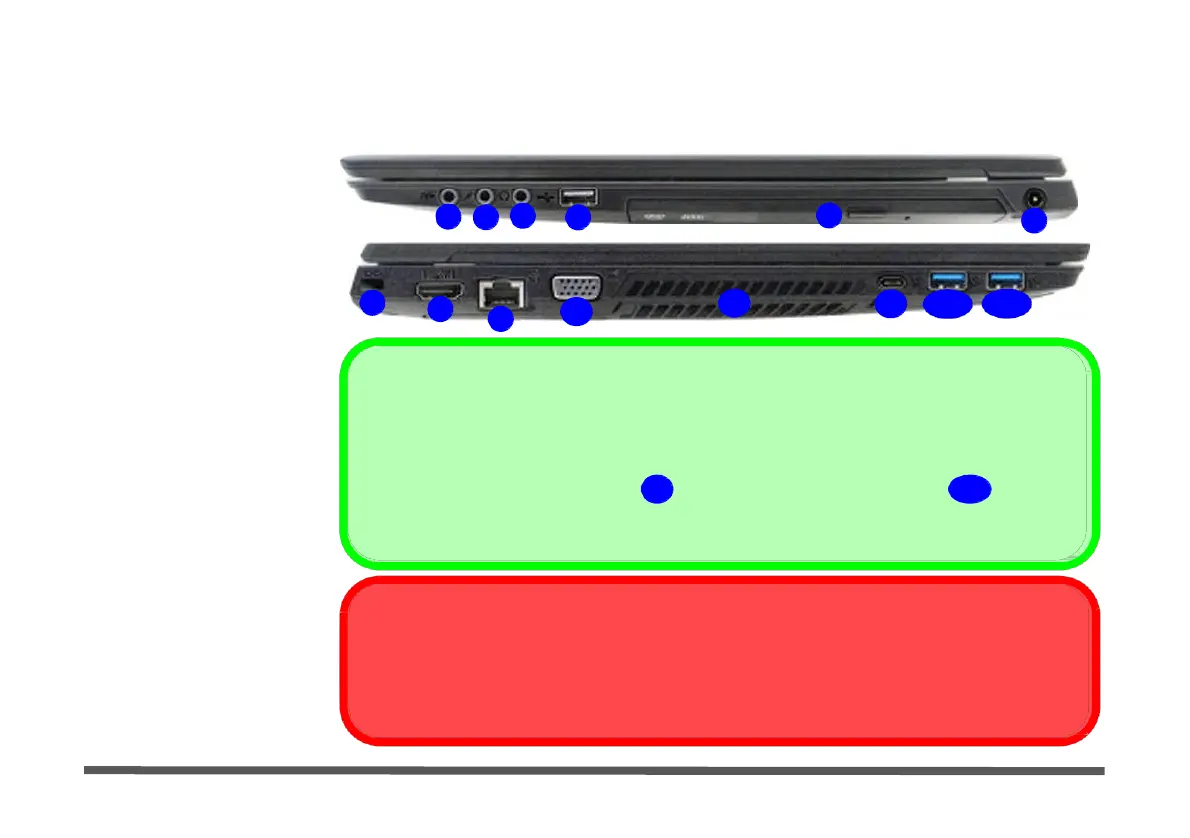
1 - 14 Right & Left Views
Figure 1 -
7
Right & Left
Views
1. S/PDIF-Out Jack
Right & Left Views
Right
2. Microphone Jack
3. Headphone Jack
4. 1 * USB 2.0 Port
5. Optical Device Drive
Bay (for DVD Device)
6. DC-In Jack
7. Security Lock Slot
1
2
3
4
7
9
10
Left
5
11
12
13a
6
13b
8. HDMI-Out Port
9. RJ-45 LAN Jack
10. External Monitor Port
11. Vent/Fan Intake
12. 1 * USB 3.0 Port (USB
3.1 Gen 1 - Type C)
USB 3.0 / 3.1 Port OR USB 2.0 Port
This model includes 2 * USB 3.0 ports (USB 3.1 Gen 1 Type A), 1 * USB 3.0 port (USB 3.1
Gen 1 Type C) and 1 * USB 2.0 port.
13. 2 *
USB 3.0 Ports
(USB
Note: 1 * USB 3.1 (Gen 2 Type C)
12
and 1 * USB 3.1 (Gen 2 Type A)
13a
ports are
3.1 Gen
1 -
Type A
)
OR
12. 1 *
USB 3.1 Port (USB
3.1 Gen
2 -
Type C
)
&
13a.
1 *
USB 3.1 Port
(USB
3.1 Gen
2 -
Type A
)
(
Factory Option
)
13b.
1 *
USB 3.0 Port (USB
3.1 Gen
1 -
Type A
)
available as a factory option for this computer model series. The USB 3.1 ports are shared
with the USB 3.0 ports in this option.
USB 3.1 Port Speed
Note that when a single USB device is plugged in to a USB 3.1 (Gen 2) port the data transfer speed
will be 10Gbps, however when two devices are plugged in to both USB 3.1 (Gen 2) ports, this band-
width will be shared between the ports..


 To Next Page
 Loading...