6
INSTALLING THE MOUNT
The Echelon
®
NOTE: Standard installation height is 69" to the top of the wall mount.
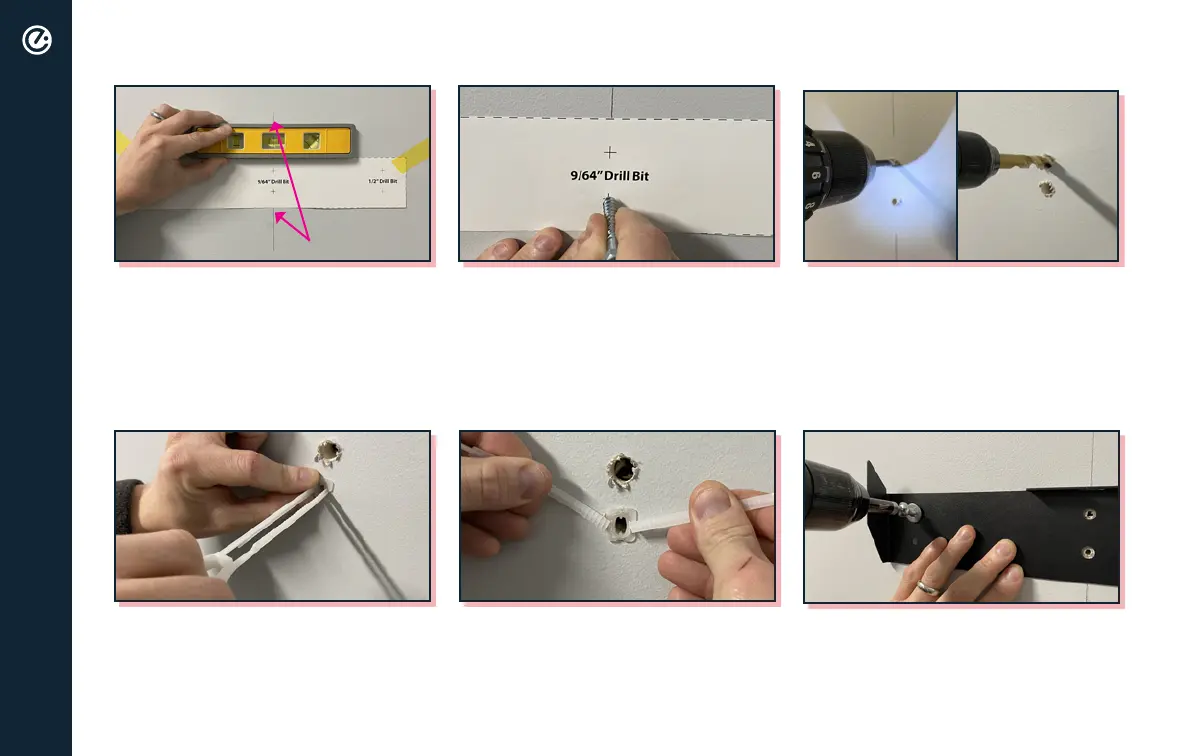
5. Snap off excess plastic from the
zip toggle.
4. Insert zip toggles into 1/2" holes
and push the zip toggle plate
* Ensure eyelet of zip toggle is oriented as
shown above.
2. Mark all six holes by pressing the
tip of a lag screw through the
center of each cross mark.
* Ensure that you press hard enough to
leave a hole in the drywall behind the
template.
3. Using a 9/64” drill bit, drill two
pilot holes for the lag screws.
Using a 1/2” drill bit, drill four
holes for the zip toggles.
STUD MARK
9/64"
1/2"
1. Locate stud within the wall you
and mark with a pencil. Level
and tape wall mount template
with middle two cross marks
centered over stud mark.
6. Hand screw in bolts into the
zip toggles. Use drill to tighten
down.
* If installing onto an insulated wall, ensure
anchor sits ush inside inner wall before
tightening down.


 To Next Page
 Loading...