17
Tilt
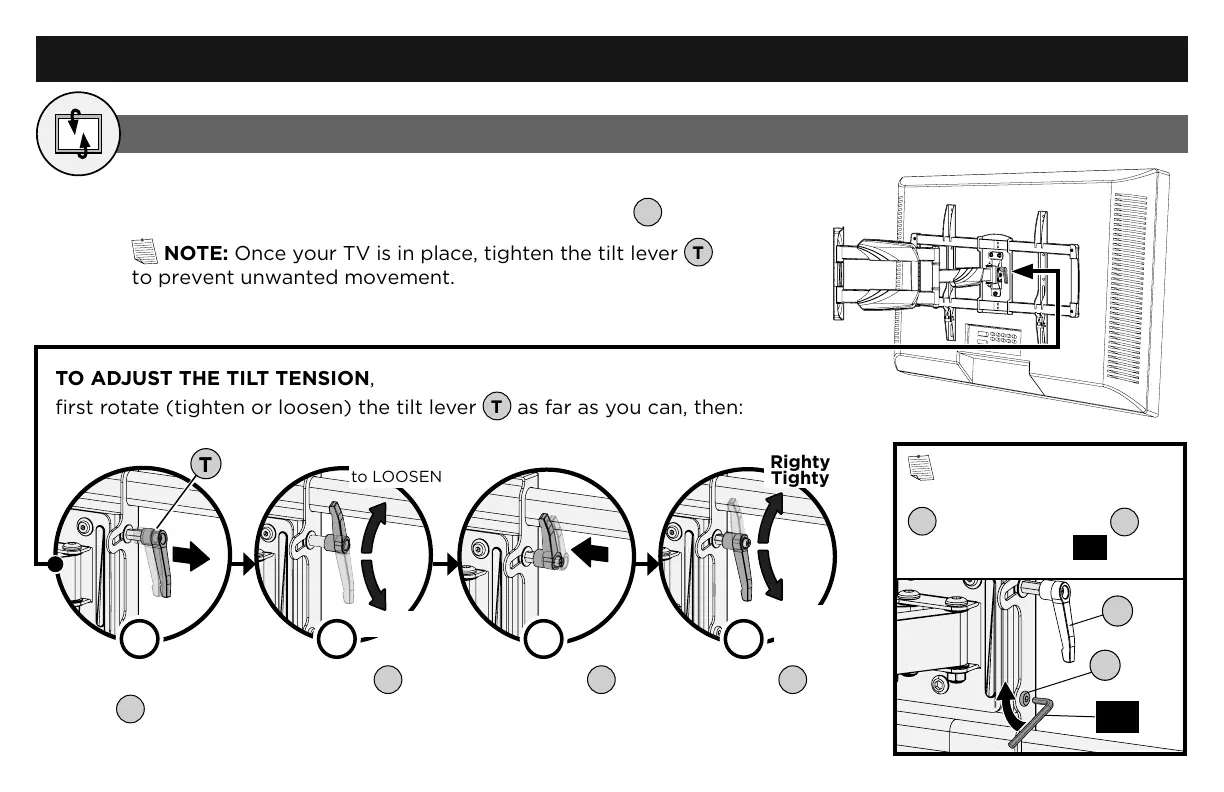
TO ADJUST THE TILT TENSION,
first rotate (tighten or loosen) the tilt lever
T
as far as you can, then:
Adjustments
Your TV should adjust easily when moved, then stay in place.
If your TV is too loose or too tight, adjust tilt lever
T
.
NOTE: Once your TV is in place, tighten the tilt lever
T
to prevent unwanted movement.
c
d
T
Righty
Tighty
to TIGHTEN
to LOOSEN
Lefty
Loosey
a
Pull and hold
lever
T
.
Rotate lever
T
in the opposite
direction (as shown).
Release lever
T
. Rotate lever
T
as
shown, to tighten
or loosen.
Repeat as needed.
b
NOTE: If your TV won't
stay in place with tilt lever
T
, tighten the screw
S
using the hex key
HK
.
T
S
HK



 To Next Page