EasyManua.ls Logo

Echogear EGCM1 - Page 5

Echogear EGCM1
16 pages
Print Icon
To Next Page IconTo Next Page
To Previous Page IconTo Previous Page
Loading...
6
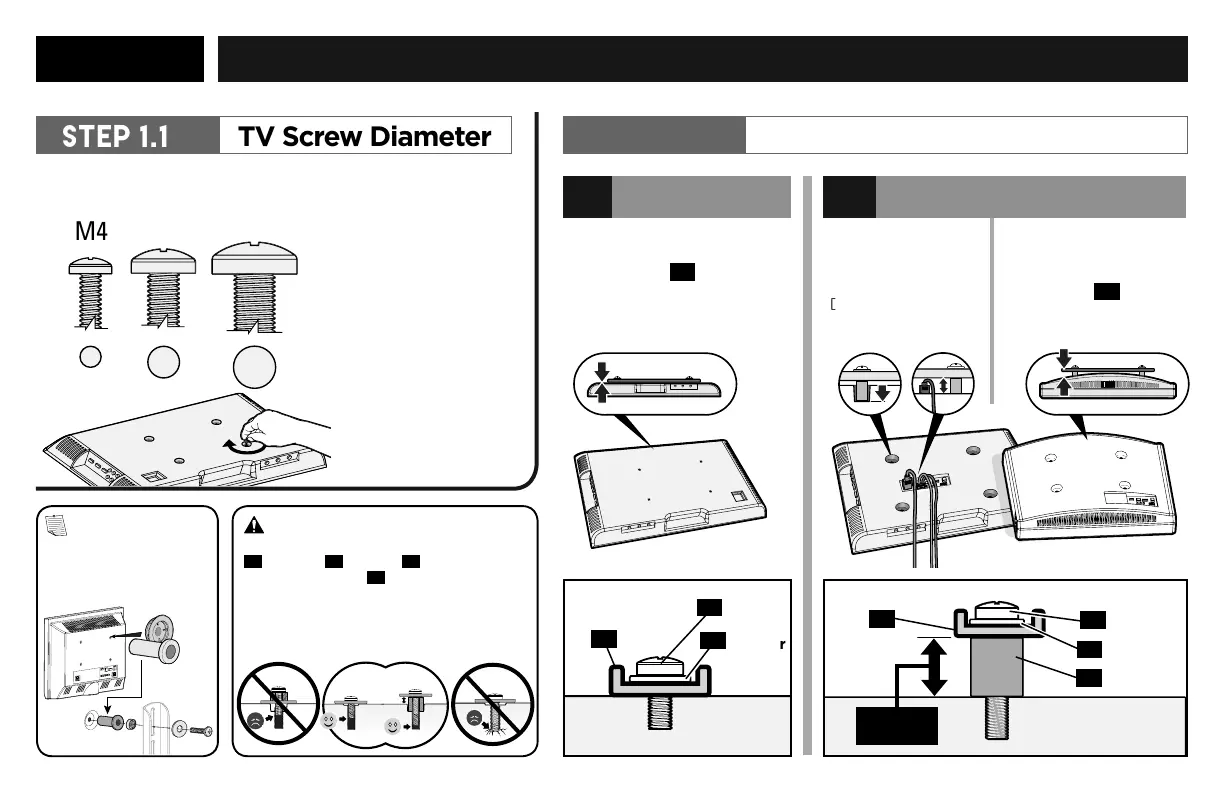
STEP 1 Attach the TV BRACKETs TO YOUR TV
M4
SPACER NEEDED
b
NO SPACER
a
TV Screw Diameter
STEP 1.1
Only one screw size fits your TV.
M6
M8
"
Suggested uses for
the extra screws
:
board game pieces,
industrial jewelry,
sweet corn holders,
musical instrument
s
like maracas or
'monsoon' sticks
,
stocking stuers,
currency (not most
countries) ..."
TV Screw Length
STEP 1.2
Long
Screw
Short
Screw
Washer
Washer
Spacer
TV Bracket
TV Bracket
EXTRA
SPACE
Flat Back TV
[TV brackets
04
lay flat on
your TV]
Flat Back TV
with Extra Space
Needed
[for deep inset holes
or cable interference]
Rounded or
Irregular Back TV
[TV brackets
04
NOT resting flat on your TV]
04
01
01
02
02
03
04
NOTE: If your
TV included inset
spacers or adapters,
use them UNDER
the mount hardware.
CAUTION: Verify adequate
thread engagement with your screw
01
, washer
02
, spacer
03
combination
AND TV bracket
04
.
Too short
will not
hold your
TV.
Too long
will
damage
your TV.

Related product manuals