8
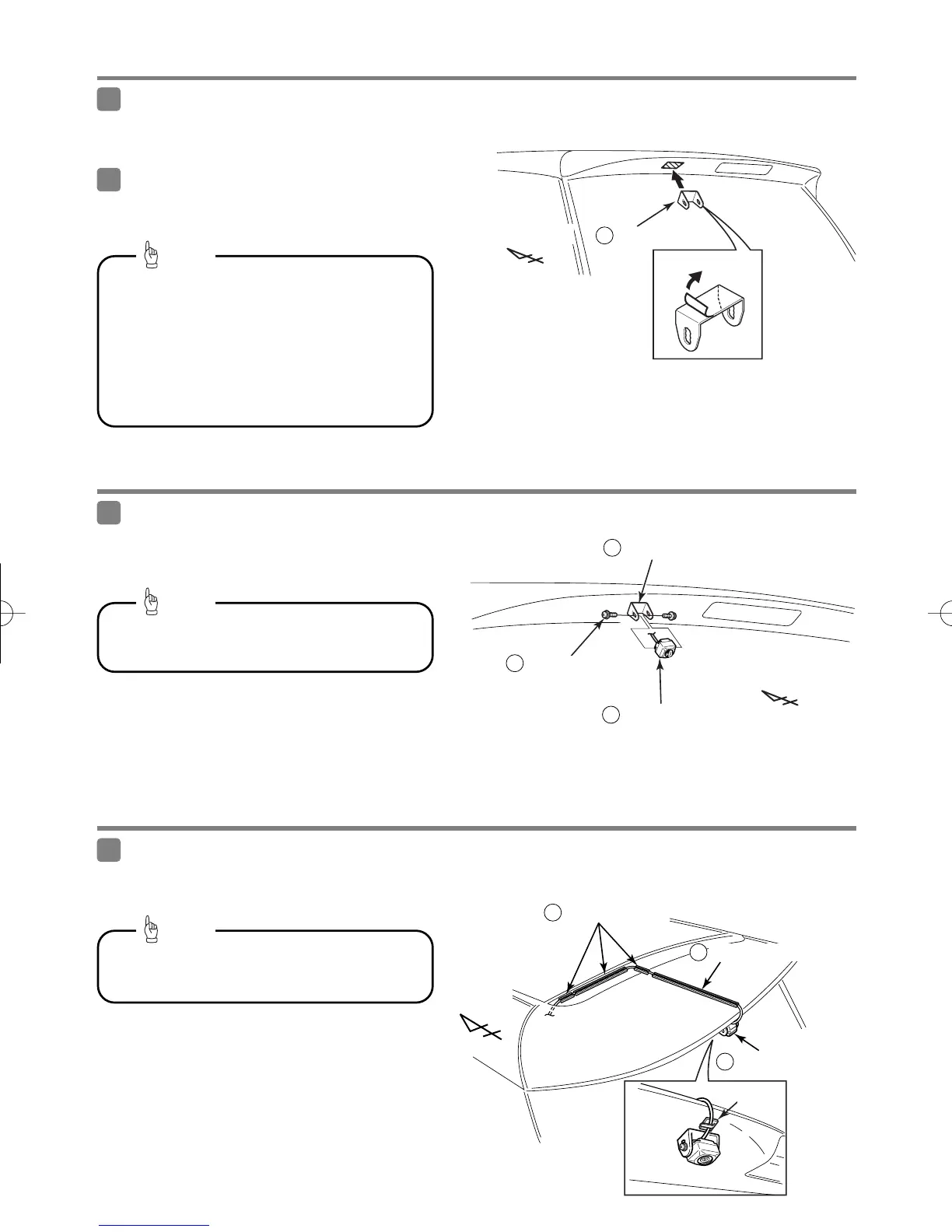
- If installing underneath a rear spoiler (example) -
Pull the rear camera cable inside the back door
while securing it with the cable rails and
commercially-available clamp.
5
Front of
vehicle
Cable rail
5
Cable rail
5
Rear camera
1
Clamp
•
The cable rails should be cut to appropriate
lengths.
Tip
Front of vehicle
Front of vehicle
- If installing underneath a rear spoiler (example) -
Peel off the backing paper from the double-sided
tape on the bracket, and affix the bracket to a flat
part of the rear spoiler.
•
After affixing the bracket, push the bracket
firmly on the mounted surface ensure that it
is securely attached.
•
The adhesive strength of the double-sided
tape will be reduced at low temperatures
(20°C) or less. Use a hair dryer or a similar
technique to warm the doublesided tape
before attaching it.
Tip
Bracket
2
- If installing underneath a rear spoiler (example) -
Install the rear camera to the bracket.
•
Install so that the "ECLIPSE" logo is facing
upward.
Tip
Bracket
2
Screw
(M3x6)x 2
3
Rear camera
1
2
3
4
Wipe the installation surface free of any dirt, water or
grease.


 To Next Page