3Eclipse Model 5602 Tester, Instruction Manual 819 2/11/2011
5) Observe that the red light inside the FLAME SIGNAL test jack comes on. At
the end of TFI (trial for ignition) time, the SPARK light will go off. Then about 5
seconds after the TFI ends, the MAIN light will come on. If interrupted pilot is
selected (DIP-Switch 2 is off), the PILOT light will go off after about 10
seconds.
6) Set the FLAME switch to EXT.
a) For non-recycling selection (DIP-Switch 1 is off), the red “FLAME
FAILURE” light on the controller will come on within 4 seconds. The
ALARM light on the tester will also come on.
b) For recycling selection (DIP-Switch 1 is on) and the flame indicator has
been on for more than 35 seconds, the unit will turn off the MAIN (and
PILOT if on). Then if post purge is selected (DIP-Switch 8 is on) it will delay
15 seconds before it recycles to the beginning self-check sequence and
continues as in step 2 above. Leave the FLAME switch at EXT. The red
“FLAME FAILURE” light on the controller will come on after the trial for
ignition. The ALARM light on the tester will also come on.
7) With the control in the ALARM condition, set the DAMPER switch to FAIL
(center position). Reset the controller by pressing the pushbutton once to the
in position and pressing it again to bring it back out.
8) Observe that the “SYSTEM ERROR” light flashes for a couple seconds and
then comes on steady. Also the tester ALARM and FAN lights will come on.
Return the DAMPER switch to VER-OK.
9) Set the AIR switch to FAIL (center position). Reset the controller. The FAN light
will come on and about 10 seconds later the “AIR FAILURE” light on the
controller and the ALARM light on the tester will both come on.
10) Set the AIR switch to SHORT (down position). Reset the controller and
observe that the “SYSTEM ERROR” light flashes for about 15 seconds. Then
the “SYSTEM ERROR” light comes on steadily and the ALARM light on the
tester comes on. Return the AIR switch to the NORMAL position.
11) Place the LIMITS switch to OFF and reset the controller. Turn the FLAME
switch to the appropriate position for the flame sensor type. Observe the red
light inside the FLAME SIGNAL test jack. The “SYSTEM ERROR” light will
start flashing. Then the FAN light will come on. Wait about 25 seconds and the
ALARM light will come on.
Veri-Flame Modulation Models 5602-4x
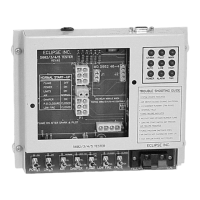
Plug the modulation relay board into the tester base for these
controllers. The connector closest to the edge of the pc-board will
mate to J2 on the tester and should be oriented to the right. Plug
the board in with the pc-board down and the relays up.
Test Procedure - set initial switch settings
1) Turn on the POWER switch, the POWER light on the tester and the “LOW
FIRE” light on the controller will come on.
2) Turn on the LIMITS switch. The green “INTERLOCKS CLOSED” light on the
controller will come on. In less than 5 seconds, the tester FAN and HIGH lights
and the controller’s “HIGH FIRE” light will come on.
3) The unit will stay in this sequence for the selected purge time. Then the tester
HIGH and the controller’s “HIGH FIRE” lights go off and the LOW and “LOW
FIRE” lights will come on.
4) After the selected purge time, the SPARK and PILOT lights on the tester will
come on.
5) Set the FLAME switch to the appropriate position for the flame sensor type of
the model under test: FR (down) for flame rods, UV/IR (up) for ultraviolet
scanners.


 To Next Page
 Loading...