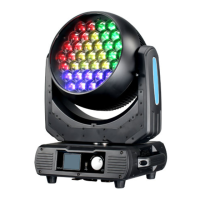
ITEM
1. Menu ....................................................................................................................02
2. Application notice ................................................................................................02
3. Parts introduction ..............................................................................................03
3. Fixture size............................................................................................................03
4. Product information .........................................................................................04
6. Control panel operate...........................................................................................05
7. DMX Channels.......................................................................................................09
2 Application notice
1: please check if device get loose during transportation .and ke ep regular maintenance
2: keep voltage steady-going , or the lamp can be damaged easily
3: please check the voltage if it get abnormal , do not switching on / off frequently
4: keep dry and ventilated for a long service life .
5: make sure switch off during installation and disassembly
Do not take out without authorization when fixture get abnormal
Should ask a professionals for inspection .
6: Install the stand , adjust the angel , connect the power supply and grand wire .
the computer will self - check about 30 seconds automatically after power up
7: do not look straight at light avoid any damage to eyes .
8: please use over 2.0 square wire .
9: no combustible or explosive materials around 0.5 m of light , do not touch the light by hands ,
10: Make sure Disconnection of power supply when installation and maintenence .


 To Next Page
 Loading...