4
1
2
3
4
5
6
7
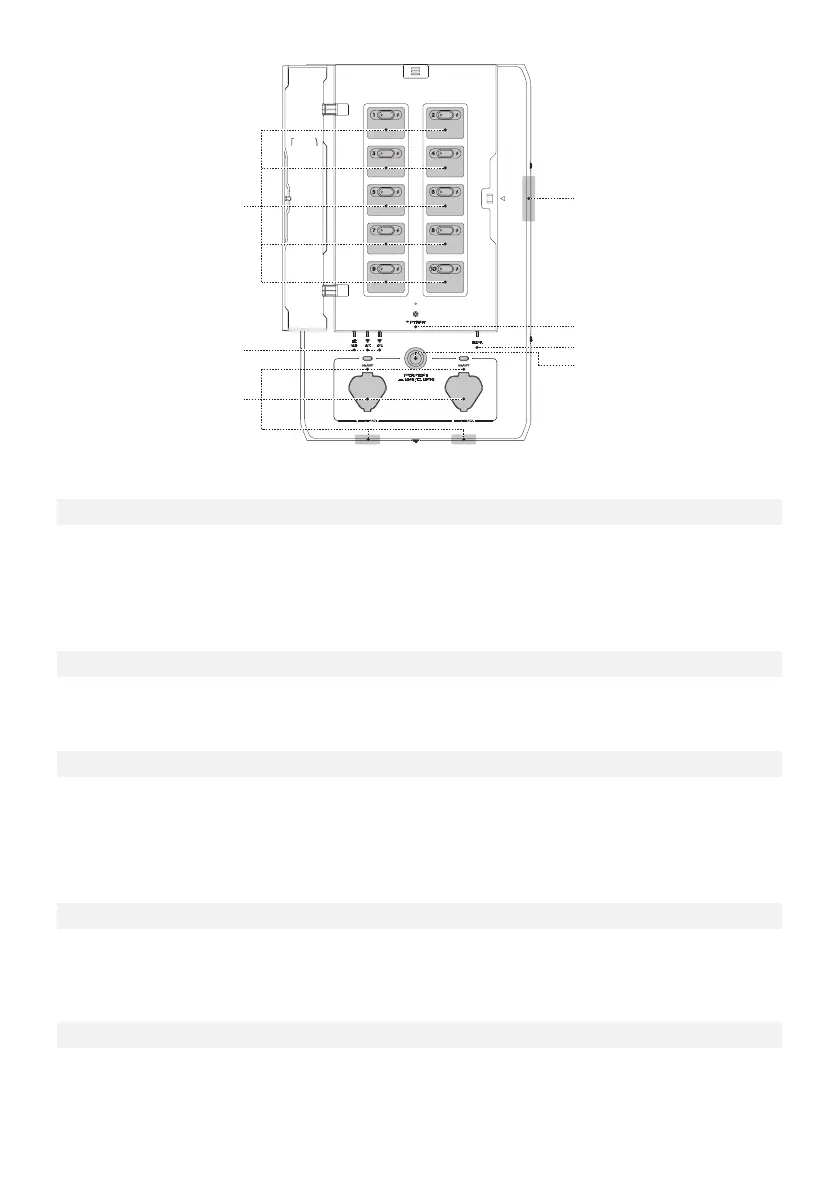
The SHP can control 10 load circuits. Circuits 1, 3, 5, 7, 9 are on the left of the board and 2, 4, 6, 8, 10 on
the right. A button allows users to manually reset each circuit relay if there has been an overcurrent on
the circuit. A light on the button will turn red if there is a circuit fault. A lightning indicator turns on if
that load circuit is energized through one of the sources.
There are three energization indicators on the SHP, one for the grid and two for the DELTA Pros. If any
of these lights are on, the SHP is energized from that source and cannot be serviced.
There are two Infinity Ports on the SHP, either on the bottom of the SHP (default) or the front. Use
these Infinity Ports to connect DELTA Pros to the SHP using an Infinity Cable. Once plugged in, SHP
and DELTA Pro will establish a connection. Users need to press the Enable Button to prepare DELTA
Pro for output.
1. Load Circuit Control Board
2. Grid Indicator and Infinity Port Indicator
3. Infinity Port and Enable Button
4. Panel Open Alarm System
5. IOT Reset Button and Indicator
This button can be used to turn on the bluetooth hotspot for 5 minutes for the user to connect. If held
down for 5 seconds, it will reset the bluetooth and IOT connection.
When the DELTA Pro load circuits are energized, an alarm buzzer will go off if the front panel is
opened. To de-energize the product, all upstream breakers must be opened and the DELTA Pros must
be unplugged.


 To Next Page