11
10
9
8
7
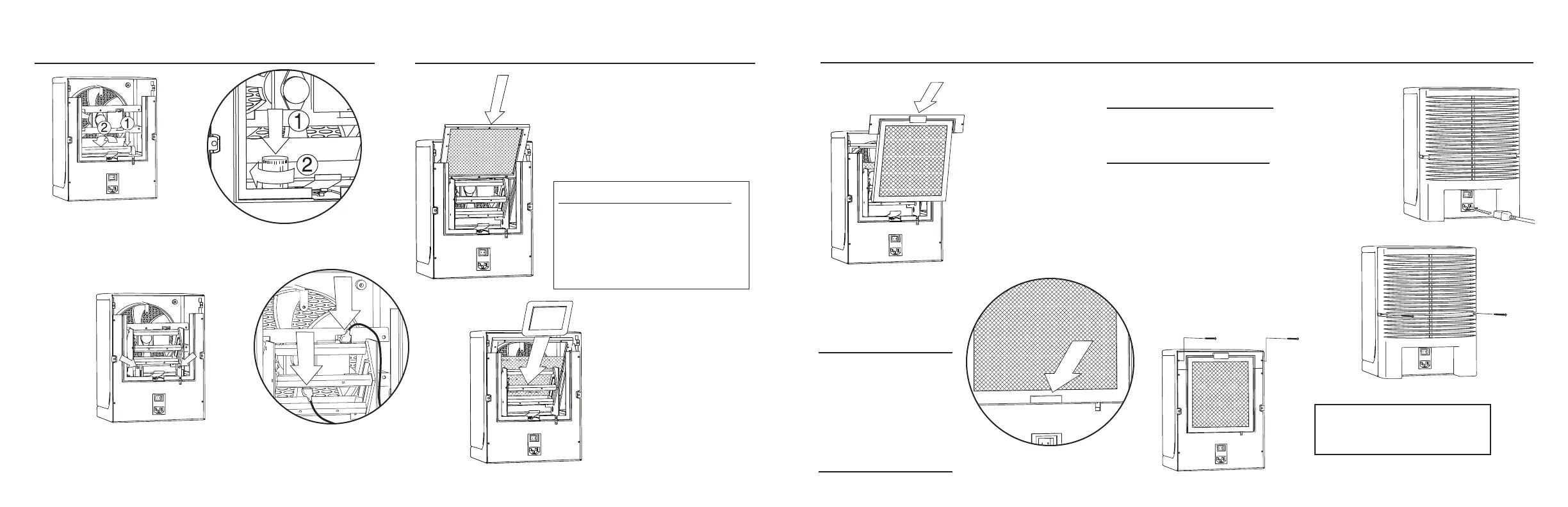
11. Reinstall the power
cord.
8. Be sure the lint screen
depresses the metal tab.
7. Replace lint screen and
the top of the lint screen
holder at the same time.
10. Replace two (2)
back cover screws.
9. Replace two (2) lint screen
top holder screws.
INSTALLING THE LINT SCREEN
WARNING: DO NOT OPERATE
Fresh Air by EcoQuest without the lint
screen and back cover properly installed.
When installing the
purification plate, be
sure the metal tabs are
making contact with
the screen on each
side of the plate.
For disassembly instructions
see pages 10 - 11.
6
4
3
2
1
INSTALLING THE UV LAMP
1. Insert UV bulb into holder then
rotate to lock into place.
2. Replace starter and
turn to lock.
3. Replace cage by lowering and
sliding back into place. Tighten
two (2) screws securely.
5
5. Replace the RCI
™
Target
by gently inserting into
the large guides until the
screen stops.
6. Gently insert the purifier plate
between the guides (inside the
cage) until it stops.
4. Connect the two (2) lead wires
attached to the purifier plate cage.
INSTALLING RCI
™
TARGET & PURIFIER PLATE
To Install:
Lint Screen or
EcoHelp Filter
follow steps 7 - 11
Purifier Plate
follow steps 6 - 11
RCI
™
Target
follow steps 5 - 11
UV Bulb
follow steps 1 - 11
NOTE: Do not touch glass areas
of UV bulb. To install, hold bulb by
ends only.






 To Next Page