
 Need help?
Do you have a question about the EcoxGear Extreme Sub ES08 and is the answer not in the manual?
Details the front control panel and rear features like the heat sink and auto-turn-on switch.
Illustrates the passive backlit subwoofer from the right and left sides.
Explains Aux-In, Remote Gain Control, and Remote Turn-On jack connections.
Details the connection for the external 12VDC power supply using the EC5 connector.
Verifies 12VDC, 30A supply, warns against accessory power and battery drain.
Provides initial steps for connecting to a gas vehicle's battery terminals.
Details connecting black/red wires to battery terminals and EC5 connectors.
Guides on setting the Auto-Turn-On switch to 'DC'.
Explains wiring to the DC-DC converter's ground and positive posts for EVs.
Guides on setting the Auto-Turn-On switch to 'DC' for electric vehicles.
Details LEDs, Phase, EcoCast, Party Lights, Gain, and Crossover buttons.
Explains the three modes: Remote, Audio, and DC.
Describes the Remote, Audio, and DC modes for automatic power activation.
Explains the status indications of the AUX and ECOCAST LEDs.
Details toggling phase and adjusting gain level with LED feedback.
Explains how to adjust the crossover frequency range.
Describes party light modes and introduces the EcoCast broadcast system.
Steps for Bluetooth pairing, transmitting, and receiving modes between speakers.
Instructions for connecting additional speakers or subwoofers in receiving mode.
Details automatic re-connection and how to clear paired devices.
Explains connecting audio via the 3.5mm Aux-In jack.
Covers mounting and connecting the remote gain controller.
Emphasizes properly closing all caps and doors for water protection.
Warns on weight, vibration, and heat sink placement for optimal performance.
Step-by-step guide for horizontally mounting the subwoofer.
Details attaching vertical plates and securing them to the vehicle.
Suggests testing speaker orientation for optimal sound.
Provides solutions for no audio, poor quality, and LED issues.
Lists the physical dimensions of the subwoofer unit.
Lists dimensions with mounts and component weights.
Details Bluetooth, power, EcoCast range, temperature, and waterproof rating.
Covers regulatory compliance statements for FCC, IC, and RF exposure.
Discusses IP66 rating, wet connection hazards, and cancer warnings.
Lists never-to-dos and essential maintenance like cleaning seals and rinsing.
Covers power requirements, warranty terms, and proper storage.
Lists all items included in the product packaging, from the subwoofer to hardware.
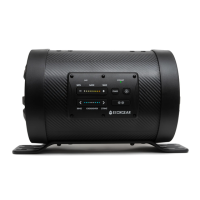
The ECOXGEAR Extreme Sub ES08 is a versatile subwoofer designed to enhance audio in powersports vehicles, golf carts, and marine environments. It is engineered to provide powerful bass and can be integrated into various audio setups, either wirelessly via EcoCast or through wired connections.
The Extreme Sub ES08 functions as an external subwoofer, augmenting the low-frequency output of an existing audio system. It does not have an internal battery and requires a 12VDC external power supply with a minimum 30A current rating. For setups including both the Extreme Sub and an ECOXGEAR SoundExtreme soundbar, a 40A current supply is recommended. The subwoofer features an Auto-Turn-On Switch with three modes: Remote, Audio, and DC. In Remote mode, it turns on with a 12VDC signal from a vehicle's ignition or power supply. In Audio mode, it activates upon detecting an audio signal from an Aux-In connection. In DC mode, it turns on whenever a 12VDC power supply is present.
The device includes a control panel with LED indicators for AUX, Phase, and EcoCast Receiving. Users can adjust the sound output phase (in or out of phase) to optimize bass performance, especially when multiple subwoofers are paired. The EcoCast feature allows the Extreme Sub to receive audio wirelessly from an ECOXGEAR SoundExtreme speaker, creating a synchronized multi-speaker audio system. It operates in EcoCast Receiving Mode by default and can be put into pairing mode to connect with a SoundExtreme transmitting speaker.
The Extreme Sub also incorporates Party Lights with 12 different modes (Red, Orange, Yellow, Green, Cyan, Blue, Purple, White, Music Sync, FADE7, JUMP7, Color Fade) that can be cycled through or turned off. Gain control buttons allow users to increase or decrease the subwoofer's output relative to a connected SoundExtreme soundbar, optimizing the bass level for different music types and installation locations. Crossover control buttons enable adjustment of the frequency range, allowing the subwoofer to perform as a full-range low woofer or solely as a low-frequency subwoofer.
The Extreme Sub ES08 offers flexible connectivity options. It can be connected to any brand of stereo, amplifier, or soundbar's wired subwoofer-out or line-out via its Aux-In / Sub-In Jack using the supplied 3.5mm Audio Cable. A Remote Gain Level Control Jack allows connection to a supplied controller for easy adjustment of the subwoofer's overall output. The Remote Turn-On Jack enables external devices to turn the subwoofer on or off, particularly useful when the Auto-Turn-On Switch is set to "Remote."
Installation in gas vehicles involves connecting the supplied power cable directly to the battery terminals, ensuring the black wire goes to the negative terminal and the red wire to the positive. For electric vehicles, a DC-DC converter is required, and the subwoofer's power cable connects to the converter's output. It's crucial to ensure all connections are dry before powering on the unit to prevent electrical damage.
Mounting options include horizontal and vertical orientations. The subwoofer comes with mounting plates, screws, washers, lock washers, and hex bolts for secure installation. Users are advised to consider the subwoofer's weight (17 lbs) and vibrations when selecting a mounting location and to ensure the heat sink on the back is not in direct sunlight for optimal performance. When mounting, it's recommended to test the sound with the active subwoofer facing both up and down to determine the best orientation for the specific vehicle.
The EcoCast functionality allows for a seamless wireless audio experience. Once a SoundExtreme speaker is paired with a Bluetooth device and set to EcoCast Transmitting Mode, the Extreme Sub (and other EcoCast-enabled speakers) can receive the audio. The system supports automatic re-connection if all speakers are turned off and then on again.
Maintaining the waterproof integrity of the Extreme Sub ES08 is crucial. The unit is waterproof only when all caps on the Aux-In, Remote Gain Level Control, and Remote Turn-On jacks are properly closed. Users must firmly push these caps into place to ensure a secure seal. The subwoofer is rated IP66, meaning it is protected against dust and water jets but is not intended for constant underwater submersion.
After exposure to salt water, the subwoofer should be thoroughly rinsed with fresh water. It's important to keep the caps and covers clean and free from sand or debris. Periodically checking the rubber seals on the caps and door for wear is recommended. If water is suspected to have entered the unit, or if it has experienced a severe impact, it should not be powered on and should be returned to Grace Digital for assessment to prevent fire or shock. Users should never attempt to open or repair the unit themselves.
The product has a limited lifespan, and replacement is recommended when obvious signs of wear appear. It's important not to modify or remove any original components, as this can compromise the unit's integrity and waterproofness. When storing the unit for long periods, especially in certain power modes where it may still draw power when off, it's advised to connect the Remote Turn-On Cable to a power on/off switch or disconnect the subwoofer from the power source to avoid battery drain.
 General
| Driver Size | 8 inches |
|---|---|
| Battery Life | 10 hours |
| Impedance | 4 Ohms |
| Color | Black |
| Connectivity | Bluetooth, AUX |
| Type | Wireless Subwoofer |

 To Next Page