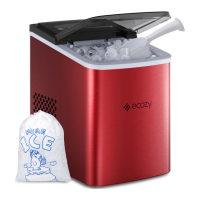
This document is a user manual for the Ecozy IM-SS440A Ice Maker, a portable appliance designed to produce ice cubes. The manual provides comprehensive instructions for safe operation, product overview, usage, and troubleshooting.
Function Description:
The Ecozy IM-SS440A is an ice maker that produces ice cubes. It is designed for ease of use with a control panel and LED display for various functions. The device allows users to start and stop ice making, adjust the size of ice cubes, set a timer for automatic operation, and provides reminders when the ice basket is full or when water is low. It also features a self-cleaning mode for convenient maintenance. The ice maker operates by circulating water over an evaporator to form ice, which is then harvested into an ice basket.
Important Technical Specifications:
- Model: IM-SS440A
- Power Supply: 115 V/60 Hz
- Ice Making Rated Current: 2.2 A
- Ice Harvest Rated Current: 2.5 A
- Refrigerant: R290 (1.13 oz/32g)
- System Pressure: High Side: 260 psig / Low Side: 88 psig
- Net Weight: 20.9 lbs (9.5 kg)
- Dimensions (H x W x D): 9.9 x 14.2 x 14.6 inches (252 x 360 x 371 mm)
- Enclosure: Stainless Steel
- Certifications: Conforms to UL STD.563, Certified to CSA STD.C22.2 No.120 (Intertek 3149457)
Usage Features:
- Control Panel and LED Display: The ice maker features a user-friendly control panel with buttons for ON/OFF, TIMER, TIME +, and TIME -. The LED display shows ice-making status, ambient temperature, ice-making countdown, timer settings, ice-making time duration, self-cleaning mode status, ON/OFF status, error codes, and a "No Enough Water" warning.
- Adding Water: The device indicates when water is needed by a flashing icon on the LED display. Users should add at least 1 liter of clean drinking water to the water tank.
- Start/Stop Making Ice: Pressing the ON/OFF button starts the ice-making process with a default time. Pressing it again stops the process.
- Adjust Ice Cube Size: While the ice maker is running, users can adjust the ice cube size by increasing or reducing the ice-making time duration using the TIME + and TIME - buttons. The letter 'M' on the display flashes to indicate that the time duration can be adjusted. The time can be adjusted by at most 6 minutes from the default. Longer durations result in larger ice cubes, and shorter durations result in smaller ones.
- Countdown: During ice-making, the LED display shows a countdown of the remaining time for the current ice-making cycle.
- Timer Function: A timer can be set to automatically stop or start ice making. When the ice maker is running, the timer can be set to stop it. When it's off, the timer can be set to start it. The timer duration can be set from 1 to 24 hours using the TIME + and TIME - buttons, with 'H' flashing on the display.
- Ice Full Reminder: An indicator light illuminates when the ice sensor detects that the ice basket is full, prompting the user to remove ice cubes. The ice maker will resume operation once ice is removed.
- Forced Ice Harvest: During ice-making, pressing and holding the ON/OFF button for 5 seconds initiates a forced ice harvest.
- Placement: The ice maker should be placed on a level surface, away from direct sunlight and heat sources, with at least 6 inches (15 cm) of clearance on all sides for proper air circulation. Before first use, it should stand upright for at least one hour to allow the refrigerant to settle.
- Grounding: The ice maker must be plugged into a grounded 3-prong outlet (110-120V/60Hz) to prevent electrical shock.
Maintenance Features:
- Self-cleaning Mode: The ice maker has a self-cleaning mode. When the ice maker is not making ice, pressing and holding the TIMER button for more than 5 seconds activates this mode. The indicator flashes, and the process takes about 20 minutes. This mode can be manually terminated by pressing the ON/OFF button.
- Water Drain: After ice making is complete, water can be drained from the tank by removing the cap on the water drain plug. The ice maker must be powered on for complete drainage.
- Cleaning: Before first use, the interior of the ice maker, the ice basket, and the ice shovel should be cleaned with warm water and a soft cloth 3-5 times to remove any manufacturing or transportation residue or odor.
- Water Quality: It is recommended to use clean drinking water. Beverages like sparkling water or coke should not be used as they may clog the pipes.
- Regular Water Change: It is advised to change the water every 24 hours.
- Storage: If the ice maker is not in use, it should be cleaned and all its parts dried.
Troubleshooting:
The manual includes a troubleshooting section for common issues:
- "No Enough Water" indicator lights up: Add at least 1 liter of water.
- "Ice Full" indicator lights up: Remove excess ice cubes from the basket.
- E1 Error (Ambient temperature sensor malfunctions): Contact customer service.
- E2 Error (Water temperature sensor malfunctions): Contact customer service.
- Ice cubes sticking together: Reduce the ice-making time.
- Ice cubes are thin: Move the ice maker to a cooler place, ensure water temperature is no more than 25°C (77°F), or increase the ice-making time.
- Ice-making cycle is normal, but no ice cubes are formed: For first-time use, wait patiently as the cycle may take longer. If the issue persists, it could indicate refrigerant leaks, in which case customer service should be contacted.
- Water flows slowly in the supply pipe: Wait for a while; frozen water in the supply pipe will automatically melt.
The manual emphasizes reading all instructions carefully and obeying safety information to reduce the risk of fire, electric shock, or injury. It also provides contact information for customer support.

 Need help?

 To Next Page
 General