2 / 4 P/N 3101095 • REV 03 • REB 25JAN13
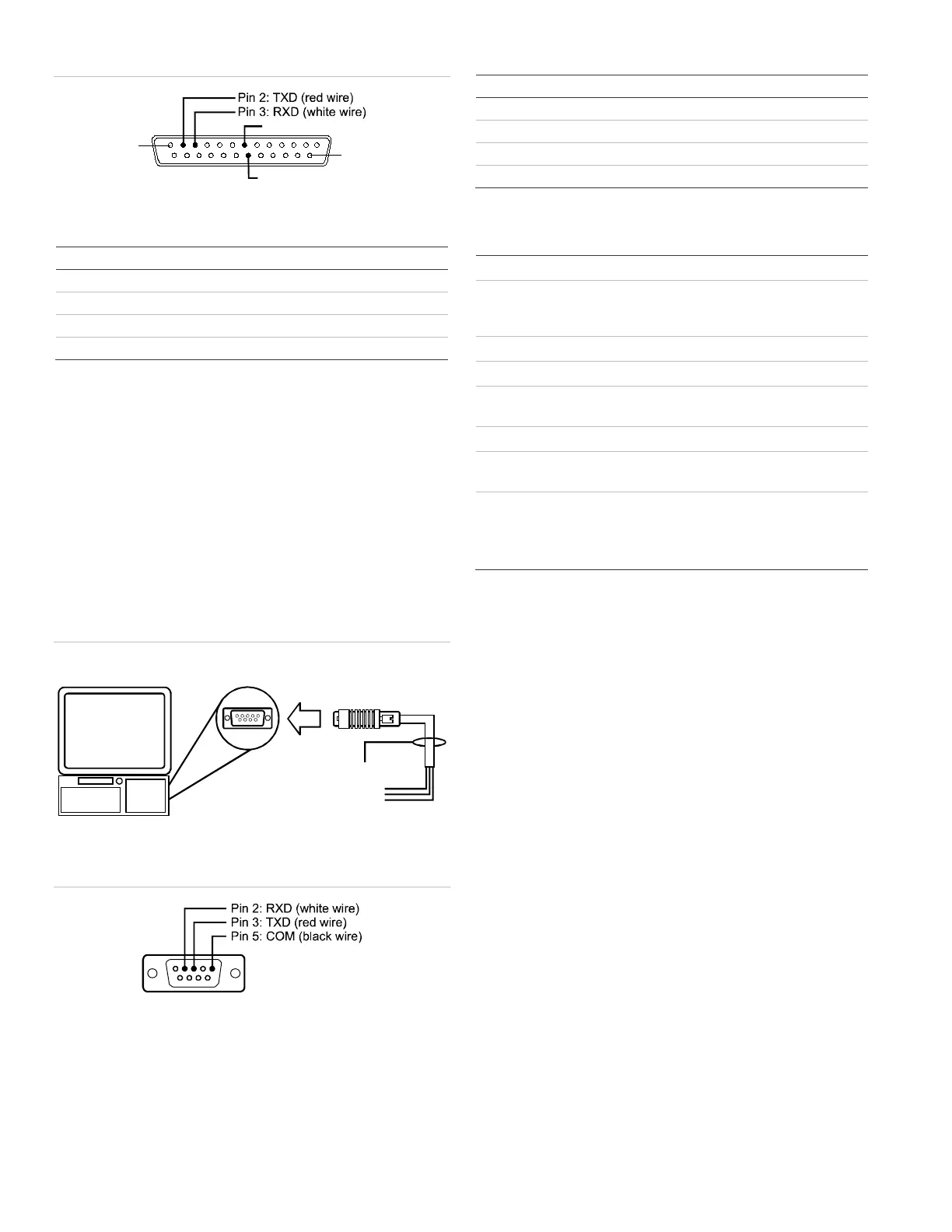
Figure 4: DB-25 pin connections
PIN 25
PIN 1
DB-25 male
(front view)
Pin 7: COM (black wire)
Pin 20: DTR (green wire)
Table 1: SA-232 card to printer DB-25 connections
-232 card DB-25 Description
COM (pin 7) Black wire (ground connection)
DTR (pin 20) Green wire (printer supervision)
RXD (pin 3) White wire (communication)
TXD (pin 2) Red wire (communication)
Computer download wiring
Wiring to a computer:
1. If you have a connected printer, disconnect it.
2. Locate a serial port (COM port) on the back of the
computer.
3. Connect the DB-9 end of the RS-232 cable to the COM
port on the back of the computer.
4. Connect the other end of the RS-232 cable to the
RS-232 card.
Figure 5: Computer download wiring
RS-232 cable
DB-9 male
Computer
DB-9 COM port
on back of computer
To RS-232 card
Figure 6: DB-9 pin connections
Table 2: SA-232 card to computer DB-9 connections
-232 card DB-9 Description
COM (pin 5) Black wire (ground connection)
- Not used
RXD (pin 2) White wire (communication)
TXD (pin 3) Red wire (communication)
Specifications
24 VDC
Asynchronous communicatio
resistance: 13 Ω
Maximum capacitance: 0.7 µF
50 feet max.
+/- 10 V
Standby/Alarm: 13 mA
Max.: 20 mA
12 to 18 AWG (0.75 to 2.5 mm
2
)
Printer communication
speed
9600 baud
t
Temperature
Humidity
32 to 120°F (0 to 49°C)
0 to 93% RH, noncondensing at 90°F
(32°C)


 To Next Page
 Loading...