INTRODUCTION of SCREEN
*Before connecting to the power cord, please check if the voltage indicated on the product's bottom nameplate matches
the power supply voltage. Otherwise, it may result in excessive or insufficient heating temperature.
■
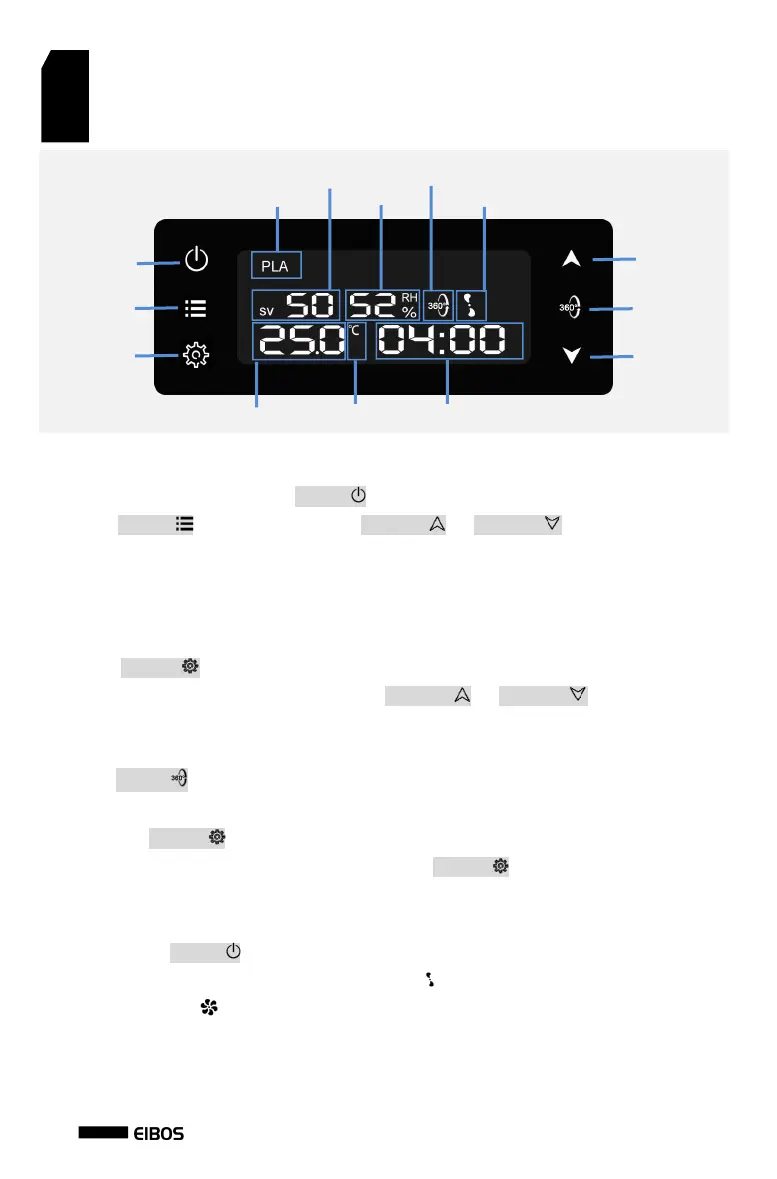
Connect the power cord and press the ‘ON/OFF ’ button to wake up the device.
■Press the ‘OPTION ’ button, and then use the ‘INCREASE ’ or ‘DECREASE ’ button to select the type of
filament, which corresponds to different drying parameters. The available options include:
PLA, ABS, PA, PC, PETG, ASA, PVA, TPU, PP, as well as M1, M2, M3 spare filament options.
*The default drying parameters provided are for reference only. It is recommended to adjust the drying parameters
according to the moisture level and heat deformation temperature of the filaments.
■Press the ‘SETTING ’ button to switch and change the setting temperature, heating level, and drying time.
When the corresponding parameter is flashing, use the ‘INCREASE ’ or ‘DECREASE ’ button to adjust it. The
drying time can be set from 30 minutes to 24 hours. When displaying ‘———’, it means it is set to be always on
without time limitation.
■Press the ‘ROTATE ’ button to enable or disable the filament spool rotation function. Make sure to secure the
filament to the spool before activating the rotation function. Please turn off the rotation function during printing.
■Long-press the ‘SETTING ’ button for 3 seconds to switch between temperature units (°C/°F).
■Press the 'ON/OFF' button to enter humidity mode. Press the ‘SETTING ’ button to set the desired humidity
level. When the humidity falls below the setup humidity level, the heating function will automatically turn on until
it reaches the setup value, and repeatedly. Press the 'ON/OFF' button again to completely turn off the device.
■
Long-pressing the ‘ON/OFF ’ button allows you to restore the device to its factory settings.
■There are three heating levels available. The minimum level has the slowest rotation speed for the icon,
while the maximum level has the fastest rotation speed. It is recommended to use the lowest level for
temperatures below 50°C and the highest level for temperatures above 60°C.


 To Next Page
 Loading...