08
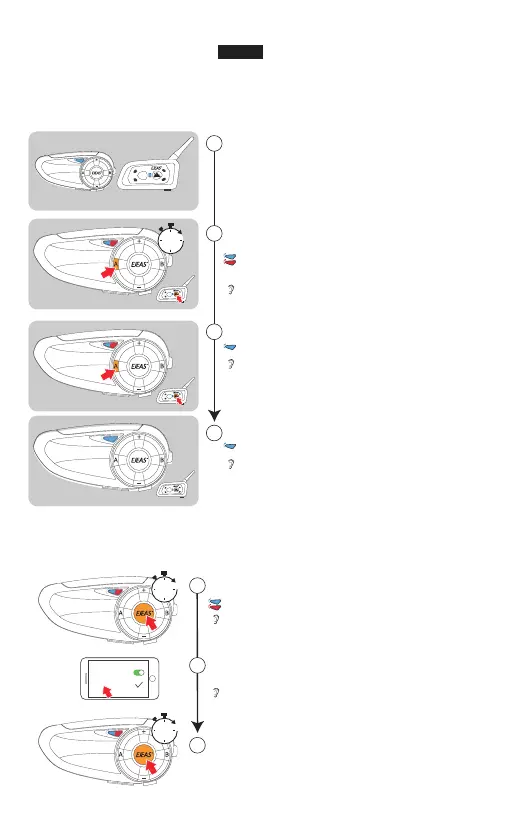
Open the phone connection
Turn on the Bluetooth on mobile,
click the "Q7"
Disconnect
"Pairing successful, connected"
"Phone pairing"
Pairing the phone/Disconnect with phone
Red & blue lights flash
Bluetooth
Q7
If there is no pairing connection, exit the pairing state after 2 minutes
1
2
3
5s
5s
Compatible with all EJEAS models
"Intercom A searching"
When pairing with other Bluetooth intercom or headset, you can
use intercom search for pairing connection
Click the A to search and pair
Regard Q7 as the main device,
the extra models as sub-machine
Power on
Pairing successful
"Intercom pairing successful"
"Intercom A connected"
Red & blue lights flash fast
alternately
Each device can become a host
"Intercom A pairing"
Use the two device's "A"
button to enter pairing mode
2
1
3
4
Blue light flashes quickly
Flashing blue at the same rate
main
sub
5s
English


 To Next Page