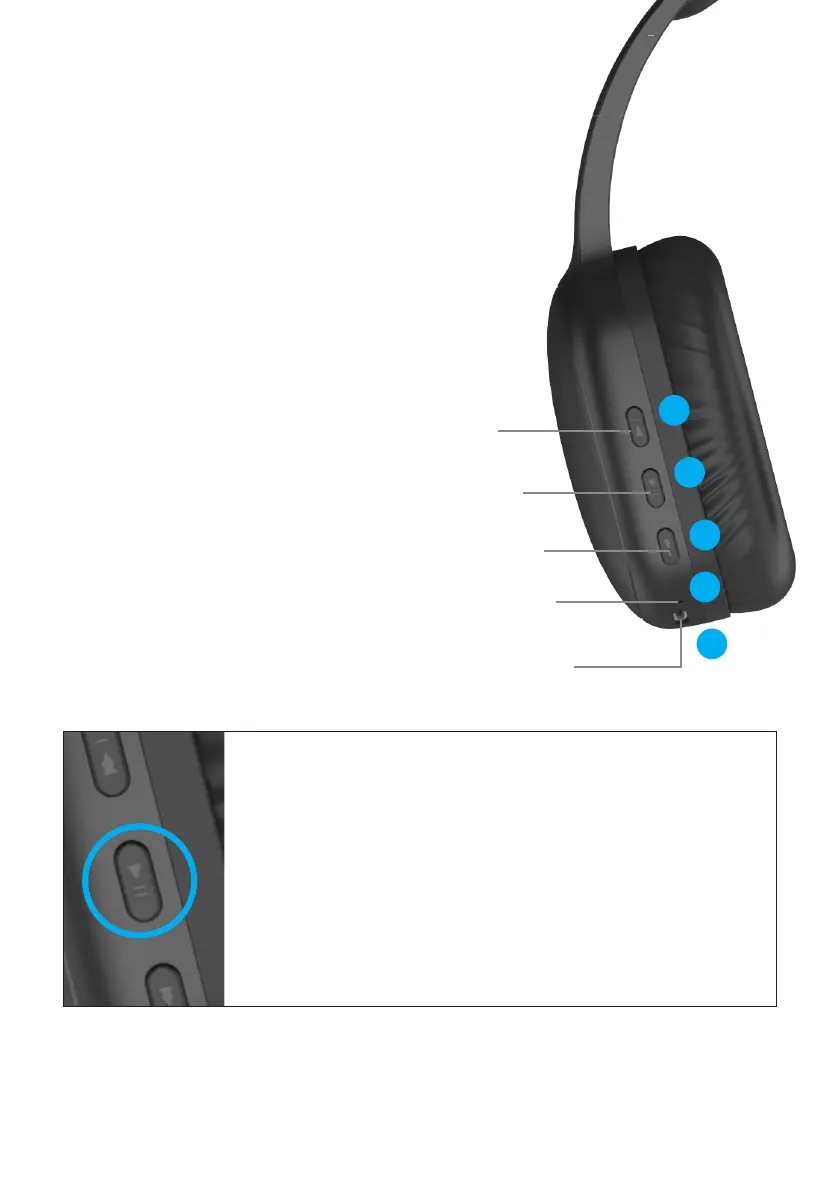
HOW TO USE
1 PREVIOUS/VOLUME DOWN
Press 2 (two) times - Previous Song
Press 1 (once) time - Volume Down
2 POWER/PLAY-PAUSE
Press and Hold (3 secs) - Power ON/OFF
Press 2 (two) times - Voice Assistant
Press 1 (once) time - Play/Pause
3 NEXT/VOLUME UP
Press 2 (two) times - Next Song
Press 1 (once) time - Volume Up
4 MICROPHONE
5 CHARGING PORT (USB-C)
Page 3 of 4
Press and hold the POWER button to turn heardphones ON.
The headphones will automatically enter pairing mode.
On your smart device, in Bluetooth settings
search pairing name:
BLACK - KBTH11B
WHITE - KBTH11W
BLUE - KBTH11BU
Press and hold POWER button to turn o.
CALLS:
When receiving a phone call,
Tap Power switch once to answer the call.
Tap Power switch once again to end the call.
Long press Power switch for 2 seconds to reject the call.
PREVIOUS /
VOLUME DOWN
PLAY/PAUSE
NEXT /
VOLUME UP
BUILT-IN
MICROPHONE
USB-C
CHARGING PORT
1
2
3
4
5


 To Next Page
 Loading...