T4™ Operating Instructions
©Elation Professional® - www.elationlighting.com - T4™ Instruction Manual Page 3
Features:
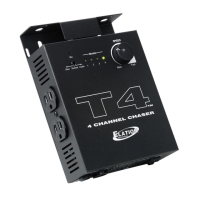
The T4™ is a 4 channel chaser. The T4™ can be set to run in audio
or chase mode. The audio mode will trigger the chase pattern to the
rhythm of the beat. Chase mode will chase without requiring an audio
signal. The T4™ is deigned to run par cans, pin spots, and other
small fixture. You may draw a total of 6.3
A from the controller. Each
channel can draw up to 5
A per a channel. Plug your fixtures into the
Edison sockets on the sides of the T4
.™ After plugging your fixtures
into the T4™ plug the T4™ into a standard grounded wall outlet.
Select your operation mode and turn the T4™ on. Remember that if
you select the audio operation mode the T4™ will not chase until it
receives an audio signal.
T4™ Operating Modes
Slow:
When the Mode switch is in the “SLOW” position the unit will chase
(step from one to channel to the next) at a slow pace.
Normal:
When the Mode switch is in the “NORMAL” position the unit will
chase at a regular pace.
Audio:
When in the “
AUDIO” mode each chase step will be regulated by low
frequencies heard through the built-in microphone.Turning the speed
knob down completely (counter-clockwise) in audio mode will regulate
the chase solely by low frequencies heard through the built-in micro
-
phone. The audio sensitivity is preset by the manufacture and may be
adjusted.
T4™ Warranty Card
The T4™ carries a 2 Year limited warranty. We recommend you fill out
the enclosed warranty card to validate your purchase. All returned
service items whether under warranty or not, must be freight pre-paid
and accompany a return authorization (R.A.)
number. If the unit is
under warranty, you must provide a copy of your proof of purchase
invoice. Please contact Elation® customer support for a R.A. number.
T4™ Controls & Functions
1. 3-POLE ELECTRICAL OUTLETS -
These are standard Edison 3-pole grounded electrical outlets.
2. INTERNAL MICROPHONE -
The T4™ comes equipped with a built-in microphone to pick-up the
beat of the music. This is used to trigger the controller in the audio
mode. The internal microphone will have no function when chase
mode is selected.
3. MODE SELECTOR SWITCH -
This switch is used to select any of the three operating modes; Slow,
Normal, or Audio.
4. LED INDICATORS -
The four channel LED’s will also glow to indicate channel activity.
5. SPEED ADJUSTMENT KNOB -
The T4™ uses a speed control knob to adjust the chase rate of the
built in program. Turning the speed knob in a clockwise direction will
increase the chase rate, turning the speed knob in a counter-clock
-
wise direction will decrease the chase rate.
©Elation Professional® - www.elationlighting.com - T4™ Instruction Manual Page 4
T M
SPEED
FastSlow
Monitor
1 2 3 4
Mic
Normal AudioSlow
1 5432


 To Next Page
 Loading...