3
STOP CODE
PROGRAMMING
STOP function.
PROCEDURE PICTURES
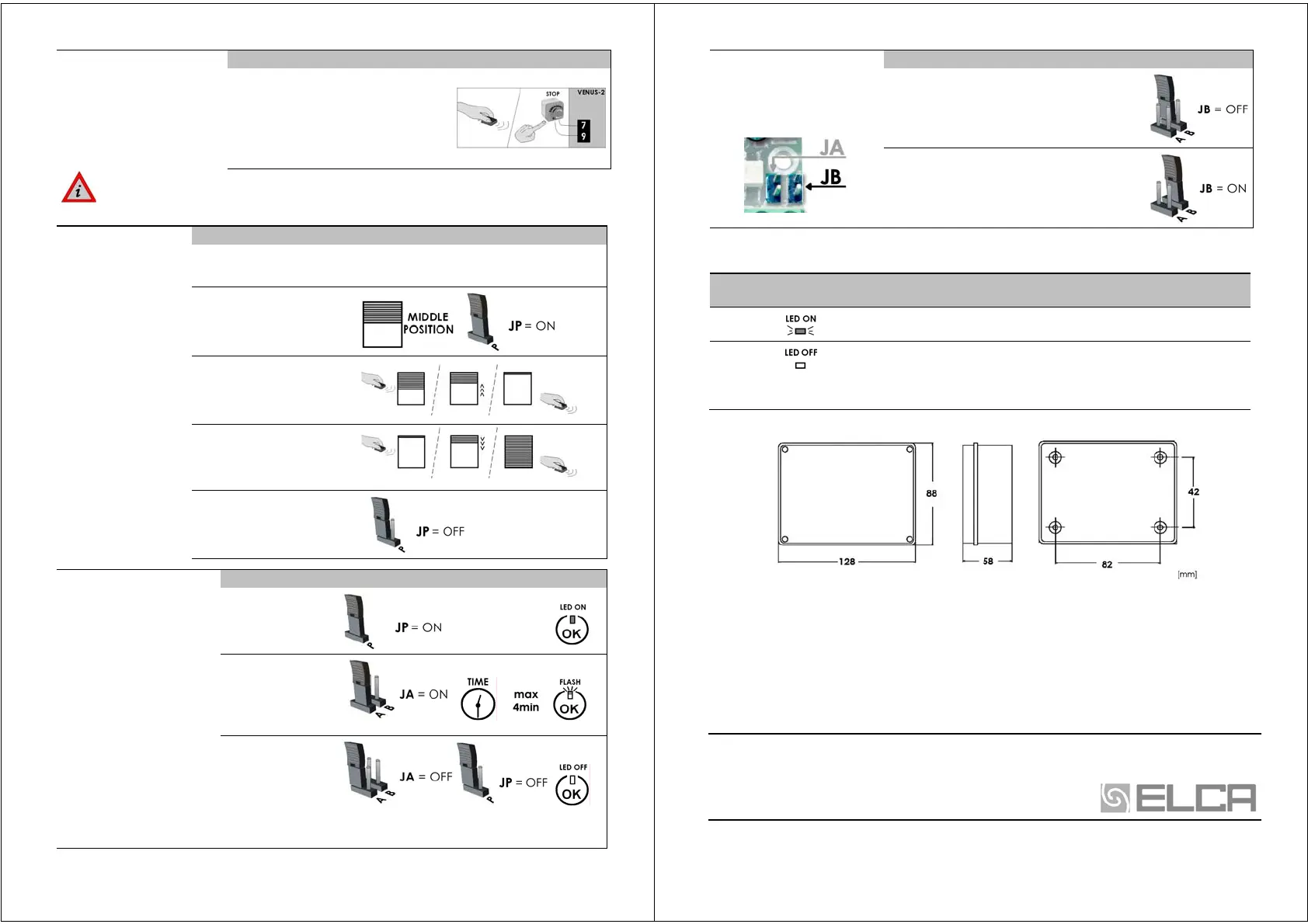
Make the “START/STOP CODE PROGRAMMING
(SS) procedure, keep pushed the STOP button
[ST] while you are sending the radio code. If
the STOP button is not been installed, you
have to open the contact between the
terminals 7 [com] and 9 while you send the radio
code. After the programming procedure put again
the little bridge.
ERASING OF ALL CODES. It’s possible to erase all codes in memory, making the
reset procedure. (see pag.2 - Attention !!: The reset procedure erases all the
programmings made !!)
WORKING TIME
PROGRAMMING
The WORKING TIME is the
time that the door needs
to open and close.
With this procedure the
board learns automatically
the door’s run.
If you don’t make the
programming, the working
time selected is 30sec.
PROCEDURE PICTURES
1) Check that the limit-switches are connected in the right way ! If the safety systems
( stop, photo-cells) are active during the procedure, the motor’s run stops.
2) Put the door in the middle
position.
Put the little bridge on JP.
The OK led OK turns on.
3) Send a SS command, the door
starts to open. When the door is
completely open, wait 2sec. and
give a new SS command.
4) Give a SS command, the door
starts to close.
When the door is completely
close, wait 2sec. and give a new
SS command.
5) Take off the little bridge JP.
The programming procedure is
ended.
PAUSE TIME
PROGRAMMING
(Automatic closing)
The pause time programming
allows the automatic closing.
To modify the pause time you
have to repeat the procedure.
During the pause time you can
exclude the automatic closing
with a SS command.
To erase the automatic
closing
you have to make the
RESET procedure (see pag.2).
Attention !!: the reset procedure
erases all programmings
memorised!!
PROCEDURE PICTURES
1) Put the little bridge
on
JP.
The OK led turns on.
2) Put another little
bridge on JA and wait
for the time you need
for the pause time. The
OK led flashes.
3) First, take off the little
bridge on JA, the OK
led turns on fixed. Then
take off the little bridge
on JP, the OK led OK
turns off.
The pause time is been
memorised
.
4
FUNCTION LOGIC
SELECTION
The VENUS2 board has 2 logics.
The logic selection is made with
the JUMPER B.
LOGIC DESCRIPTION JB POSITION
IMPULSIVE LOGIC: JB = OFF
To open or close the shutter , you have to activate
the commands for an instant.
“PUSH and HOLD” LOGIC IN CLOSING TIME: JB = ON
The close’s commands (SS or CH, also by radio) work
only if the command is always activated. That means:
to close the shutter you have to push and keeping
pushed the CLOSE command. When you finish to
push the CLOSE command, the motor stops.
LED The VENUS-2s board has 2 led .
LED
STANDARD
CONDITION
FUNCTION
LED ON
The board is turn on.
LED OK
When the board is turn on, it flashes.
It makes a flash when the board receives a correct radio code.
It makes a fast flash when the inputs are activated.
If the OK led is always turn on or it always flashes, it means that the board is in the
programming phase (JA and/or JP are still inserted), (pag.2,3).
DIMENSIONS Box 205 IP56
WARRANTY
ELCA devices and accessories are guaranteed for a period of 24 months after production, whose date is
printed on each items. ELCA will replace or repair its devices, provided that they are returned to our
plant. In order to check the actual functioning of the returned pieces, they will remain the property of
manufacturer. The warranty does not include damages due to any incorrect use, such as : non fulfilment
of the instructions detailed for each device. Moreover, warranty does not cover damage due to wrong
tension supply and any other reason for which the manufacturer cannot be made responsible. Any device
returned must be delivered to ELCA with carriage paid and will be sent back with freight collect.
Warranty validity ceases in case of the customer’s non fulfilment of payment.
ELCA declines all responsibility for the non observance of the safety rules by part of the installer.
ELCAsnc elettronica & automazioni: via Malintoppi, 32 Fermo (AP) 63023 Italy
Tel: +39 0734 243503
Tel : +39 0734 608484
Fax: +39 0734 605080
Web: www.elcasnc.com email: elcasnc@tin.it



 To Previous Page
 Loading...