10 www.electrolux.com
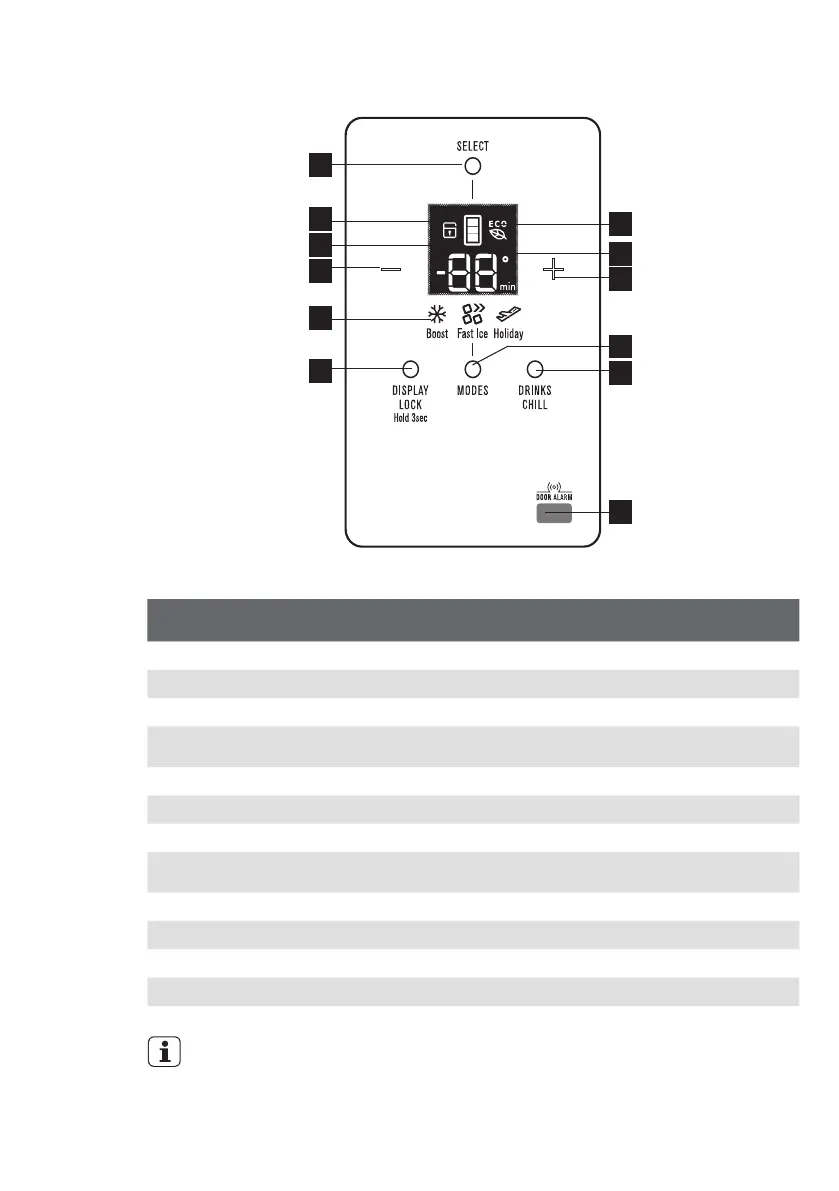
Control – EBE5304 Model
Button
/ Icon
Description Primary Function
1 Compartment Selector button Selects controllable compartment.
2 Lock Icon Indicates if the user interface is locked.
3 Compartment Icon Indicates controllable compartment.
4 ECO Icon Indicates if the appliance is operating in its most
energy efficient mode.
5 Digital display Indicates temperature of selected compartment.
6 Decrease button Decreases temperature of selected compartment.
7 Increase button Increases temperature of selected compartment.
8 Mode indicators
(Boost, Fast Ice, Holiday)
Indicates appliance operation mode.
9 Display Lock button Selects lock state of user interface.
10 Display Lock button Selects operation mode of appliance.
11 Drinks Chill button Selects drinks chill timer.
12 Door sensor Senses door state (open or closed).
1
4
5
7
10
11
12
2
3
6
8
9
IMPORTANT
The factory default settings for the refrigerator is “3°C” and “-18°C” for the freezer.
If you want to change the temperature, remember to make only small adjustments
and wait 24 hours to see if it’s correct.



 To Next Page