í
electrolux
15
Auto cook
1. Open the door, place the food on
the turntable.
2. Press the ' Auto cook ' button until
the desired programme is reached.
3. Turn the setting control knob until
the required quantity is reached.
4. Close the door.
5. Press Start (The oven begins
cooking.)
At the end of this function a bell will
be heard to signal the end of the
program.
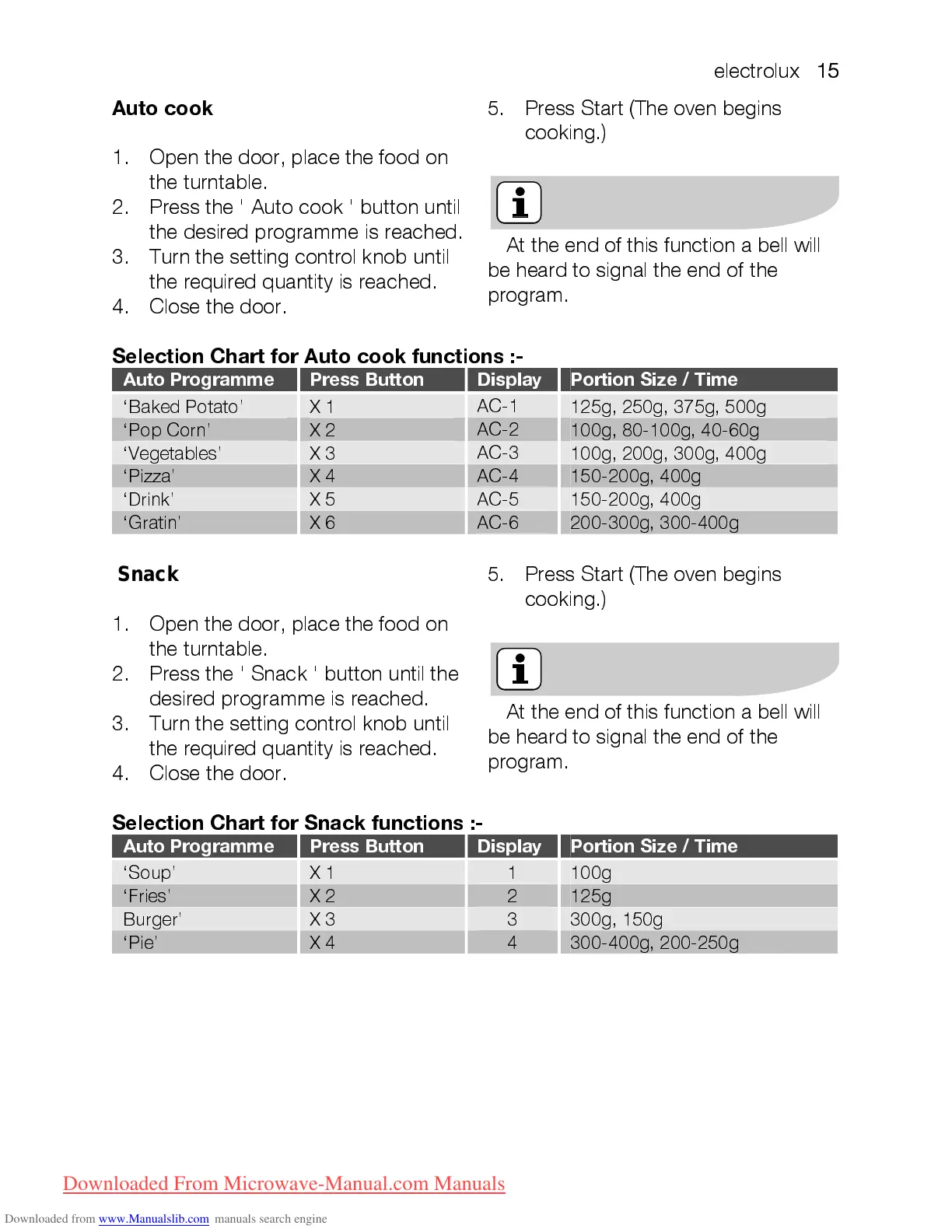
Selection Chart for Auto cook functions :-
Auto Programme Press Button Display Portion Size / Time
‘Baked Potato’ X 1
AC-1
125g, 250g, 375g, 500 g
‘Pop Corn’ X 2
AC-2
100g, 80-100 g, 40-60 g
‘Vegetables’ X 3
AC-3
100g, 200g, 300g, 400 g
‘Pizza’ X 4
AC-4
150-200g, 400g
‘Drink’ X 5
AC-5
150-200g, 400g
‘Gratin’ X 6
AC-6
200-300g, 300-400g
Auto cook
1. Open the door, place the food on
the turntable.
2. Press the ' Snack ' button until the
desired programme is reached.
3. Turn the setting control knob until
the required quantity is reached.
4. Close the door.
5. Press Start (The oven begins
cooking.)
At the end of this function a bell will
be heard to signal the end of the
program.
Selection Chart for Snack functions :-
Auto Programme Press Button Display Portion Size / Time
‘Soup’ X 1
1
100g
‘Fries’ X 2
2
125g
Burger’ X 3
3
300g, 150g
‘Pie’ X 4
4
300-400g, 200-250g
Snack
Downloaded From Microwave-Manual.com Manuals






 To Next Page