You have selected the correct
operating times and power level.
The food you have put inside the
oven is a larger amount or colder
than you usually put in.
The food is too hot, dried out or
burnt! Check if:
you selected the correct operating
time and power level.
I hear some noises after the cooking
process is finished!
This is not a problem. The cooling
fan keeps on working for some
time. When the temperature has
dropped sufficiently, the fan will
switch itself off.
The oven switches on but the interior
light does not go on!
If all the functions work properly it
is probable that the lamp has
blown. You can keep on using the
oven.
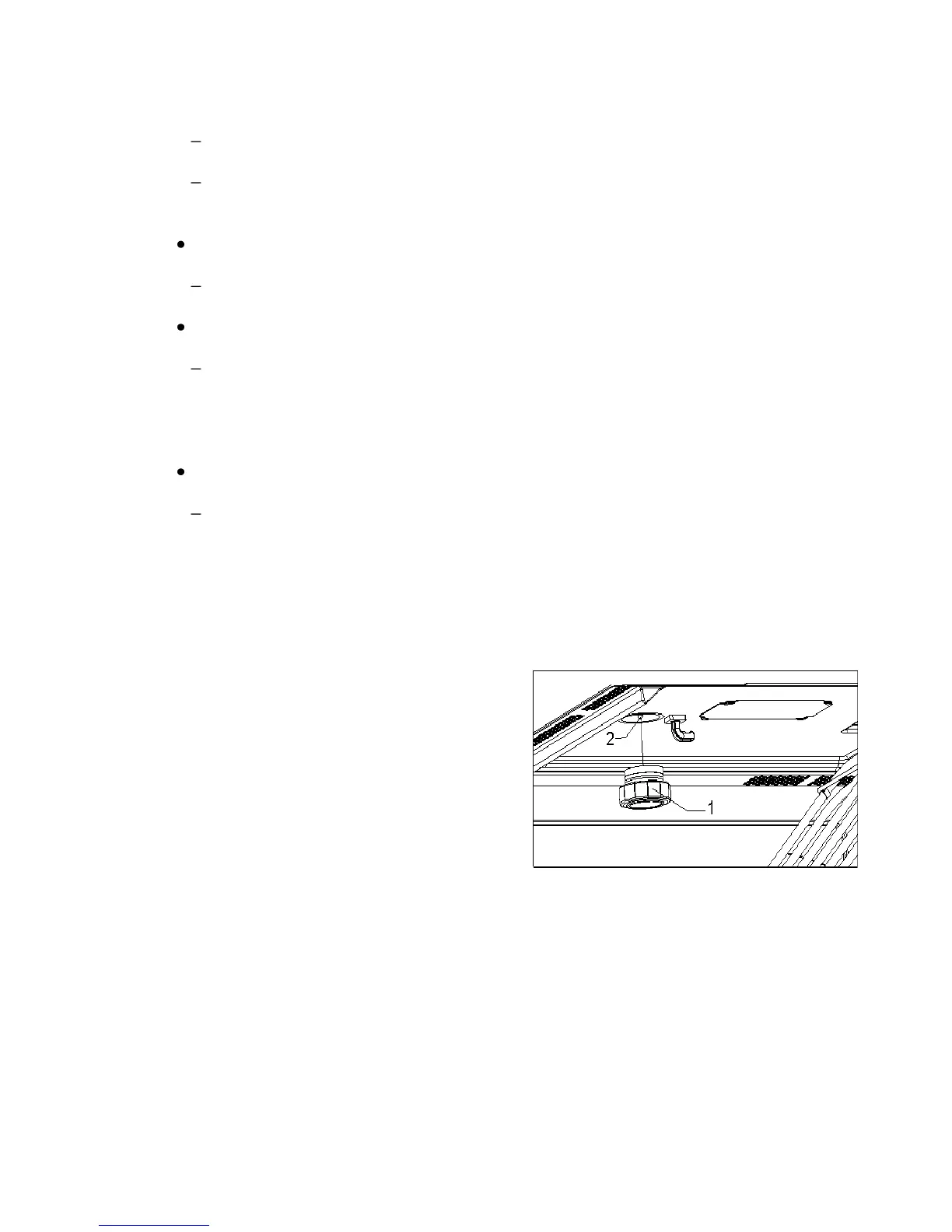
SUBSTITUTION OF LIGHT
BULB
To substitute the light bulb, proceed as
follows:
1. Disconnect the oven from the
power supply. Take the plug out of
the socket or switch off the oven’s
power circuit.
2. Unscrew and remove the glass
light cover (1).
3. Remove the halogen light bulb (2).
Warning! The bulb may be very
hot.
4. Fit a new G4/12V/10-20W halogen
bulb. Warning! Do not touch the
light bulb surface directly with your
fingers because you may damage
the bulb. Follow the lamp
manufacturer’s instructions.
5. Screw the glass light cover into
place (1).
6. Connect the oven again to the
power supply.



 To Next Page