daily use electrolux 23
Activation/deactivation of the rinse
aid dispenser
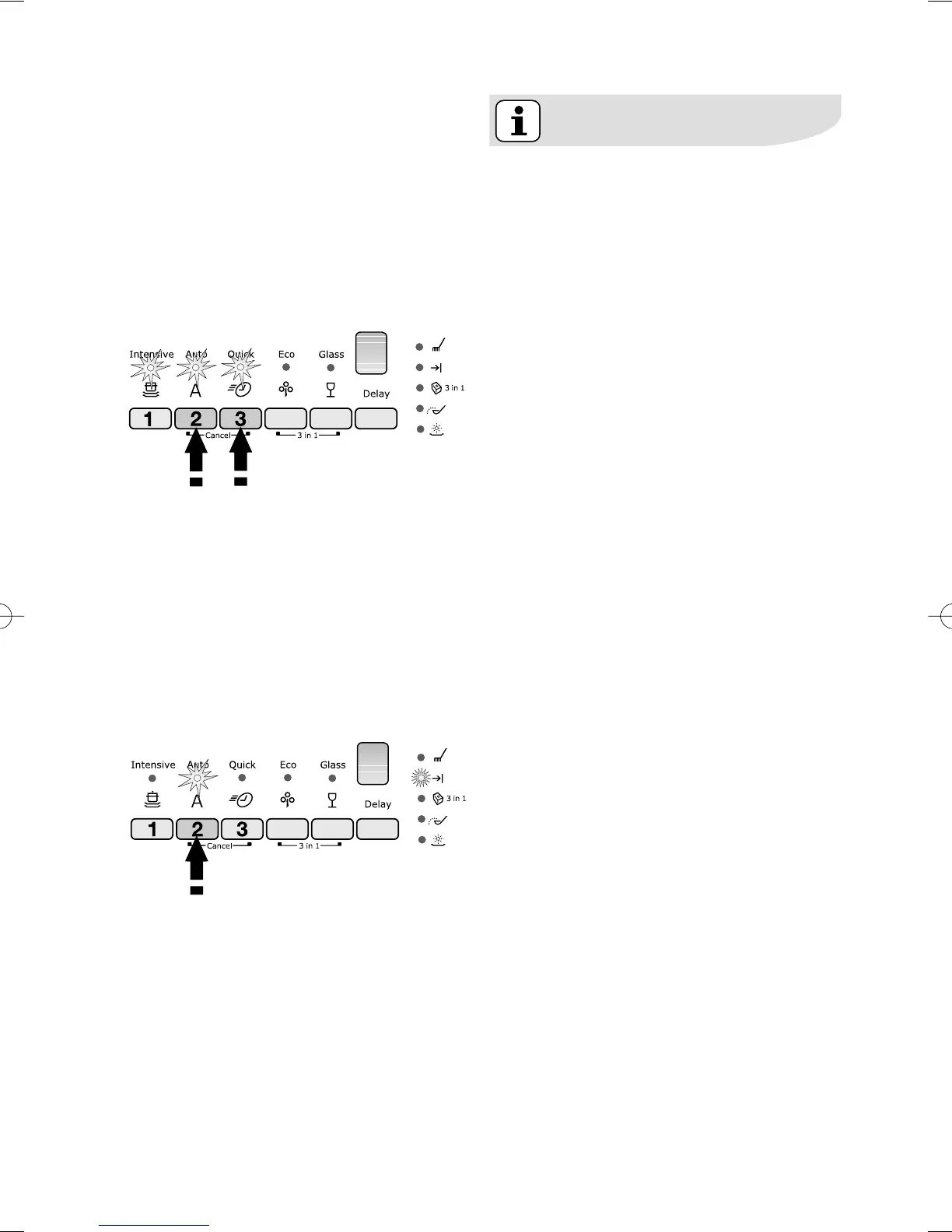
1. Press the On/Off button. The
dishwasher must be in setting
mode.
2. Press simultaneously buttons 2
and 3, until the indicator lights of
buttons 1, 2
, and 3 start flashing.
3. Press button 2, the indicator lights
of buttons 1 and 3 turn off while
the indicator light of button 2 goes
on flashing.
4. To activate the rinse aid dispenser,
press button 2 again, the end of
programme indicator light
illuminates, indicating that the rinse
aid dispenser has been activated.
5. To memorise the operation, switch
off the dishwasher by pressing the
On/Off button.
6. To deactivate the rinse aid
dispenser again, follow the above
instructions until the end of
programme indicator light turns
off.
If you decide to turn back to the
use of standard detergent system
we advise that you:
1. Deactivate the 3 in 1 function.
2. Fill up the salt container and the
rinse aid dispenser again.
3. Adjust the water hardness setting
to the highest setting and perform
1 normal washing programme
without loading any dishes.
4. Adjust the water hardness setting
according to the hardness of the
water in your area.
5. Adjust the rinse aid dosage.



 To Next Page