control panel electrolux 11
Audible signals
Audible signals have been introduced
to help indicate which operations the
dishwasher is performing:
- setting of the water softener
- end of programme
- intervention of an alarm due to
malfunction
It is possible to deactivate the audible
signals, using some of the programme
buttons on the control panel.
Factory setting: audible signals
activated
4. To change the current setting,
press again button 3, the digital
display will indicate the new
setting.
5. To memorise the operation, switch
off the dishwasher by pressing the
On/Off button.
Deactivation/activation of the
audible signals
1. Press the On/Off button. The
dishwasher must be in setting
mode.
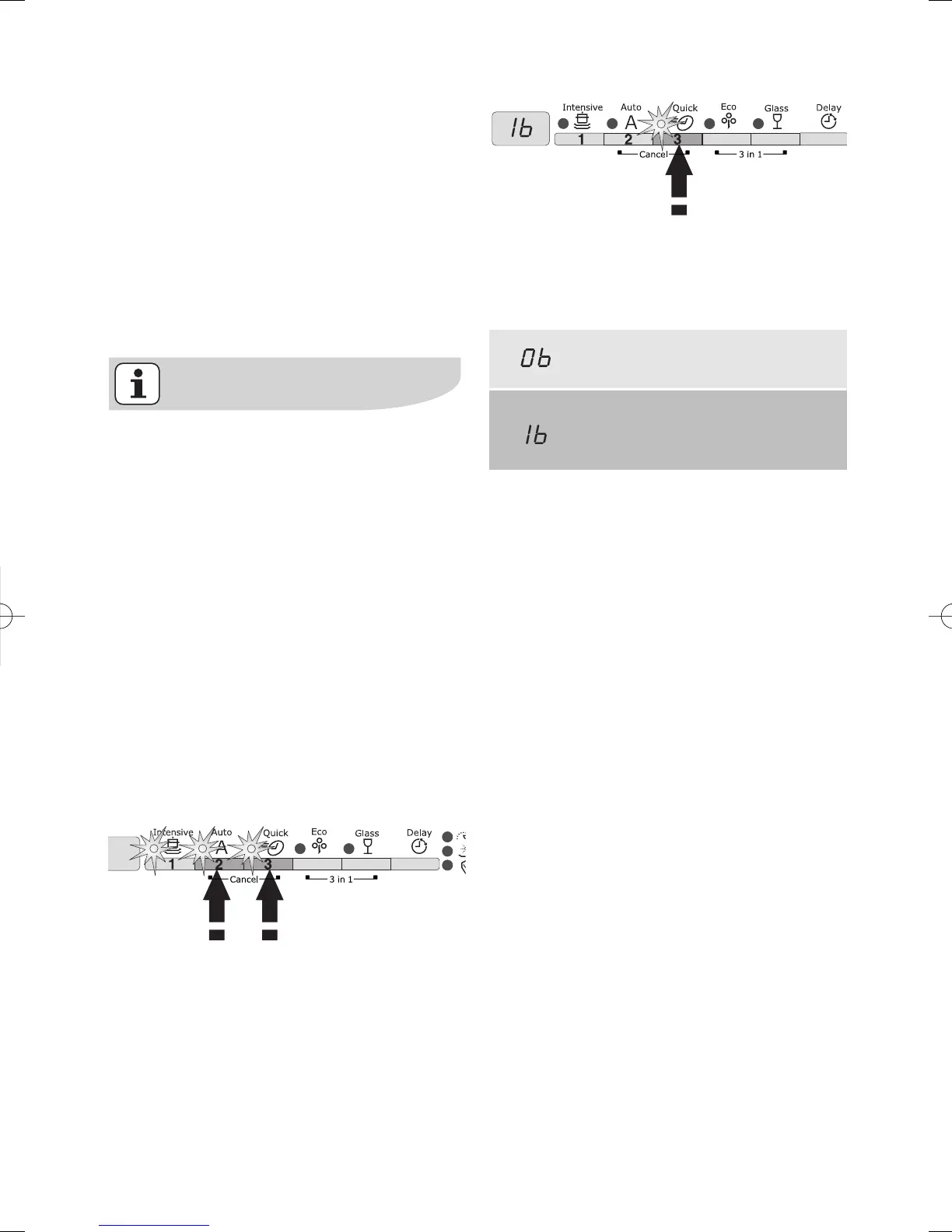
2. Press simultaneously and keep
pressed buttons 2 and 3 until the
lights of the buttons 1, 2 and 3
start flashing.
3. Press button 3, the lights of
buttons 1 and 2 turn off while the
light of button 3 goes on flashing.
The digital display indicates the
current setting.
Audible signals deactivated
Audible signals activated
(factory set)



 To Next Page