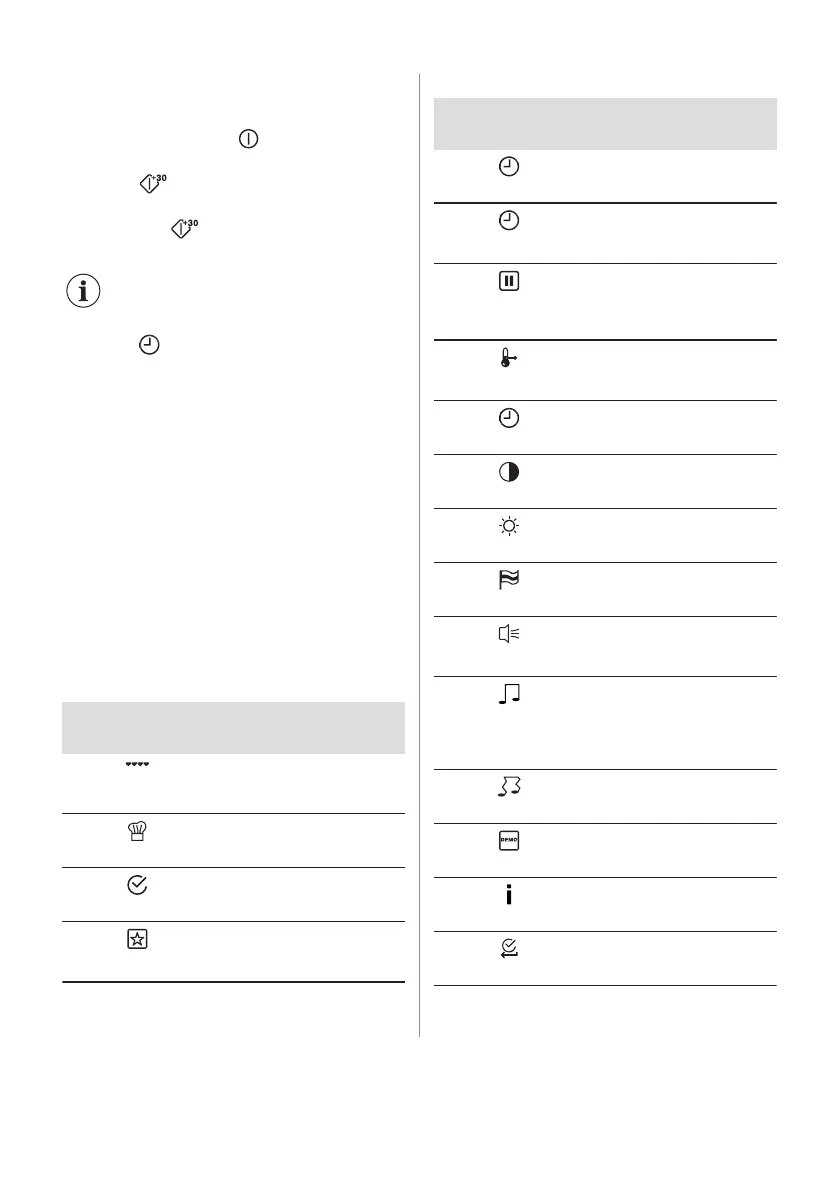
6.5 Setting the Microwave Quick
Start function
1. If necessary, press to turn off the
oven.
2. Press to turn on the Quick Start
function.
Each press of adds 30 seconds to the
Duration time.
You can change the microwave
power (refer to "Setting the
Microwave function").
3. Press to set the time for the function:
Duration. Refer to "Clock functions"
chapter, Setting the clock functions.
6.6 Heat-up indicator
When you turn on a heating function, the bar
shows that the temperature increases. When
temperature is reached the signal sounds 3
times, the bar flashes and disappears.
6.7 Residual heat
When you turn off the oven, the display
shows the residual heat. You can use the
heat to keep the food warm.
6.8 The menus in overview
Main menu
Symbol / Menu
item
Application
Grill
A heating function to grill flat
food items in the middle of
the shelf. To make toast.
Recipes
Contains a list of automatic
programmes.
Basic Settings
Used to set the appliance
configuration.
Favourites
Contains a list of favourite
cooking programmes created
by the user.
Submenu for: Basic Settings
Symbol / Menu
item
Description
Set Time of Day
Sets the current time on the
clock.
Time Indication
When ON, the display shows
the current time when you
deactivate the appliance.
Set + Go
To set a function and acti‐
vate it later with a press of
any symbol on the control
panel.
Heat + Hold
Keeps the prepared food
warm for 30 minutes after a
cooking cycle finished.
Time Extension
Activates and deactivates
the time extension function.
Display Contrast
Adjusts the display contrast
by degrees.
Display Brightness
Adjusts the display bright‐
ness by degrees.
Set Language
Sets the language for the
display.
Buzzer Volume
Adjusts the volume of press-
tones and signals by de‐
grees.
Key Tones
Activates and deactivates
the tone of the touch fields. It
is not possible to deactivate
the tone of the ON / OFF
touch field.
Alarm / Error Tones
Activates and deactivates
the alarm tones.
DEMO mode
Activation / deactivation
code: 2468.
Service
Shows the software version
and configuration.
Factory Settings
Resets all settings to factory
settings.
12 ENGLISH



 To Next Page