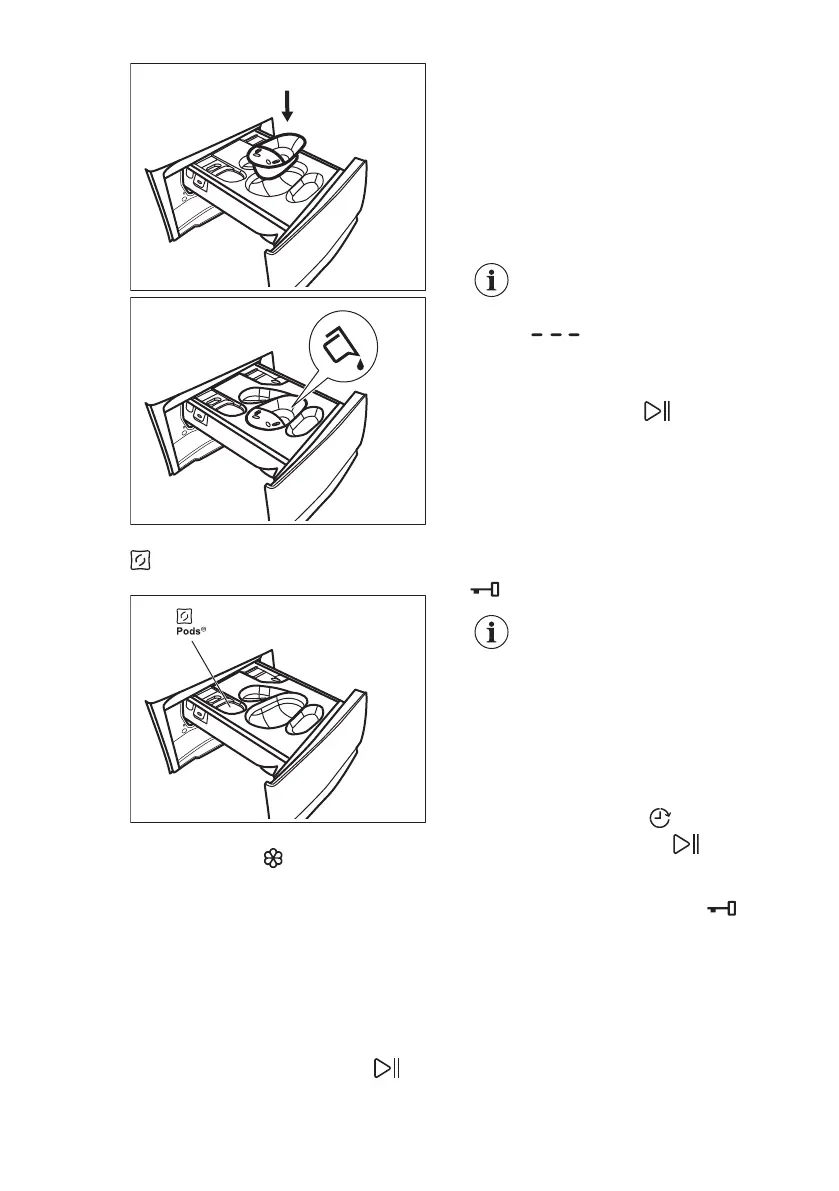
c) Put the tablets in the compartment
. Make sure that the Pods option is
activated.
4. Pour fabric softener in the
compartment .
5. Close the detergent dispenser.
11.4 Setting a programme
1. Turn the programme dial to select the
desired washing programme. The
first programme on the top right of
the programme dial is Eco 40-60, the
programme to which the information
of the energy label relates.
The indicator of the Start/Pause
button flashes.
The display shows an indicative
programme duration.
2. To change the temperature and/or
the spin speed, touch the related
buttons.
3. If desired, set one or more options by
touching the related buttons. The
related indicators illuminate on the
display and the given information
changes accordingly.
If a selection is not possible
an acoustic signal sounds
and the display shows
.
11.5 Starting a programme
Touch the Start/Pause button to start
the programme. It is not possible to start
the programme when the indicator of the
button is off and doesn't flash (e.g.
programme dial on a wrong position).
The related indicator stops flashing and
stays on.
The programme starts, the door is
locked. The display shows the indicator
.
The drain pump can operate
shortly before the appliance
fills water.
11.6 Starting a programme with
the delay start
1. Touch the Delay Start button
repeatedly until the display shows the
desired delay time. On the display
the indicator shows .
2. Touch the Start/Pause button.
The appliance door locks and starts
the countdown of the delay start. The
display shows the indicator
.
When the countdown is completed, the
programme starts automatically.
Cancelling the delay start after
the countdown has started
To cancel the delay start:
ENGLISH 25



 To Next Page