14 www.electrolux.com
Delay End ( ) Touchpad
Before you start the program, this option
makes it possible to define the end of the
washing program from minimum of 1 hour to
maximum of 20 hours.
If program duration is longer than 3
hours, minimum Delay End option
starts from 4 hours.
After selecting Delay End time, press
Start/Pause touchpad to start the program.
Machine will then countdown and update
time on the display every hours until it
reaches the starting point of the wash cycle.
Press the Delay End touchpad to choose the
end time as you wish. The display shows the
number of hours and the indicator beside
the touchpad is on.
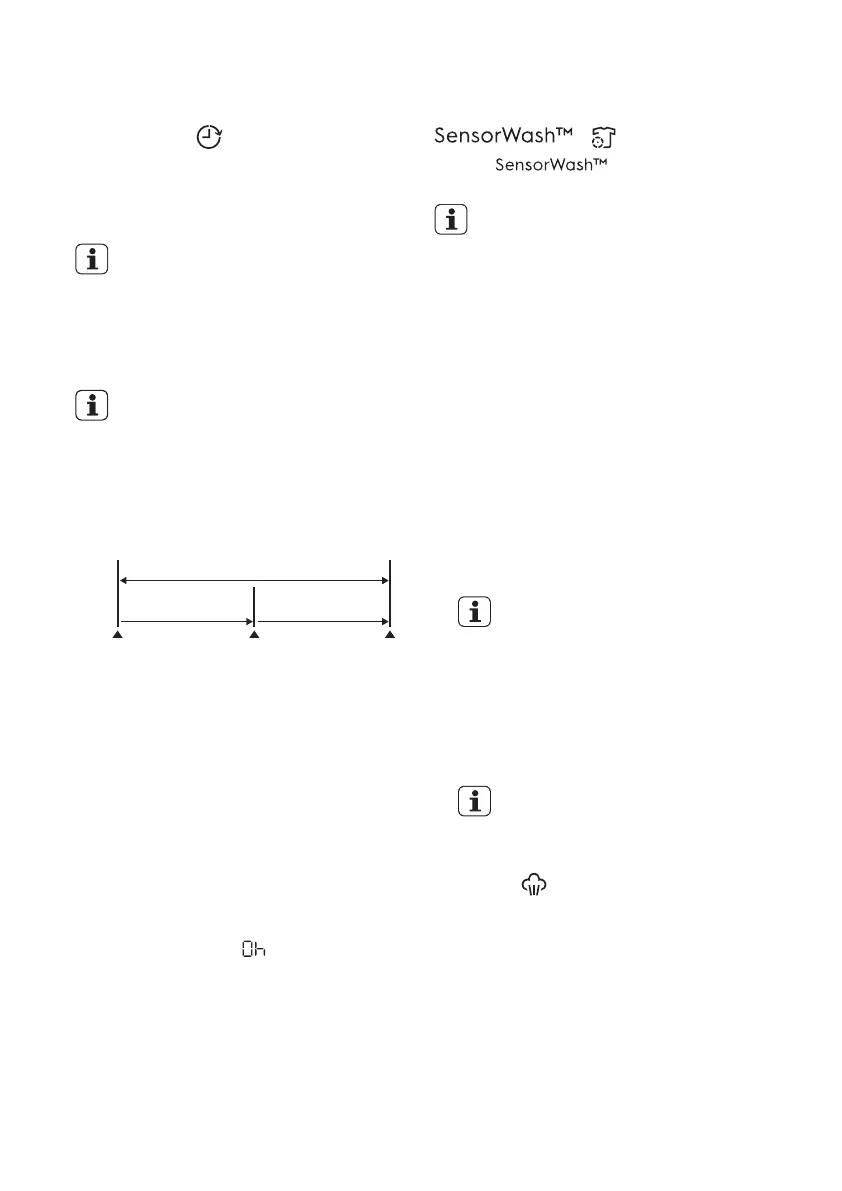
For example, if the program duration of your
selected program is 3.20 hours and you
define the “Delay End” time to 6 hours. This
means your wash program will finish in 6
hours. (See diagram)
3.20 hrs.2.40 hrs.
Working Cycle
“Delay End” Time : 6 hrs.
Pressed
Start/Pause
End of
Cycle
Start the
Program
Countdown
This option must be selected after
choosing the wash program, and before
pressing the “Start/Pause” touchpad.
If you wish to modify or cancel Delay End
option after starting the program, follow the
steps below:
set the washing machine to PAUSE by
pressing “Start/Pause” touchpad;
−
deselect this option by pressing “Delay
End” touchpad repeatedly till the display
shows delay time “ ”;
−
press the “Start/Pause” to start the
program.
−
Select this option to add approximately 30
minutes of tumbling in vapour during the wash
cycle. Vapour helps open fabric fibers up to
allow laundry additives to release tough stains.
The indicator of this option will be on.
Vapour ( ) Touchpad
Vapour may not necessarily be visible
inside the drum during a vapour wash cycle.
Vapour is created below the drum and
allowed to naturally rise into the clothes.
Vapour may not be present during the entire
vapour wash cycle.
Vapour function is more effective with half load.
●
●
●
( ) Touchpad
Select “ ” option to turn ON the
sensors for the dirt and detergent residue.
The “SensorWash” is switched ON by
default. If you want to turn OFF the sensor
press this touchpad once. (Please see the
table “Program Options Compatibility” for
which programs can be used with this
option.)
The initial time displayed on the
control panel indicates the time
needed for the maximum dirt level.
Please see details of detergent usage
at “Detergents Type and Quantity of
Detergent”
When using this option, the washing machine
will automatically check the dirt level and
detergent residue on your laundry. The machine
will automatically adjust the washing time and
numbers of rinses according to the load to make
sure that your clothes are really clean.
The SensorWash technology consist of 2
different sensors for detection:
1) The 1
st
Turbidity sensor detects the dirt level
at the start of cycle and automatically
calculates the actual time needed to remove
the level of dirt in the wash; from low dirt
levels all the way to the maximum dirt level.
2) The 2
nd
Conductivity sensor will check the
amount of detergent residue after the first
rinse and the machine will calculate the
optimum number of rinses (Maximum addition
of 2 rinses) needed to make sure that the
detergent residue is properly removed.



 To Next Page