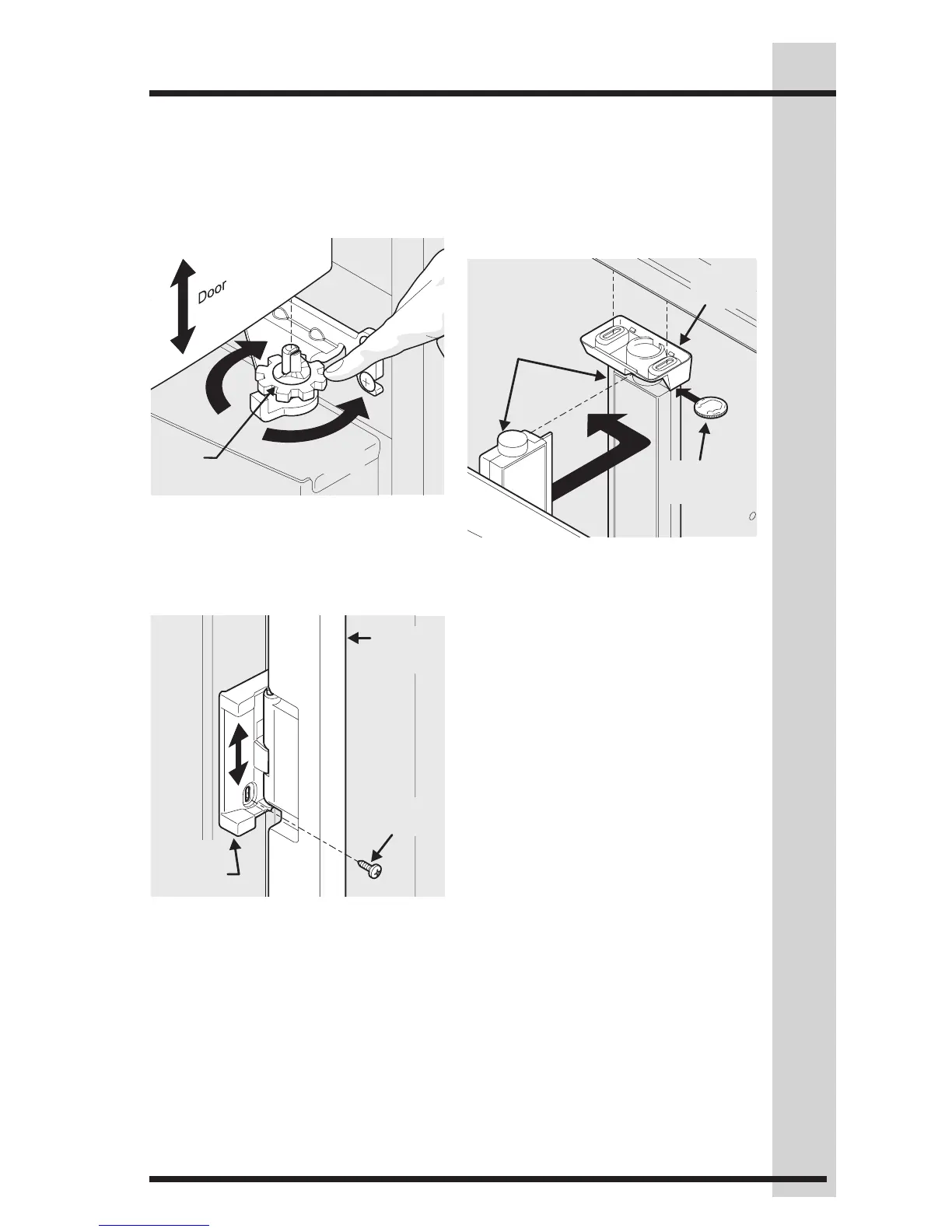
Flipper
Mullion
Set
Screw
Adjusting Flipper Mullion Screw
Installation
2 Adjust flipper mullion height. For
proper connection with the flipper
mullion guide, there should be a
separation about the thickness of
a coin (0.060 inches, or 1.5 mm)
between the guide and flipper
mullion.
3 Re-tighten set screw.
3 Lift the door while adjusting the
washer. To raise the door, rotate
washer clockwise (when viewed from
the bottom). To lower door, rotate
washer counter-clockwise (when
viewed from the bottom).
To adjust the flipper mullion:
1 Loosen the set screw located on the
flipper mullion hinge.
Flipper
Mullion
Mullion
Guide
Thickness
of a Coin
Adjusting Flipper Mullion Height
Lower
Door
Hinge
Washer
Raise
Door
Raising/Lowering Door





 To Next Page