5
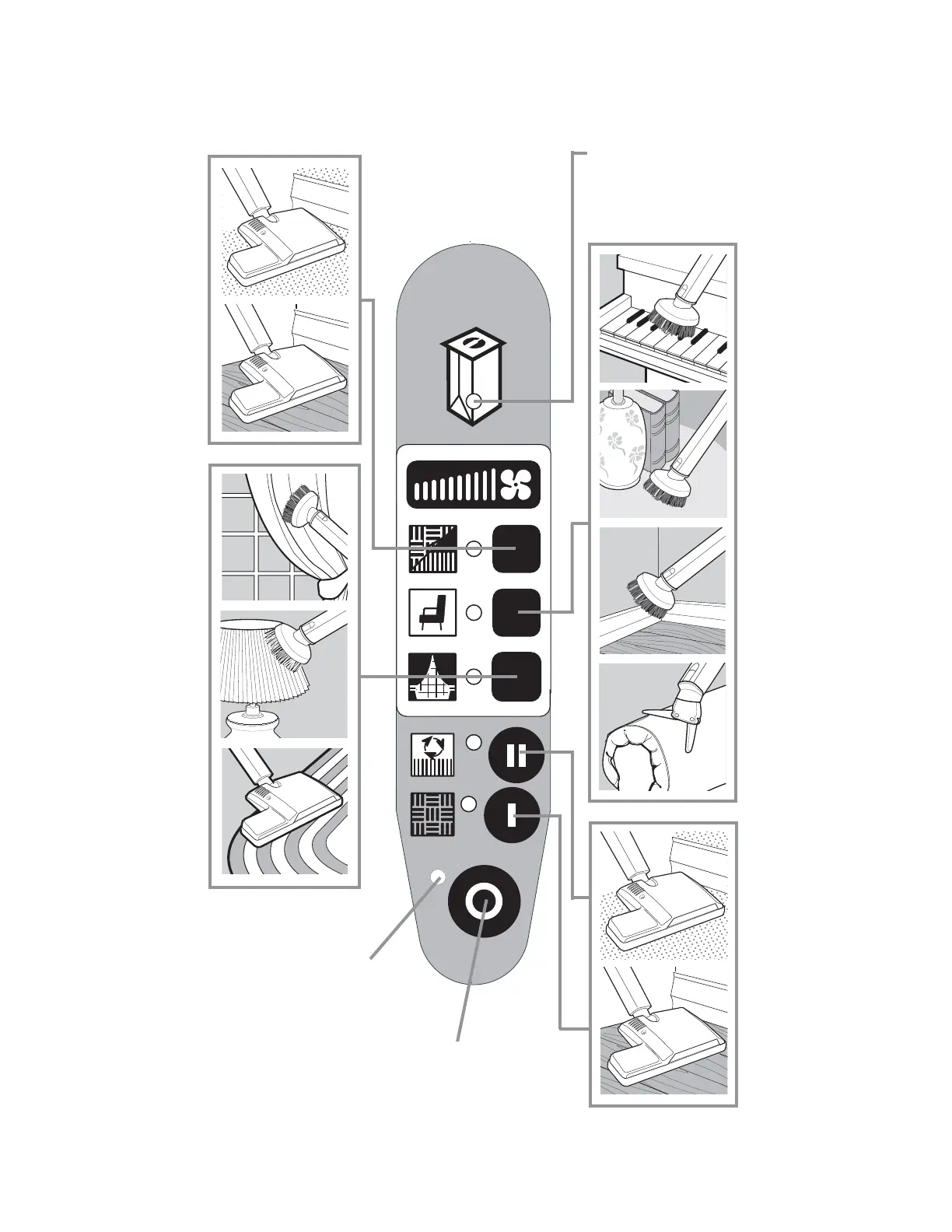
Use Vacuum Settings
Utilisation des réglages de l’aspirateur
MEDIUM
Push to Select
«MOYENNE»
Pousser pour
choisir
*ON Vacuum & power
nozzle (carpet)
Push to Select
*«MARCHE» -
Aspirateur et balai à
moteur (tapis)
Pousser pour choisir
*ON Vacuum only
Push to Select
*«MARCHE» -
Aspirateur seulement
Pousser pour choisir
BAG CHANGE Indicator
Indicateur de
CHANGEMENT DE SAC
Cleaner will turn off and
indicator will flash
L’aspirateur s’arrête
et l’indicateur clignote.
HIGH
Push to Select
«GRANDE»
Pousser pour
choisir
LOW
Push to Select
«FAIBLE»
Pousser pour
choisir
Cleaner is ready to operate
when power light is on.
L’aspirateur est prêt à
fonctionner quand le voyant
d’alimentation est allumé.
OFF
Push to Select
«ARRÊT»
Pousser
pour choisir
*Cleaner will start on HIGH speed
*L’aspirateur démarre à
«GRANDE» vitesse.






 To Next Page