9 DUTY CYCLE
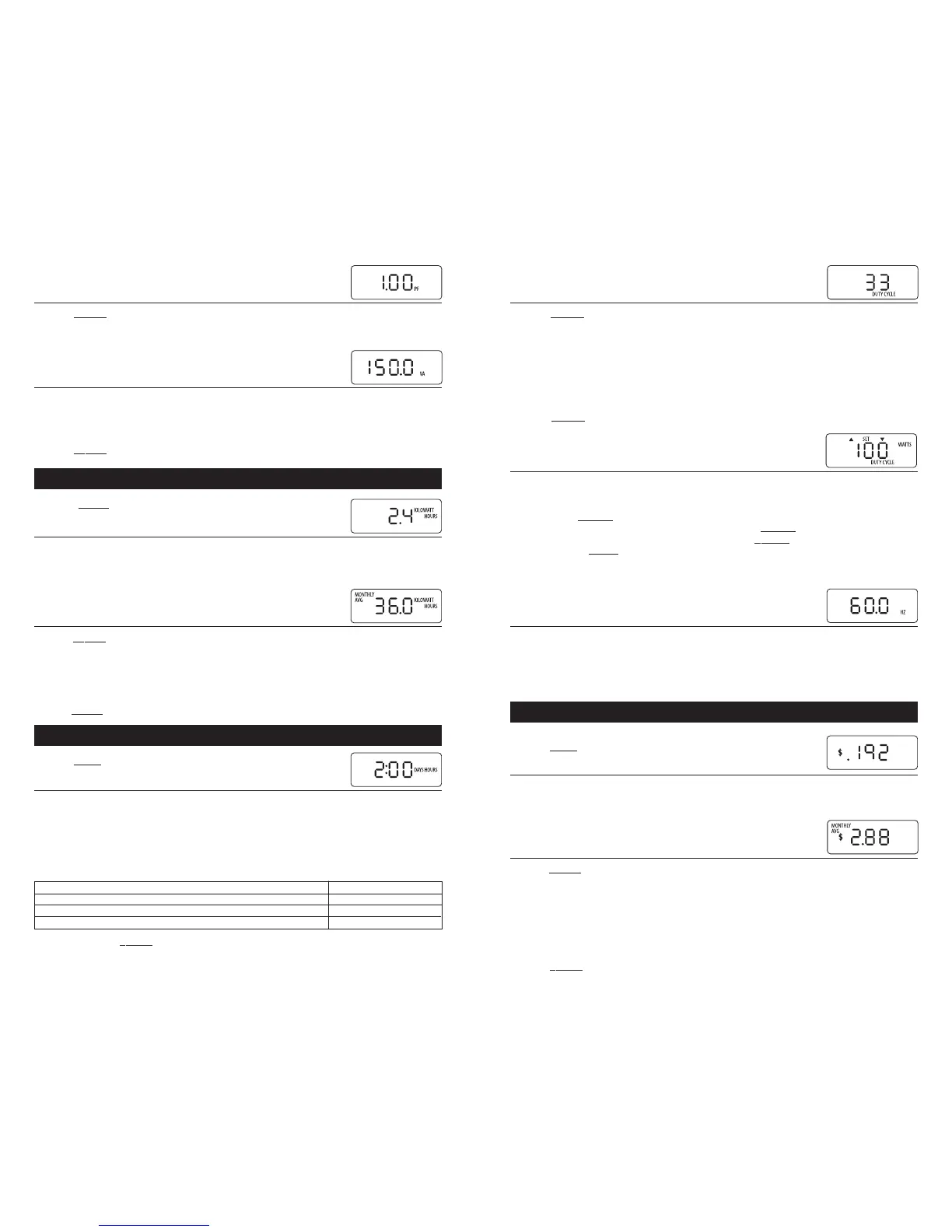
Click the SELECT button while in the TIME mode. The display now shows the DUTY CYCLE as
a percentage (the number will be between zero and 100). DUTY CYCLE is the percent of time
the appliance is above a threshold level. The default threshold is 100 watts, so the DUTY
CYCLE will display the percentage of time the load is above 100 watts. The threshold can be
changed to any number between one and 4800 watts.
For example, plug a refrigerator into Watts up?. The DUTY CYCLE will be the percent of time
that the refrigerator compressor is running (if the threshold is set to more than the wattage
of the refrigerator light bulb).
Click the S
ELECT button again. The display now returns to the TIME mode.
Duty Cycle Watts Threshold
DUTY CYCLE is the percent of time the appliance is above a threshold level. The default
threshold is 100 watts, so the DUTY CYCLE will display the percent of time the appli-
ance is above 100 watts. To change the threshold, go to the DUTY CYCLE display. Press
and hold the S
ELECT button until the SET, DUTY CYCLE, WATTS symbols come on.
UP/DOWN indicators will alternately flash. Click the S
ELECT button and the value will
change in the direction of the arrow. Holding the S
ELECT button changes the value
faster. Click the MO
DE button when the threshold is correct. It is recommended that
you reset the TIME (see above) after changing the DUTY CYCLE THRESHOLD, because
the duty cycle value is a real-time calculation.
10 FREQUENCY (Hz)
Click the SELECT button while in the TIME mode. The display now shows the frequency. The
meter measures the nominal frequency (50 Hz or 60 Hz) at initial power on. It then displays
actual frequency in real time. Many calculations utilize calibration factors that are fre-
quency dependent, so it is recommended that the meter be power cycled when changing
between nominal frequencies.
COST MODE
Click the MODE button again.
11 CUMULATIVE COST
The display now indicates the amount of money consumed since Watts up? was plugged in or TIME
was last reset. Tenths of a cent are initially displayed, so “.001” means 1/10 of a cent. “.234”
means 23 and 4/10s cents. “3.24” means three dollars and 24 cents.
12 AVERAGE MONTHLY COST
Click the SELECT button while in the COST mode. The display now shows the cost per month for
whatever is plugged in. This is a pro-rated average, calculated since Watts up? was plugged in
or TIME was last reset. The formula is:
AVERAGE MONTHLY $ = (cost) / {(# of elapsed days) / (30 days)}.
This value will change quickly when something is first plugged in. For refrigerators and
other appliances that turn on and off, wait until the value no longer changes for an accurate
reading. This may take a few hours, or even longer depending on how often the appliance
cycles on and off.
Click the S
ELECT button again. The display now returns to the COST mode.
4 POWER FACTOR
Click the SELECT button again. The display now shows power factor for the appliance current-
ly plugged in. POWER FACTOR is a number between zero and one, and it represents the phase
angle shift between the voltage and current. To figure POWER FACTOR, Watts up? performs the
following calculation: Watts / Volt * Amps.
5 VOLT AMPS (APPARENT PWR)
Click the SELECT button while in the WATT HOUR mode. The display now shows the volt
amps, or apparent power. Volt amp is the product of the RMS Volts and RMS Amps. It does
not take into account phase angle, which is the distinction between apparent power and
active, or real power (see watts).
Click the S
ELECT button again. The display returns to the WATTS mode.
WATT HOURS MODE
Click the MODE button.
6 CUMULATIVE WATT HOURS
The display now indicates the cumulative WATT HOURS used since Watts up? was plugged in or TIME
was last reset. Watt hours equal watts multiplied by time. For instance, a 150 watt bulb plugged in
for 1 hour will consume 150 watt hours. In two hours, it will have consumed 300 watt hours. As the
value increases, the display will automatically change units to
KILOWATT HOURS (1 kilowatt hour (kwh) = 1000 watt hours).
7 AVERAGE MONTHLY KWH
Click the SELECT button while in the WATT HOUR mode. The display now shows how many watt
hours will be consumed each month. This is a pro-rated average, calculated since Watts up?
was plugged in or TIME was last reset. The formula is:
AVERAGE MONTHLY KWH = (watt hours)/{(# of elapsed days)/(30 days)}.
It is used to determine how much electricity is used per month. Resetting the TIME will also
reset the MONTHLY AVERAGE.
Click the S
ELECT button again. The display returns to the WATT HOURS mode.
TIME MODE
Click the MODE button again.
8 ELAPSED TIME
The display now indicates the elapsed TIME since Watts up? was plugged in or TIME was last
reset. The TIME is first displayed in minutes and seconds (i.e. 1:25 means one minute and 25
seconds), up to 20 minutes. At 20 minutes, the display changes to hours and minutes and the
HOURS symbol turns on (i.e. 1:25 now means one hour and 25 minutes). At 20 hours, the dis-
play changes to days and hours, and the DAYS symbol turns on (i.e. 12:17 means 12 days and
17 hours). At 20 days, the display changes to days with a decimal point, and the HOURS sym-
bol turns off (i.e. 22.7 means 22 days and 7 tenths. 7 tenths is about 16 hours and 45 minutes).
Press and hold the S
ELECT button for one second while in the TIME mode to reset the TIME,
WATT HOUR, COST, DUTY CYCLE and MONTHLY AVERAGE values back to zero. These values, as
well as MINIMUMS and MAXIMUMS are also reset when Watts up? is unplugged.
0:00 – 19:59 (Zero to 19 minutes, 59 seconds) Display > no symbol
0:20 – 19:59 (20 minutes to 19 hours, 59 minutes) Display > HOURS
0:20 – 19:23 (20 hours to 19 days, 23 hours) Display > HOURS and DAYS
20.1 – 1999 (20 1/10 days to 1999 days. After 1999 days, start over at 1 second) Display > DAYS


 To Next Page
 Loading...