Power Up and Reset
a. When the clock insert the battery, LCD display for 3 seconds, while issuing three BI, then
converted to the standard display mode, while showing the environment where the temperature
and humidity.
b. Power up default display:
Default time: 0:00, 24HR
Default date: M01/D01 (year:2015, date form: M/D)
Default week: THU (language: ENG )
Default temperature unit: °C
Operation
1. Normal Mode
a. Press “MODE (A)” to switch time mode and alarm mode.
b. Press and hold “MODE (A)” to the time setting mode and alarm setting mode.
c. In the normal mode, press “UP (B)” to open or close the AL.
d. In the normal mode, press “C/F (D)” or “DOWN (C)” to switch °C/°F.
e. Press “UP (B)” and “DOWN (C)” to setting the desired value, press and hold “UP (B)” or
“DOWN (C)” for 2s to setting the value by 8teps/s speed, press “MODE (A)” to confirm the
setting value.
f. Press "SNOOZE (E)" to enter snooze mode when the alarm sounds.
2 Time Setting Mode
a. In the normal time mode, press “MODE (A)” for 2s into time setting,and the setting item will be
flashing.
b. In the time setting mode, press the “MODE (A)” key to confirm the setting result and switch to the
next setting item, the setting item is as follows: Time form→hour→minute→date form→year→
mouth→date→week language→exit.
c. Press the “MODE (A)” button for 2s to changing the time showing from 12 hours to 24 hours.
d. In the setting mode, press “UP (B)” and “DOWN (C)” to setting the desired value, press and hold
“UP (B)” or “DOWN (C)” for 2s to setting the value by 8teps/s speed. Press “MODE (A)” to confirm
the setting value.
e. When the value is changed by pressing the “UP (B)” or “DOWN (C)” key while setting the minute
item, the number of seconds is automatically cleared to 00 when the value of the minute is changed.
f. When the date item is set, the display of the week changes depending on the setting value of
the date.
g. The maximum time that time can be set is: January 1, 2000 ~ December 31, 2099.
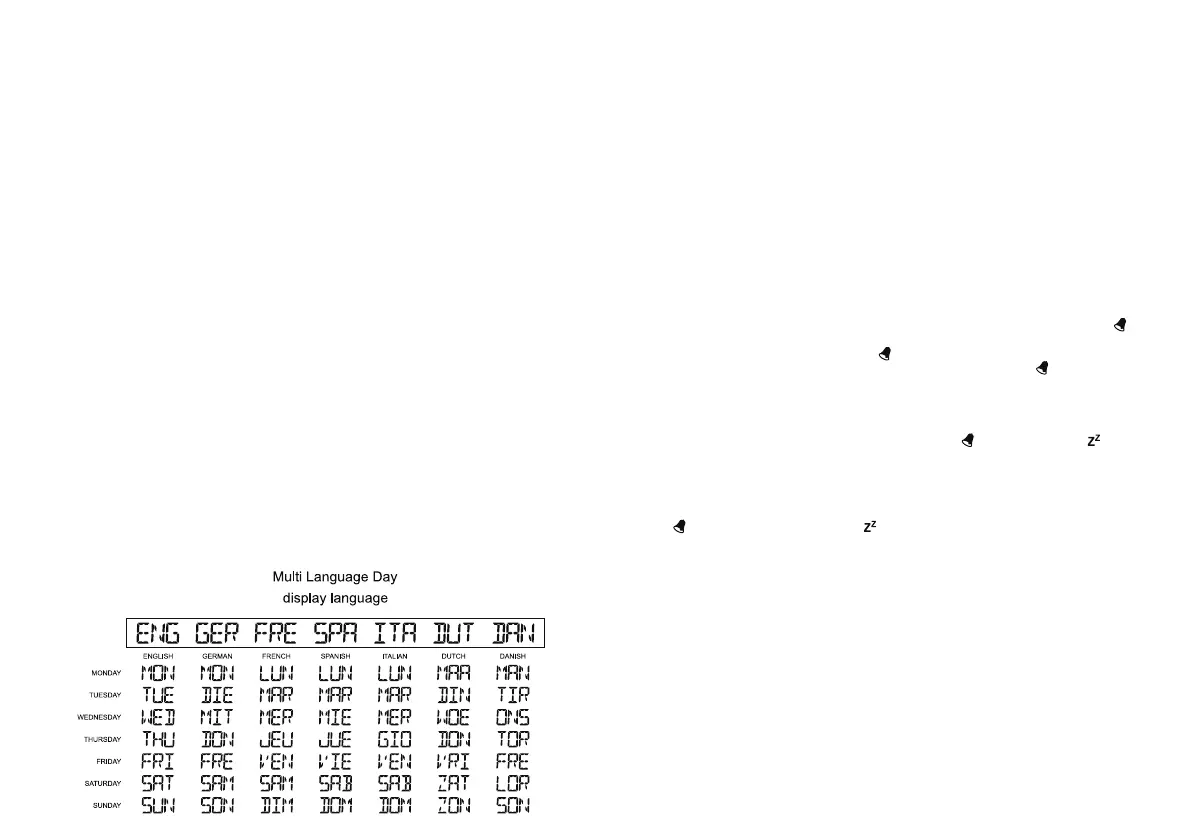
h. Week language a total of seven countries, the order of setting: ENG → GER → FRE → SPA → ITA
→ DUT → DAN, the week show as shown in the table below:
i. No keys operation within 20 seconds will discard the item being set and exit the setup state.
3 Alarm Setting
a. In normal mode, short press “MODE (A)” key to switch between time display interface and alarm time
display interface. In the alarm time interface, no key operation for 20 seconds, automatically return
to the time display interface.
b. In the alarm time display interface, press and hold the “MODE (A)” button for more than 2 seconds to
enter the alarm time setting mode.
c. In the alarm time setting mode, press the “MODE (A)” key to confirm the setting item and switch to the
next setting item, the setting items are as follows: hour→minute→snooze duration→exit.
d. In the setting mode, press the “UP (B)” or “DOWN (C)” button to adjust the value and item of the
setting, press 1 time, to increase or decrease the value, press and hold for more than 2 seconds,
set the value forward continuous value or continuous impairment, to adjust the value every 1/8 second.
e. No keys operation within 20 seconds will discard the item being set and exit the setup state.
f. Snooze time can be set to 1 ~ 60 and OFF, the default setting is in minutes, when set to OFF, no
snooze function. (Default is set to 5 minutes), in this setting interface, the symbol "ZZ" and the value
of the minute bar are displayed.
g. power up the default alarm is off, the alarm time defaults to 6:00 am, set the alarm time
automatically open alarm.
h. Press the “UP (B)” key in the standard mode to turn the alarm on and off.
4. Alarm and Snooze Instructions
a. Press the “UP (B)” key to turn on or off the alarm function. When turned on, the alarm symbol " " is
displayed, indicating that the alarm function is in the open mode.
b. When the alarm is in the on state (alarm symbol " " display), the time travel time to set the alarm
time, the host beep alarm alarm, the time is 2 minutes, while the alarm symbol " " flashing display.
c. When the alarm process, other than "SNOOZE (E)" button press any key or do not do any operation
after the alarm 2 minutes to the end, do not enter the snooze mode, and so go to the next alarm
time and then into the alarm.
d. On the alarm process, press the "SNOOZE (E)" button once to suspend the alarm, enter the snooze
mode, snooze time according to set the time, the alarm symbol “ "and snooze symbol" " flashing
show, once again into the alarm when snooze is time to timing, If you press the "SNOOZE (E)" key
again and then enter the snooze mode again, you can cycle snooze.
e. If the snooze set to OFF, press any button to terminate the alarm, it can only into alarm again
until the time travel the alarm time on the next time.
f. Snooze mode, press any button other than "SNOOZE (E)" to exit snooze mode, the alarm
symbol " " does not flash, snooze symbol " "is not displayed.
g. The longest time for 2 minutes, the sound of the sound format is divided into four paragraphs
0-9 seconds: BI per second
10-19 seconds: BI BI per second, two times,
20-29 seconds: BI BI BI per second three times,
30 seconds to start BI BI BI BI four times per second, until the end of the alarm.
5. Temperature and Humidity Detection Instructions
a. Temperature range: -9.9°C to + 50°C (+ 14.1°F to + 122°F) with a resolution of 0.1 °C/°F.
b. The detection temperature is below -9.9°C (+14.1°F), which is shown as LL.L°C /°F, above +50°C
( +122°F)and is shown as HH.H °C/°F
c. Humidity detection range: 20% RH ~ 95% RH, display resolution: 1% RH
d. The detected humidity is less than 20% RH, showing 19% RH, above 95% RH, showing 96% RH.
e. The temperature detection period is 20 seconds.


 To Previous Page
 Loading...