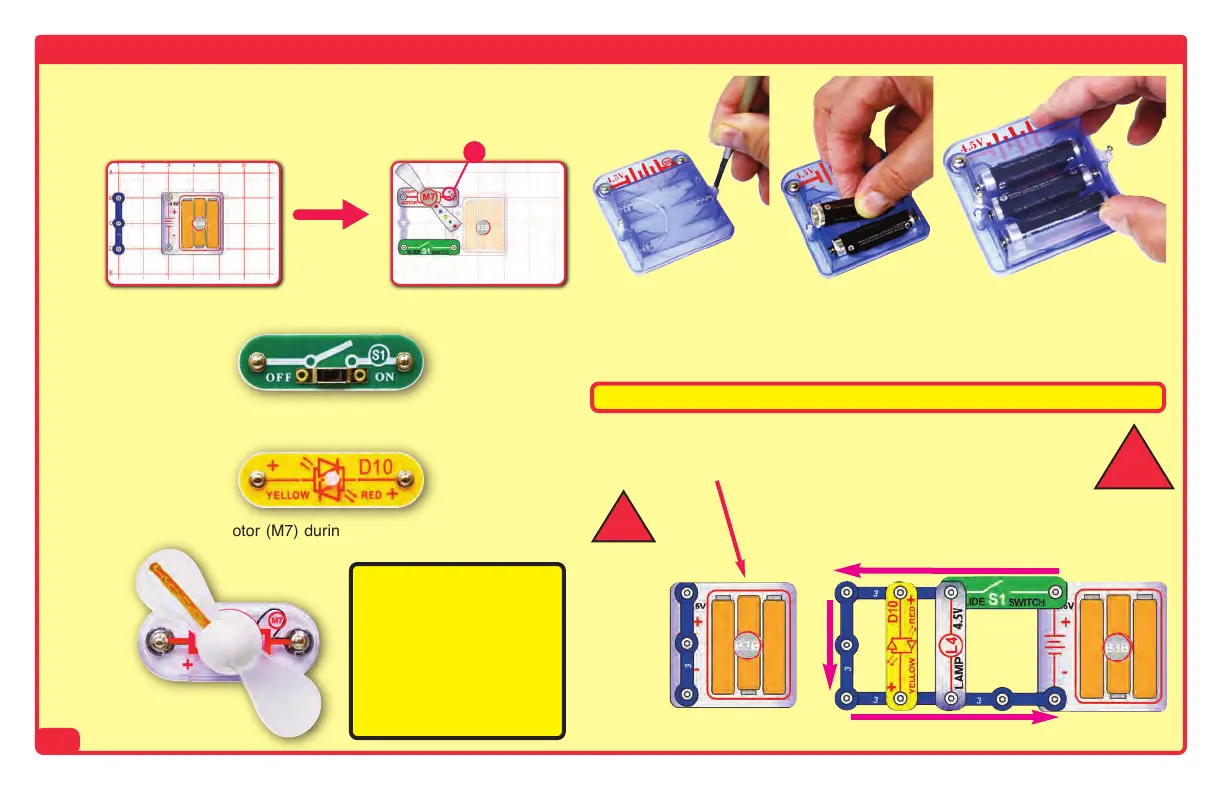
Note: While building the
projects, be careful not to
accidentally make a direct
connection across the bat-
tery holder (a “short cir-
cuit”), as this may damage
and/or quickly drain the
batteries.
How to add or replace batteries
Remove the safety cover from the battery holder (B3B) with a Phillips head screwdriver.
Insert three (3) 1.5V “AA” batteries (not included) into the battery holder (B3B). Be sure
to orient the battery “+” side as marked in the holder.
Replace battery holder cover.
How To Use It
-3-
Placing a 3-snap wire directly
across the batteries is a
SHORT CIRCUIT.
NEVER
DO!
!
When the slide switch (S1) is turned
on, this circuit has a SHORT CIR-
CUIT path (as shown by the ar-
rows). The short circuit prevents
any other portions of the circuit from
ever working.
!
NEVER
DO!
Examples of SHORT CIRCUITS - NEVER DO THESE!!!
Do not touch the light motor (M7) during
operation.
Activate the circuit using the slide switch (S1) or press switch (S2) as in-
dicated in the final step.
Be sure that the light motor (M7), red/yellow LED (D10, and horn (W1)
have their “+” marking positioned as per the drawing.
For each project, follow the drawings to place all STEP 1 parts on the
mini base grid, then place all STEP 2 parts, then place any additional
parts indicated by STEPS 3 or 4.
Step 1
+
Step 2
SCB-20 Manual_050115.qxp_SCB-20 Draft 5/26/15 4:26 PM Page 4


 To Next Page