Project 32
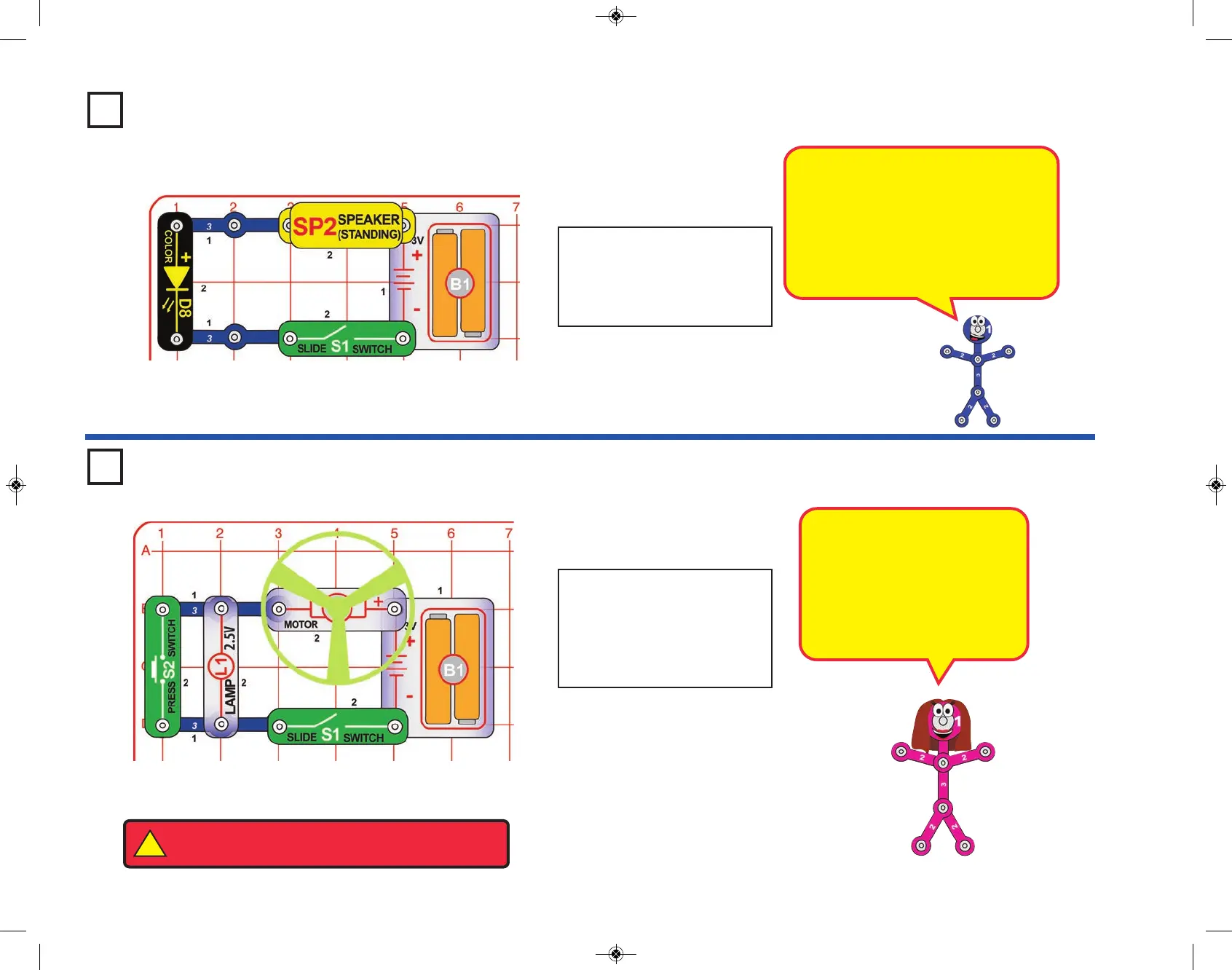
Turn on the slide switch (S1).
The color LED (D8) changes
colors in a repeating pattern,
and you hear a clicking sound
from the speaker (SP2).
Listen to the Light
Project 33
Turn on the slide switch (S1);
the motor (M1) spins the glow
fan and the lamp (L1) lights.
Push the press switch (S2) to
bypass the lamp and increase
the fan speed.
Two-Speed Fan
What makes the clicking sound? The
color LED actually contains separate red,
green, and blue lights, with a microcircuit
controlling them. Each time the LED
changes colors, the voltage across it
changes. Each time the voltage
changes, you hear a “click” from the
speaker.
When the lamp is on, the fan
spins slower because the battery
power is divided between the
motor and lamp. Pushing S2
allows electricity to bypass the
lamp, so all the battery power is
available to the motor, so the fan
spins faster.
-21-
!
WARNING: Moving parts. Do not touch the fan or
motor during operation. Do not lean over the motor.


 To Next Page