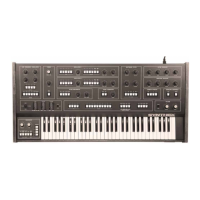
ELKA SYNTHEX
Synthex MIDI is very basic
Only Note On/Note O can be received. Further, a specic MIDI channel
from 1-16 may be selected. By using an external MIDI-CV interface, velocity
data (or any sys-ex data) can be used to control lter frequency by connecting
CV to the FILTER-IN port. is method improves basic MIDI options at least
a littlebit and oers you greater musical expression in the modern studio.
Note On/Note O is also transmitted - from the keyboard and from the on-
board 4-track sequencer. is allows you to control other polyphonic studio
gear with MIDI (synthesizers, drum machines, ...) via the Synthex sequencer.
How to select a MIDI channel on the Synthex
A combination of three buttons needs to be pressed at the same time:
Bank, Panel and Program.
Midi Channel 1: press Bank 1, Panel and Program 1
Midi Channel 2: press Bank 1, Panel and Program 2
Midi Channel 3: press Bank 1, Panel and Program 3
Midi Channel 4: press Bank 1, Panel and Program 4
etc. up to Channel 9
Midi Channel 10: press Bank 2, Panel and Program 0
Midi Channel 11: press Bank 2, Panel and Program 1
Midi Channel 12: press Bank 2, Panel and Program 2
Midi Channel 13: press Bank 2, Panel and Program 3
etc. up to Channel 16
MIDI
All manuals and user guides at all-guides.com


 To Next Page
 Loading...