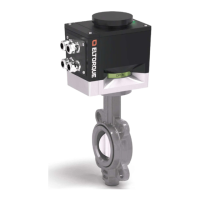
Figure 7: Communication interface box – CANopen
The communication interface box provides connectors for power, control signals
and configuration media.
The interface box is by default delivered in three versions:
• CANopen – interface using the CAN (Controller Area Network)
communications standard. Eltorque recommends a maximum of 80 nodes
on 500 m/1660 ft. cable.
The actuator can also be delivered with Dual CAN. Standard CANopen is
described in the main parts of this User Manual while Dual CAN is described
in Appendix A on page 61 and onwards.
• Digital – interface allowing simple Open and Close operation of valves.
Actuators with Digital Interface can be controlled directly from a
conventional panel with buttons/switches and indicator lamps. Alternatively,
it can be controlled from a PLC with digital inputs and outputs.
• Analog – interface allowing regulating valves where positioning of the valve
is needed. The actuator provides continuous feedback of its actual position,
for comparison between desired and actual position. Both positioning and
feedback signals are analog 4-20 mA. The Analog Interface also has a digital
Alarm output, which is trigged by failures in both actuator and valve.
If a Modbus interface is required, please contact your Eltorque representative.
More technical details on the different communication interfaces are given in
Chapter 7 Technical Details on page 53.
The Product ID label on the actuator housing shown in Figure 8 (in orange
rectangle) states the actuator family, generation, torque, power supply
requirement, IP rating, type approval, the production serial number and the
production date are also included. In the red rectangle is a computer readable QR
code containing serial number, part number and production date.



 To Next Page