05
You can choose 3 lighting modes by pressing the button.
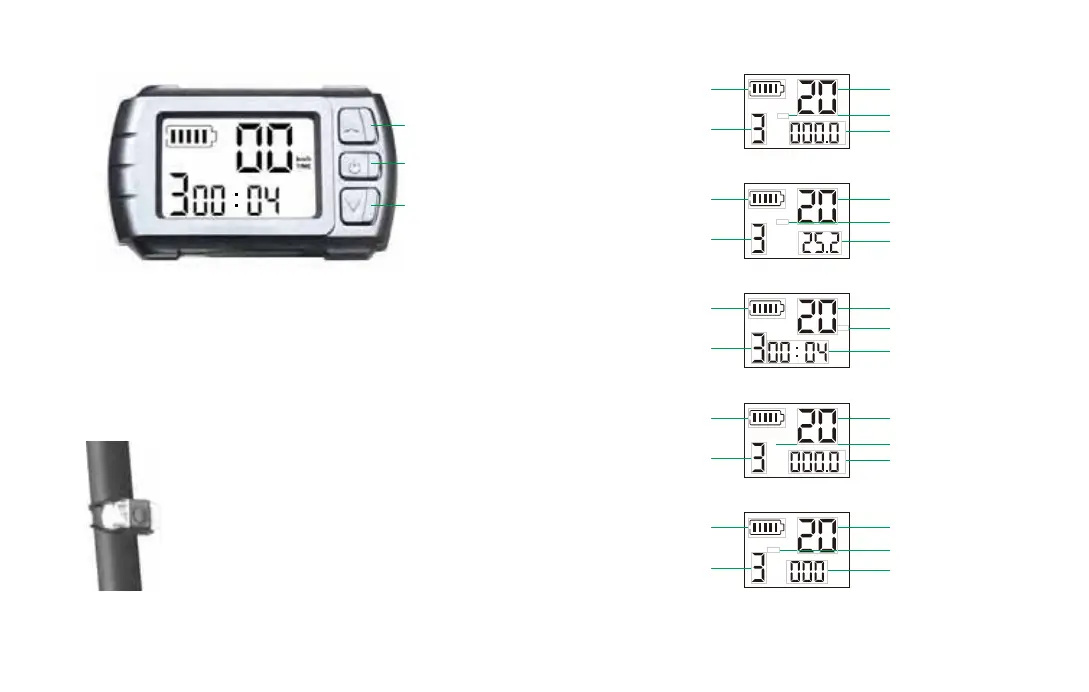
4.2 Display description
4.3 Light description
Speed level +
Power key
Switch display mode
Display mode: ODO, VOL, TIME, DIS, RPM
Speed level: 1--Max 5km/h
2--Max 15km/h
3--Max 23km/h
Speed level -
Km/h
TIME
Battery power
Selected speed level
Speed (Km/h)
Display mode (TIME)
Using time
Km/h
km
DIS
Battery power
Selected speed level
Speed (Km/h)
Display mode (DIS)
Single distance (km)
Km/h
RPM
Battery power
Selected speed level
Speed (Km/h)
Display mode (RPM)
Motor speed
Km/h
km
ODO
Battery power
Selected speed level
Speed (Km/h)
Display mode (ODO)
Total mileage (km)
Km/h
VOL
Battery power
Selected speed level
Speed (Km/h)
Display mode (VOL)
Battery voltage (V)
1. Press the button to switch on, the LED ashes with
short intervals.
2. Pressing again, the LED ashes with longer intervals.
3. Press the button again to activate the permanent
lighting.
4. Press the button the fourth time to turn o the light.



 To Next Page