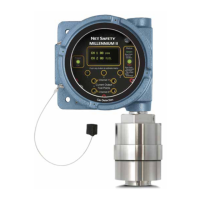
3.2 Indications and outputs
Transmitter indicationsTable 3-1:
State Current Output Status LED Display
Main menu entered 3.0 mA Solid green Main menu items
Normal operation 4.0 mA Green blip Clear
Startup delay 3.0 mA Slow red flash Start delay
Dirty optics 3.3 mA Fast red flash Dirty chamber
Particulate present 20 mA Red blip Alarm
Fault Condition 2.5 mA Fast red flash Fault
Updating APM Sensor 3.0 mA Slow red flash Busy
3.3 Alarms
3.3.1 APM fault
To ensure proper response, the Millennium features self-testing circuitry that continuously
checks for problems. When power is applied, the system automatically begins a test to
ensure proper functionality.
During normal operation, the transmitter continuously monitors the signal from the
internal APM source. If the transmitter determines that the APM program is not running
correctly and reset of the APM sensor will occur.
3.3.2
Clean window/dirty chamber
Over an extended period, oily film or particulate build-up on the sensor window may
obscure the infrared (IR) detector. When dirty, the clean window alarm will trip, the
message Dirty Chamber displays, the Status LED will flash fast red and the current output
will be 3.3 mA. Refer to Section 4.3.2 to define the clean window sensitivity and Section 5.2
on cleaning the APM window.
Operation
23



 To Next Page
 Loading...