22
SETTING PARENTAL CONTROL (CONTINUED)
TV Parental Guidelines have one or more letters added to the basic rating to let parents know when a show contains higher
levels of violence, sex, adult material or suggestive dialogue.
TV PARENTAL RATING SET UP
Enter the PARENTAL CONTROL menu as described on
page 20.
Blue Back: On
Change Password
Parental Control
Closed Caption: Off
1
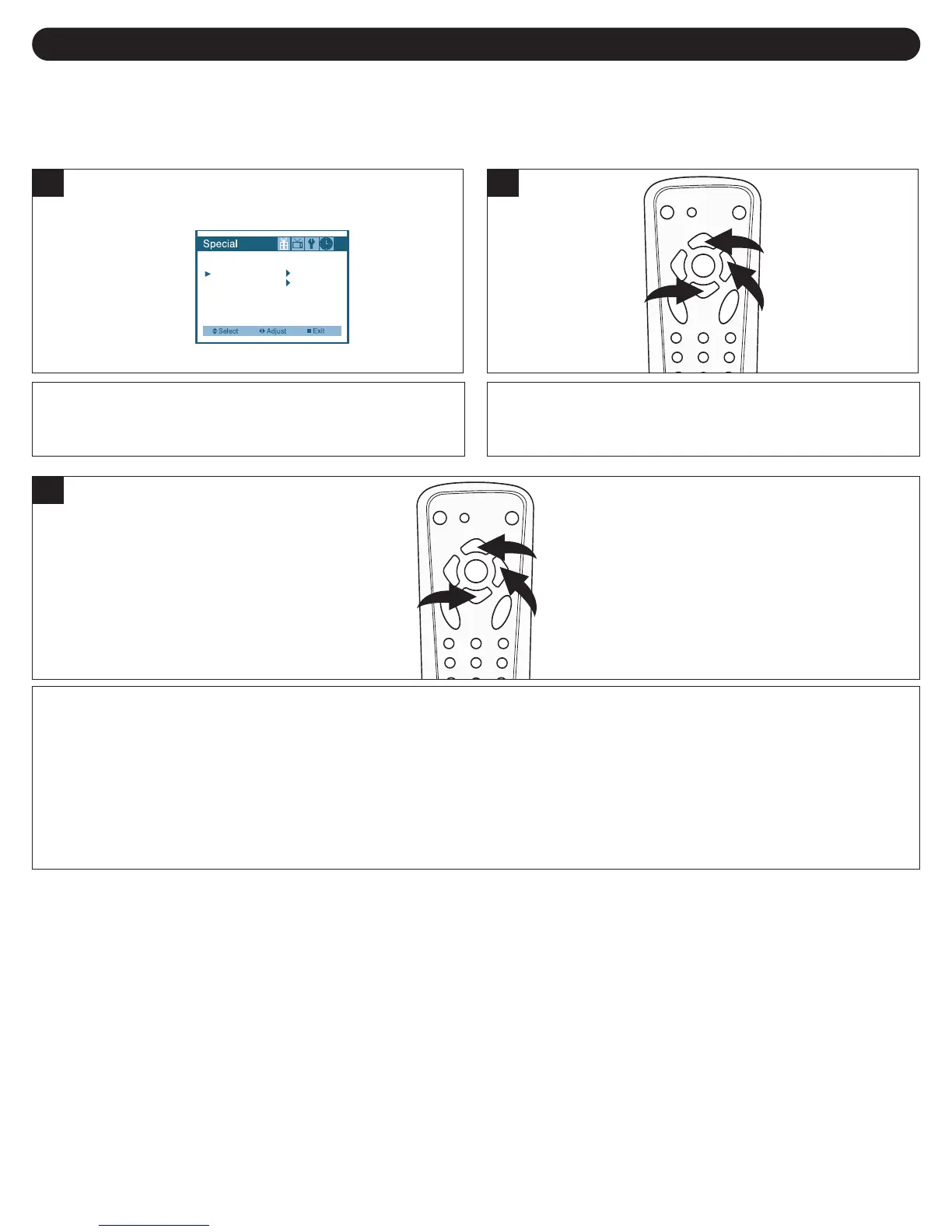
Press the CHANNEL UP (i) 1/DOWN (m) 2 buttons to
select TV GUIDELINES, and then the VOLUME UP (
k)
button
3 to select it.
2
Press the CHANNEL UP (i) 1/DOWN (m) 2 buttons to select a rating. When a desired rating appears, press the
VOLUME UP (k) button 3 to turn selected rating On or Off. Then press the CHANNEL DOWN (m) button 2 to scroll down
and then press the VOLUME UP (k) button 3 to turn the individual settings On or Off (these represent the descriptions as
shown above. All programs with a higher rating than the one selected will also be blocked).
3
F: Fantasy Violence
V: Violence
S: Sexual Situations
L: Adult Language
D: Suggestive
Dialogue



 To Next Page
 Loading...