6-7
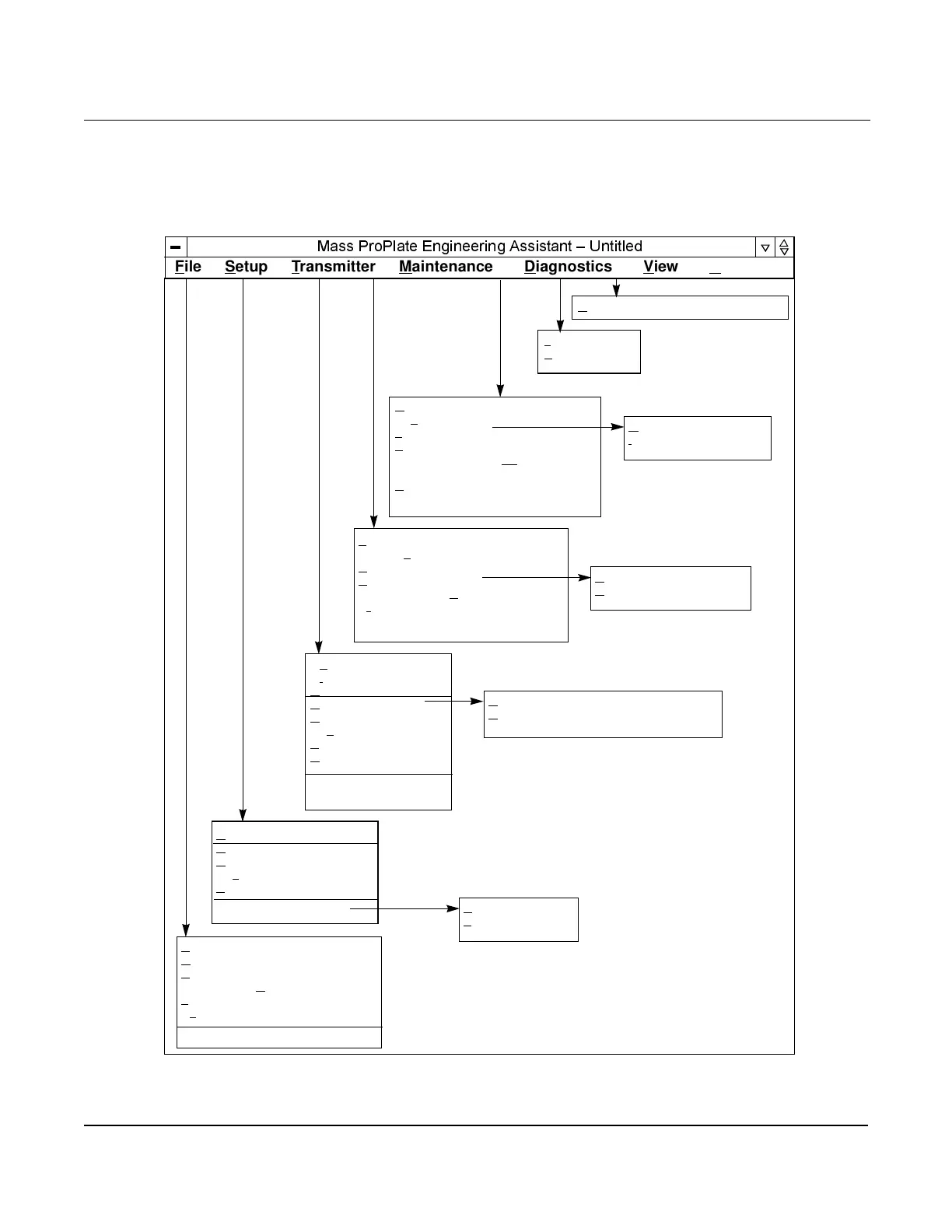
MENU STRUCTURE Figure 6-3 illustrates the complete menu structure for the Mass
ProPlate Engineering Assistant Software.
Figure 6-3. Engineering Assistant
Menu Structure.
0DVV3UR3ODWH(QJLQHHULQJ$VVLVWDQW±8QWLWOHG
File Setup Transmitter Maintenance Diagnostics View Help
Connect...
Di
sconnect
H
ART Output
U
nits...
D
amping...
Dev
ice Info...
S
end Config...
R
ecv Config
Module Info...
I
dentification Info...
New Config Ctrl + N
O
pen Config... Ctrl + O
S
ave Config Ctrl + S
Save Config A
s...
1
filename.mfl
Ex
it
Compensated Flow...
U
nits...
D
amping...
Dev
ice Info...
E
A Default Units
Privileges...
Sensor T
rim...
A
nalog Output...
C
hange Passwords...
Enable/Disable S
ecurity...
Pr
ocess Temperature Mode
Read Outputs...
Dev
ice Info
T
est Calculation...
L
oop Test...
Transmitter Master
Reset
Error Info...
Toolbar
S
tatus Bar
About Engineering Assistant
Range Values...
O
utput Trim...
Burst Mode...
C
ommunication Configuration...
U.S. Units
S
I/Metric Units



 To Next Page
 Loading...









