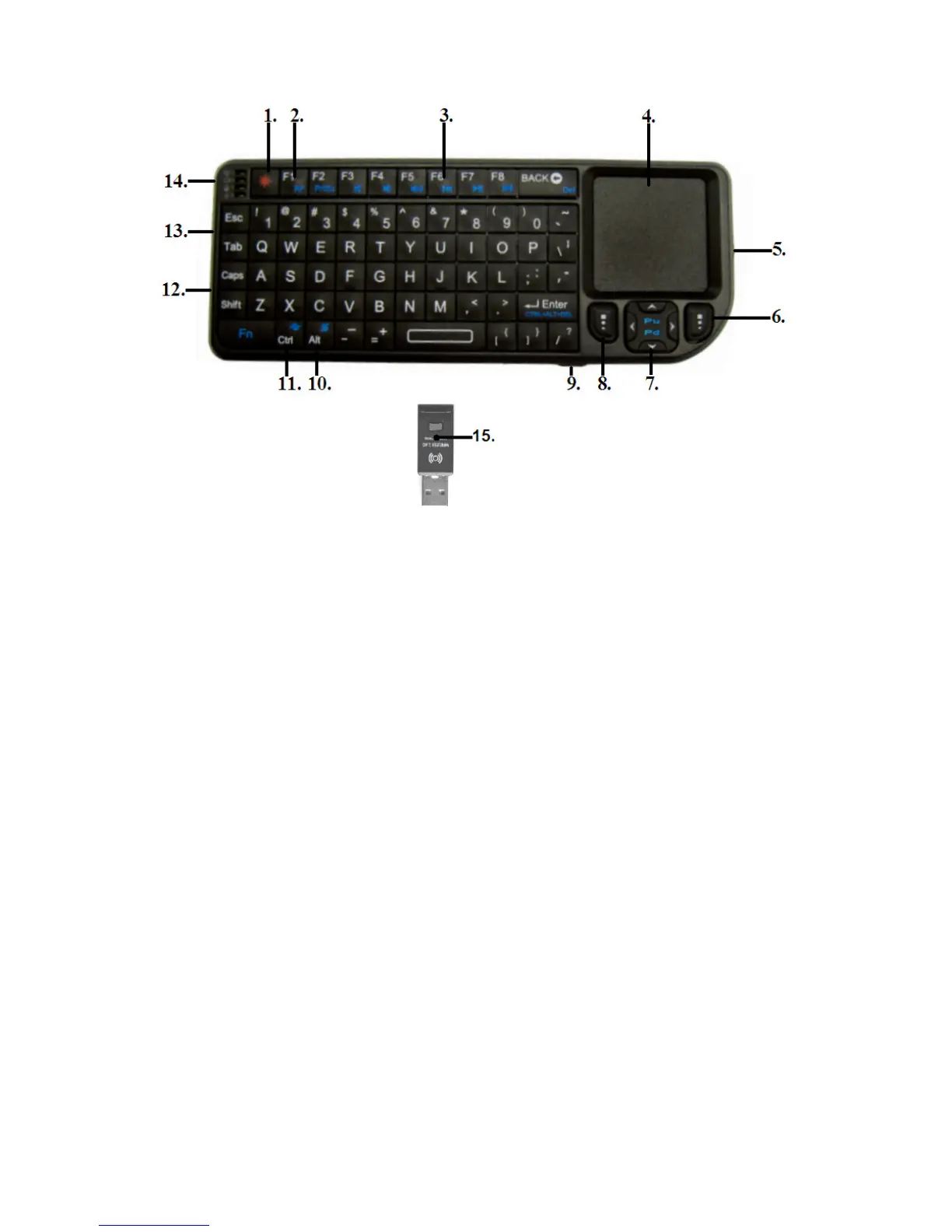
1. Backlight button: Turn the backlight on/off.
2. F1/Help button: Activates the help function (Windows).
3. Multimedia buttons: Used to control media files (Windows).
4. Touchpad: Used to control the mouse indicator in the same way as
on a notebook)
5. Laser LED: Laser of the pointer. Used when presenting.
6. Right mouse button: Used to right-click an item.
7. Navigation buttons: Used to navigate through the menu’s (media player).
8. Left mouse button: Used to left-click an item.
9. Laser button: Used to activate the laser.
10. Alt button: Used to rotate the touchpad in combination with the Fn
button.
11. CTRL button Shortcut (Windows).
12. USB connection: Charging interface. Used to charge the EM3140.
13. On/Off switch: Used to switch the EM3140 on and off.
14. Indicator LED’s: LED’s which indicate the RF status, battery status etc.
15. USB receiver: Needs to be connected to a free USB port of the media
player or computer.



 To Next Page