ENB / 2 / 32 / 6 /18 / 2 5W
ENB / 2 / 44 / 12 / 18 / 2 10W
ENB / 2 / 54 / 15 / 22 / 2 13W
ENB / 2 / 68 / 24 / 18 / 2 22W
ENB / 2 / 92 / 36 / 18 / 2 32W
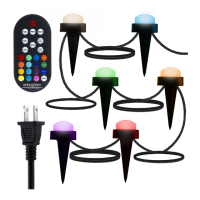
Congratulations on your recent purchase of Enbrighten Mini Landscape Lights.
Enbrighten Mini Landscape Lights are designed to provide lighting for life.
IMPORTANT: Before installation, please read all the warning statements included at the bottom
of these instructions.
To ensure proper installation, please follow each step below.
Step 1 - INITIAL SETUP
1. Carefully unpack your lights from the box. Remove and dispose of the wire ties and plastic
bag (see warning on bottom).
2. Locate remote control and install 2 AAA batteries (included).
3. When installing landscape lights outside, a ground-fault circuit interrupter (GFCI)
receptacle must be used. Before installing, plug the landscape lights into the GFCI
receptacle to ensure all lights work properly.
IMPORTANT: Unplug the landscape lights prior to installation.
Step 2 - INSTALLING LANDSCAPE LIGHTS
Each landscape light is designed for mounting with the included stakes (one per light) or
for use on a flat surface (see below instructions).
Ground Installation
1. Carefully plan your installation by laying out the
landscape lighting system.
Start with the GFCI receptacle and mounting of
controller. Placement for the first light can be up to
10ft. away from the controller. Each subsequent light
can be placed up to 3ft. from the previous light.
2. Mount the power supply using either the keyholes on the back
or ear-tabs on the side (see Figure A). Do not lay the power
supply directly on the ground or where standing water may
accumulate (see Figure B).
Keyholes
Ear-tabs
2in./50.8mm
6.38in./162mm
Seasons
Refer to the manual or visit www.byjasco.com for limitations and restrictions on warranties and the product registration information.
WARNING: When using outdoor as portable luminaires, basic safety precautions should always be followed to reduce the risk of fire, electrical shock, and personal
injury, including the following:
Ground-fault circuit Interrupter (GFCI) protection is to be provided on the circuit(s) or outlet(s) to be used for the wet-location portable luminaire. Receptacles are available
having built-in GFCI protection and are able to be used for this measure of safety.
WARNING: Keep these bags away from babies and children. Do not use in cribs, beds, carriages or playpens. The thin film may cling to nose and mouth and
prevent breathing.
WARRANTY INFORMATION: This Jasco product is warrantied for three (3) years with a limited-lifetime replacement warranty on Enbrighten LED light source only.
RISK OF ELECTRIC SHOCK
• OUTLETS USED FOR POWERING LANDSCAPE LIGHTS
SHALL COMPLY WITH ALL NATIONAL AND LOCAL
ELECTRICAL CODES. CONSULT LOCAL ELECTRICIAN
IF UNSURE OF COMPLIANCE REQUIREMENTS.
• FOR USE ONLY ON GFCI-PROTECTED CIRCUITS.
• DO NOT SUBMERSE.
• DO NOT USE AROUND AQUARIUMS.
• LANDSCAPE LIGHTS ARE A WET-LOCATION
PRODUCT AND HAVE NO SERVICEABLE PARTS.
• DO NOT USE WITH EXTENSION CORD NEAR WATER
OR WHERE WATER MAY ACCUMULATE.
• KEEP LAMPS AT LEAST 16 FEET FROM POOLS
AND SPAS.
• KEEP PLUGS AND RECEPTACLES DRY.
• AVOID DAMAGE TO THE CORDS AND LAMP
ASSEMBLIES DURING INSTALLATION. PERIODICALLY
INSPECT THE LANDSCAPE LIGHTS FOR PHYSICAL
DAMAGE OR OTHER DAMAGE CAUSED BY OUTDOOR
EXPOSURE TO THE ELEMENTS.
• REPLACE ANY DAMAGED LANDSCAPE
LIGHTS.
• DO NOT INSTALL IN LOCATIONS WHERE
LANDSCAPE LIGHTS CAN BE STEPPED ON.
• ENSURE LANDSCAPE LIGHTS ARE
UNPLUGGED FROM POWER DURING
INSTALLATION.
• CHILDREN SHOULD NOT BE ALLOWED TO
PLAY WITH LANDSCAPE LIGHTS.
• UL RECOMMENDS TESTING GFCI CIRCUITS
AND RECEPTACLES EVERY MONTH TO
ENSURE PROPER OPERATION.
RISK OF FIRE
• LANDSCAPE LIGHTS ARE DESIGNED TO
BE MOUNTED WITH THEIR INDIVIDUAL
KEYHOLE MOUNTING FEATURE, DO NOT
MOUNT LANDSCAPE LIGHTS BY USING
THE MAIN ELECTRICAL CORD OR THE
INDIVIDUAL DROP CORDS.
• NOT INTENDED FOR INSTALLATION IN
CEILINGS, SOFFITS, CABINETS, ATTICS OR
OTHER ENCLOSED SPACES.
Electrical Ratings
Input: 120V, 50/60Hz
Important — please read:
WARNING
56060
Version 1
11/16/20
USING THE REMOTE
To power on your lights, press the red ON/OFF button located at the top of the
remote. Your Enbrighten Mini Lanscape Lights come paired with your remote.
NOTE: Keep remote indoors when not being used. Remote is not waterproof.
Now that your lights are installed and powered on, take time to explore the
following settings that are programmable via your remote.
Single-Color Select
Find your favorite color on the remote’s color pad and simply push that
button to set all of the lights the same color.
NOTE: Within this feature, you can also press the dimming button to adjust
from 10 light levels. The dimming option is only available for single- and dual-
color selection.
Dual-Color Select
a) Press Color 1, then select a color from the color pad to set the color of
every other light starting with the first light.
b) Press Color 2, then select a color from the color pad to set the color of
every other light starting with the second light.
c) During the selection feature, press the dimming button to choose one of 10 light levels.
White Select
By pressing the white button, cycle through white selections — 2200K, 2700K and 5000K.
Strobe
By pressing the strobe button, the lights will strobe through all of the colors in a random pattern.
Fade
By pressing the fade button, the lights will fade in and out through all of the colors in a random pattern.
Modes
Press the modes button repeatedly to cycle through the following preset modes:
•Twinkle •Multi-Fade •Christmas •St. Patrick’s Day
•Red, White and Blue •Fall •Spring •Multi-Colors
NOTE: Your landscape lights will automatically remember the last customized settings and turn back on in
the same mode and color scheme.
Timer Selection Feature
By pressing the 2-hour timer button, you will activate a two-hour countdown until lights turn o.
By pressing the 4-hour timer button, you will activate a four-hour countdown until lights turn o.
Pair Your Remote with Additional Lights
Your remote can be paired to additional sets of Enbrighten Mini Landscape Lights and Enbrighten
Seasons Café Lights. Follow the instructions below.
1. Plug in (or supply power) to the lights, and within 8 seconds press and hold the ON/OFF button.
The lights will turn white, blink once and remain white. Your remote and lights are now paired.
a) Please note, you can pair a remote with as many Enbrighten Seasons Lights as you desire
b) Multiple strings can be paired at one time with one remote, by suppling power to multiple
strings at once, then pressing and holding the ON/OFF button within 8 seconds of power
on, per the above instructions.
2. Lights can be paired with up to 8 remotes. If you wish to remove a remote control
from memory of a light (unpair) follow the below instructions:
a) Plug in (or supply power) to the lights, and within 8 seconds, press and hold
the yellow button (in bottom left corner). The lights will turn white, blink twice and remain
white. Your remote and lights are now unpaired.
b) Multiple lights can be unpaired at one time from one remote by suppling power to
multiple lights at once, then pressing and holding the yellow button within 8 seconds of
powering on.
L
a
n
d
s
c
a
p
e
s
L
a
n
d
s
c
a
p
e
s
Ground Mounting
a) Place light directly on ground or garden bedding.
b) Using the mounting stake: insert the stake into either keyhole slot on the bottom of
the puck and firmly plant it into soil or mulch. NOTE: If the stake requires more than a
firm push, loosen the soil or remove debris.
Cord Management
Your Enbrighten Mini Landscape Lights feature burial-grade cable. This allows you to
conceal excess cable by directly burying it in the soil or covering it with garden bedding.
Flat-Surface Mounting
Lay out the landscape system in the manner in which you plan to mount it. Only mount
lights to a solid support structure, such as joist, beams, studs or other sturdy mounting
surfaces. Use one #6 pan head screw (not included) of an appropriate length for the
mounting surface to properly install the lights.
Figure B
Do not pull cord tight, leave
slack in loop to prevent
strain on controller.
Best Practices for Installation
•
Install power supply/receiver a minimum of 18in. above the ground to ensure optimal range
on remote control.
• Note that placing power supply/receiver directly on ground can severely diminish the
remote control range.
• Do not mount power supply/receiver behind large objects such as posts, walls, large
boulders or other items which may interfere with the signal from the remote control. Also,
avoid mounting the power supply/receiver on or near metal walls or other large metal
objects. Doing so can reduce the remote control’s operation distance.
• Do not pull cords tight as it may damage electrical connections. Leave a small amount of slack on
cords to remove strain on connections.
• Longest remote control operating distances are obtained when the power supply/receiver is in line
of sight of the remote control. Operating the remote control inside of houses and other buildings will
reduce the remote control’s operation distance.
WET
MADE IN CHINA
Distributed by Jasco Products Company LLC,
10 E. Memorial Rd., Oklahoma City, OK 73114.
This Jasco product comes with a 3-year limited warranty.
Visit www.byjasco.com for warranty details.
Questions? Contact our U.S.-based Consumer Care at 1-800-654-8483
between 7AM-8PM, M-F, Central Time.
Patents pending | www.enbrightenme.com
READ IT OR WATCH IT
Read instructions or watch easy-to-follow video.
Scan QR code or visit https://byjasco.com/56060i
LED Color-Changing
Landscape Lights
Landscapes
Figure A

 Need help?
 General

 To Next Page