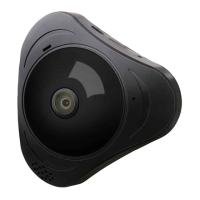
Panoramic VR IP Camera 360º
16
1) Q: Add camera Device by WI-FI, But APP didn’t discover any new device.
A: Please conrm that the mobile phone and camera connected in the
same LAN (one router), check if the Network indicator of the camera is
ON. If the camera and mobile is not in the same LAN, Please try to add
device by Manual.
2) Q: Indicate “wrong password”, when try to access to camera monitoring
status on APP.
A: Please check if the remote monitoring password has input correctly
when adding the camera device into APP. If it’s not correct, then need
click device name to popup the menu “Playback/Setting/Edit”, access
to “Edit” to input the right password. if you forget the password, then
RESET camera to recover to Factory Defaulting.
3) Q: In the Device list, Device Indicate “Ofine”.
A: Please check if the camera is connecting the network, Check if the
indicator is on. Make sure the router is working well.
4) Q: While Playback recording, can’t nd the recording le.
A: First check if the MicroSD card is defective, If it is ne.Then please
check the search time for the recording le. Also Make sure the
camera system tie has changed by mistake.
5) Q: Can’t do any recording; Or Can’t overwrite the date automatically
when MicroSD is full.
A: Format the MicroSD on the computer rst, and insert the MicroSD into
the camera, if the blue light is not ON, MicroSD card is defective, please
replace the MicroSD card.
6) Q: WI-FI Camera can’t connect with WI-FI.
A: Please make sure the WI-FI password is correct, Camera doesn’t
support 5G, so please make sure the mobile connect with 2.4G WI-FI
network.
7) Q: What kind of situation need to reset the device.
A: For the below issue, please kindly reset the device for testing.
a) Forget the password.
b) WI-FI is unstability.
c) APP has the problem after upgrade.
d) The device an be normal enable, but there is no warning tone.
4
FAQ


 To Next Page
 Loading...