Need help?
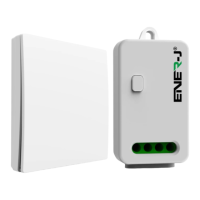
Do you have a question about the ENER-J K10R and is the answer not in the manual?
Detailed specifications for the wireless switch, including frequency, keys, color, and dimensions.
Technical specifications for the non-dimmable receiver model K10R, including SKU and power.
Technical specifications for the dimmable Wi-Fi receiver model K10DW, including compatibility.
Technical specifications for the non-dimmable Wi-Fi receiver model K10W, including compatibility.
Step-by-step guide for installing the switch using fixed plate or adhesive tape.
Methods for installing the receiver and integrating it with smart home systems.
Setup for multi-switch to single controller and single switch to multi-controller.
Details on dimming capabilities, compatible lamps, and brightness control methods.
Step-by-step guide to pair wireless switches with the receiver and clear pairing records.
Guide to downloading the ENERJSMART app and initiating Wi-Fi connection.
Steps to connect the device to Wi-Fi and pair it using the mobile application.
Overview of the ENERJSMART app's home page and device management interface.
Instructions for adding a new device within the ENERJSMART application interface.
Steps to confirm the device pairing process within the ENERJSMART application.
Final steps to complete the Wi-Fi connection and device initialization.
Instructions for enabling and linking ENERJSMART devices with Amazon Alexa.
Guide to setting up and controlling ENERJSMART devices with Google Home and Assistant.
Contact details for technical support, including phone number and email address.
 General
| Brand | ENER-J |
|---|---|
| Model | K10R |
| Category | Home Automation |
| Language | English |

 To Next Page