USB installation
Installation USB
Instalación de USB
USB-Installation
Installazione USB
USB安装
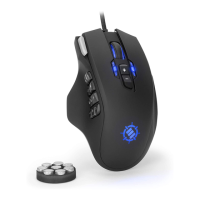
While your computer is running, insert the ENHANCE GX-M1’s USB plug into an available USB port.
Your system will automatically detect the new hardware and begin installation of the necessary drivers.
After being notied that driver installation is complete, the mouse is ready for use
Lorsque votre ordinateur est allumé, insérez la clé USB ENHANCE GX-M1 dans un port USB disponible
Votre système détecte alors automatiquement le nouveau matériel et commence l’installation des
drivers nécessaires
Après avoir été informé que l’installation du driver est terminée, la souris est prête à l’emploi
Mientras tu computadora está encendida, enchufe el ENHANCE GX-M1 en el puerto de USB disponible
El sistema automáticamente detectará el nuevo hardware y comenzar la instalación de la información
necesaria
Después de ser noticado de que termine la instalación del controlador, el ratón está listo para usar
Stecken Sie den USB-Stecker vom ENHANCE GX-M1 in einen freien USB-Anschluss, während der
Computer eingeschaltet ist
Das System erkennt automatisch die neue Hardware und startet die Installation der notwendigen Treiber
Nachdem Ihnen mitgeteilt wird, dass die Installation des Treibers abgeschlossen ist, ist die Maus
einsatzbereit
Mentre il vostro PC è acceso, inserite la presa USB dell’ENHANCE GX-M1 in una delle porte USB disponibili.
Il vostro sistema individuerà automaticamente il nuovo hardware e inizierà l’installazione dei driver
necessari.
Una volta informati che l’installazione del driver è stata completata, il mouse sarà pronto per l’uso.
当电脑使用时,插入ENHANCE GX-M1到USB口
您的系统会自动检测到新硬件,并开始安装必需的驱动程序
通知驱动程序安装完毕后,滑鼠就可以使用了

 To Next Page
 Loading...