URC 4 User’s Guide
Copyright
2012 Entone, Inc. All rights reserved
.
v2.5 for URC 4
Connecting STB to the TV coax network
Connect the Entone STB to the TV coax network wall outlet according to whether you are using an Entone
Janus or Amulet STB. The rear panel of actual product may vary.
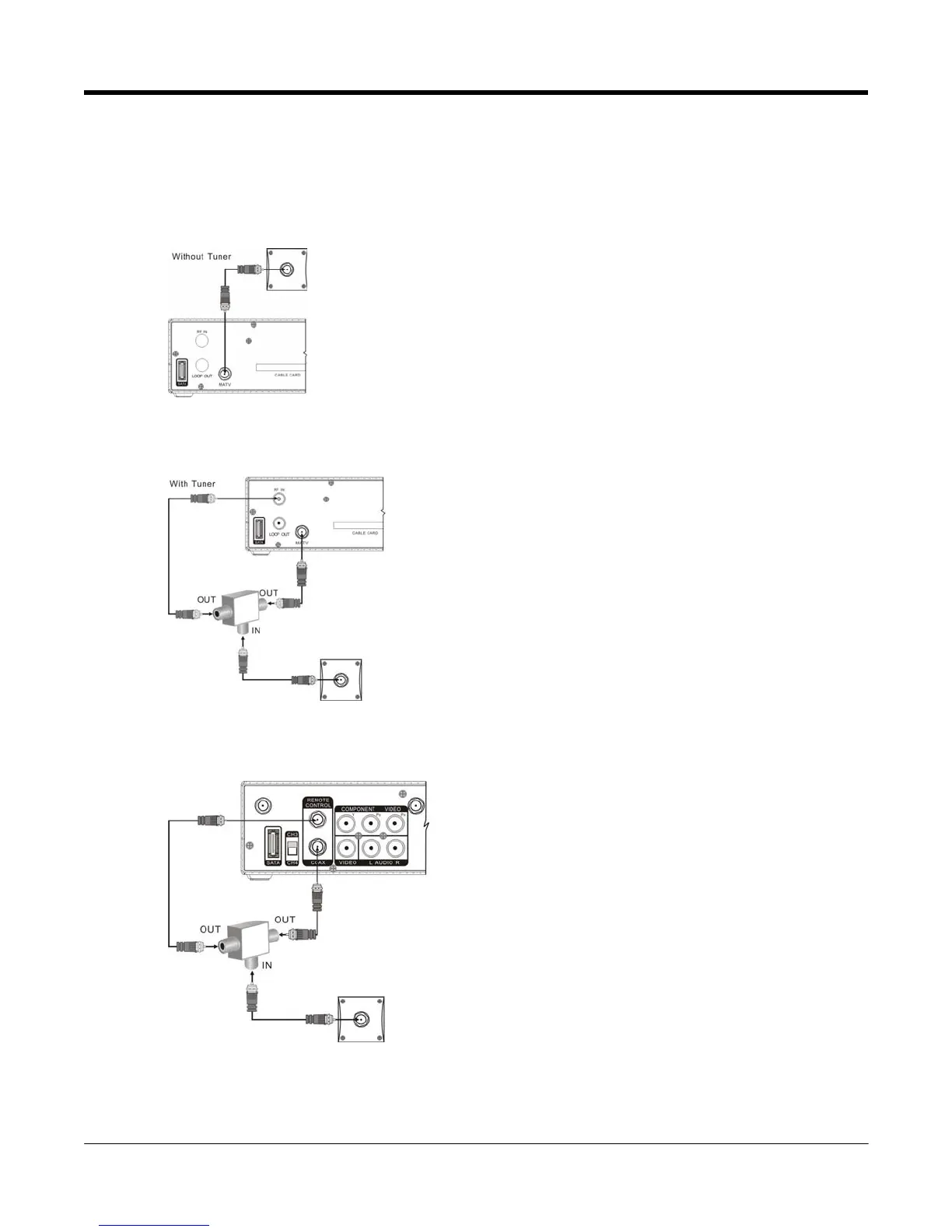
1. Janus without Tuner Connection: Connect the Janus “MATV” or “TV OUT” output to the TV coax
network as shown.
Figure 2-4 Connecting Janus without Tuner
2. Janus with Tuner Connection: Connect the Janus “MATV” or “TV OUT” and “RF IN” or “CABLE/ANT
IN” output to the TV coax network as shown using a 3-way splitter (which is not provided).
Figure 2-5 Connecting Janus with Tuner
3. Amulet F1 Connection: Connect the Amulet “REMOTE CONTROL” and “COAX” or ”TV OUT” output to
the TV coax network as shown using a 3-way splitter (which is not provided).
Figure 2-6 Connecting Amulet



 To Next Page